A small number of customers with Samsung Omnia 7 phones who installed the 7390 (March) update for Windows Phone 7 may have difficulty updating to the 7392 update.
See full details on how to resolve this here

A small number of customers with Samsung Omnia 7 phones who installed the 7390 (March) update for Windows Phone 7 may have difficulty updating to the 7392 update.
See full details on how to resolve this here
The OFFICIAL Tech.Ed app is just been released.
Search it using ‘mytechEd’ in marketplace
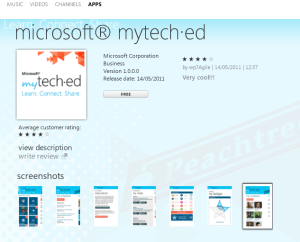
The next Tech·Ed Europe will be held the week of June 25, 2012 at the Amsterdam RAI Exhibition and Convention Centre in the historical and picturesque city of Amsterdam.
TechEd 2012 is a free handy app for attendees of Tech.Ed 2012 Europe to be held in Amsterdam. This app in now available for download in the marketplace.
As TechEd 2011 in Atlanta comes close, this app allows you to start browsing the curriculum for TechEd 2012 Europe

- Browse recently updated sessions by timeslots
- Browse all Speakers, Tags and Tracks available
- Browse filtered sessions by Session Type such as Breakout, Hands-on-labs
- Browse filtered sessions by Levels such as Intermediate, Advanced, Expert
- Browse filtered sessions by Speakers and Tracks such as Architecture, Windows Phone, etc
- Browse filtered sessions by Tags and Audience categories
- Manage/Save your favorite sessions lists on the app for easier access later
- View details of each session including schedules, speakers, tracks, level, tags
The app uses:
* phone’s internet connection
to access the TechEd 2012 Conference Session OData feeds.




Coding standards. Yes. Coding standards. Why do we need them?
I was reviewing our companies coding style document and thought I share with you some references I have come across.
The essence of enforcing coding standards is to have coding style – which is good for management of your code base and consistency. And overall, improves productivity of your developers.
Here are some useful links on coding style:
Brad Abrams Internal coding style
MSDN: Design Guidelines for Developing Class Libraries
Google C++ Style Guide

If you’re planning on attending Tech.Ed North America 2011 conference in Atlanta and if you own a Windows Phone 7, please check out our new TechEd 2011app for Windows Phone 7 that is now available in the marketplace. You can get it either by searching it in the market place or downloading it directly using link below
Update
Many thanks for checking this app out and giving us feedback, we appreciate all your comments which we’ve incorporated in the updates to the app. Latest version published is 1.7 fixes issue on ‘now showing’ and ‘coming up’ lists
Please note the app does NOT sync the sessions on the app with your sessions on the official website.










- Browse all Sessions available
- Browse all Speakers and Tracks available
- Browse filtered sessions by Session Type such as Breakout, Hands-on-labs
- Browse filtered sessions by Levels such as Intermediate, Advanced, Expert
- Browse filtered sessions by Speakers and Tracks such as Architecture, Windows Phone, etc
- Manage favorite sessions lists on the app
- View details of each session including schedules, speakers, tracks, level, tags
- View session Rooms to session summary details
- Link from session Room opens the Conference layout
- Browsing session now defaults to ‘timeslots’ view to filter ‘now showing’, ‘coming up’, May 15, May 16, May 17, May 18, May 19 and No Date
- Favorite sessions now appear with a ‘favorite’ icon for easier identification on the browsing lists
- Manage their Schedules by directly linking a selected session to the website
- view Bing Map of the conference
- View Conference Layout
- View Conference Rooms and details
- View Conference Agenda
- Browse Tech.Ed News
Disclaimer:
TechEd 2011 app uses the official Tech.Ed 2011 Conference Session OData feeds to retrieve all the content displayed.
It also links to the official Tech.Ed 2011 website resources to serve hyperlinks.
wp7agile is not responsible for any content displayed.
TechEd 2011 uses:
* phone’s internet connection
* phone’s web browser
* location services
to access the Tech.Ed 2011 Conference Session OData feeds and website resources.
The performance and responsiveness of this app may be affected by slow internet connections.
By purchasing the app, you have agreed with terms and conditions.
Good news! If you have not gotten the news, Chris has them for you. On his blog, he has released an updater that will get you the #NoDo updates.
Please check it out now
Welcome to my blog for Windows Phone 7 apps. I am a systems developer with bias 4 Microsoft .NET technologies including web development. I am a programming enthusiast. I have recently added wp7 to my list.
This is not my first blog. I usually write on karpcom on programming related issues I encounter as a systems developer.
I am also a fan of Stack Exchange family of Q&A websites
I hope together we will learn something new:)
Suppose we have a web method in ASP.NET web form or webservice
[WebMethod]
public void GetItems(string itemName, string itemDesc)
{
}
Using jQuery, we are going to call this method using the code like this below. I am pre-suming there is a search button which we have assigned id #searchNow
$(document).ready(function () {
$(‘#searchNow’).click(function () {
$.ajax({
type: “POST”,
url: “SearchItems.aspx/GetItems”,
data: “{‘itemName’:’book’,’itemDesc’:’toys’}”,
contentType: “application/json; charset=utf-8”,
dataType: “json”,
success: function (msg) {
}
});
}); Our interest is how to pass parameters to the web method.
In the snippet above the line
data: “{‘itemName’:’book’,’itemDesc’:’toys’}”,
is used to pass parameters to the GetItems function. Please not that it must be a JSON compliant string
The Date object is used to work with dates and times.
Date objects are created with the Date() constructor.
There are four ways of instantiating a date:
new Date() // current date and time
new Date(milliseconds) //milliseconds since 1970/01/01
new Date(dateString)
new Date(year, month, day, hours, minutes, seconds, milliseconds)
Date(dateString)
This Date constructor only accepts dateString in UTC format.
However, we can write our custom function that accepts a custom format, say dd/mm/yyyy, from which we can extract the date parts and use them to construct a Date object.
function parseDate(input, format) {
format = format || ‘dd/mm/yyyy’; // somedefault format
var parts = input.match(/(\d+)/g),
i = 0, fmt = {};
// extract date-part indexes from the format
format.replace(/(yyyy|dd|mm)/g, function(part) { fmt[part] = i++; });
return new Date(parts[fmt[‘yyyy’]], parts[fmt[‘mm’]]-1, parts[fmt[‘dd’]]);
}
Usage
parseDate(’01-31-2010′, ‘mm-dd-yyyy’);
parseDate(’31/01/2010′, ‘dd/mm/yyyy’);
parseDate(‘2010/01/31’);

