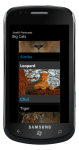
‘Shake It Share It’ is a handy pictures app to surprise you with your random pictures in your camera roll.
It uses a normal distribution randomising algorithm to surprise you with pictures in your camera roll.
And why not share your suprise on facebook with this app?
How to:
Auto mode: Your pictures will be randomly selected after a delay of ‘n’ milli seconds which you can change using the swttings page
Manual mode: Shake your phone to randomly select your pictures
Use settings page to configure your auto mode delay in ms (1000 ms= 1 sec)
To share on facebook, ensure you have paused if in auto mode, then select picture to share using ‘Back’ and ‘Next’
You can get it either by searching it in the market place or downloading it directly using link below
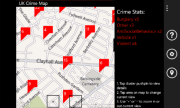
UK Crime Map is a handy location-aware app to help you view street-level crime in streets of England and Wales in United Kingdom.
This app uses your current location when initialising default view of the map.
Your location is not shared in any way with any third party.
Crimes at street-level within a 1 mile radius of a single point.
The street-level crimes returned in the API are only an approximation of where the actual crimes occurred,
they are NOT the exact locations.
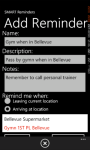
SMART Reminders is a handy location-aware app to help you:
manage your favorite locations
set up reminders when leaving current location
set up reminders when arriving at a location
set up reminders when arriving at a contact location
Do you usually forget to pass by your favorite bookshop when your are down town Bellevue? Forget no more as SMART Reminder is exactly for you, just set up a reminder to fire when nearby your bookshop! It makes use of – Bing Maps facilities – Background agents available in Mango version to trigger reminders when you are nearby your favorite locations. It also integrates with Bing Maps street-by-street navigation. With Live Tile updates on unread reminders!
You can get it either by searching it in the market place or downloading it directly using link below
SMART Reminders app
Live double-sided live tile updates
Choosing your favorite locations on Bing maps
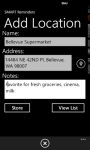
Adding location details
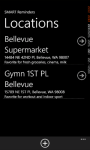
Locations list
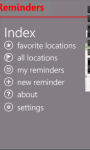
SMART Reminders index screen
Setting up reminders based on current location, destination location and contacts
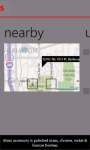
Nearby locations
Instructions on setting up reminders
When leaving current location, you don’t need to add a location first
When arriving at a contact, you don’t need to add a location first, simply add new reminder
When arriving at destination, you need to add the destination location first using the Locations list.
Ensure you tick ‘Enable background location’ and ‘Enable live tile update’
Reminders will fire as a Toast Notification message and update the live tile with a count. Ensure you set pin up your live tile!
Live tile is double-sided and will show reminder count on one side, and a list of reminders on the other
Privacy Policy This app uses your current location when creating reminders which fire based on your current location. A background periodic task also runs and accesses your location, and use it to determine if your proximity to destination location which you setup within the app. Your location is not shared in any way with any third party. You can always override this option by using the ‘Settings’ page to disable the background location. PS: SMART Reminders app uses background agents which run periodically. Note that we ca not guarantee this periodic nature because the operating system has control over their scheduling.
If you’re planning on attending Tech.Ed Australia 2011 conference and if you own a Windows Phone 7, please check out our new TechEdAU 2011app for Windows Phone 7 that is now available in the marketplace. You can get it either by searching it in the market place or downloading it directly using link below
TechEdAU 2011 app
TechEdAU 2011 is a handy app for attendees of Microsoft Tech.Ed Australia 2011 conference.
Session Types list
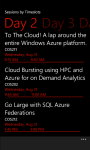
Sessions filtered by Days
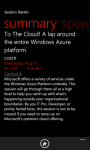
Session details summary
Speakers index
Attendees will find this app useful as follows:
Browse all Sessions available
Browse all Speakers and Tracks available
Browse filtered sessions by Session Type such as Breakout, Hands-on-labs
Browse filtered sessions by Levels such as Intermediate, Advanced, Expert
Browse filtered sessions by Speakers and Tracks such as Architecture, Windows Phone, etc
Manage favorite sessions lists on the app
View details of each session including schedules, speakers, tracks, level, tags
View session Rooms to session summary details
Browsing session now defaults to ‘timeslots’ view to filter Day1, Day2, Day3 (Aug 30 – Sep 2)
Favorite sessions now appear with a ‘favorite’ icon for easier identification on the browsing lists
The app uses:
* phone’s internet connection
* phone’s web browser
* location services
to access the Tech.Ed 2011 Conference Session OData feeds and website resources.
Disclaimer: TechEdAU 2011 app uses the official Tech.Ed Australia 2011 Conference Session OData feeds to retrieve all the content displayed.
It also links to the official Tech.Ed 2011 website resources to serve hyperlinks.
wp7agile is not responsible for any content displayed.
TechEdAU 2011 uses:
* phone’s internet connection
* phone’s web browser
* location services
to access the Tech.Ed 2011 Conference Session OData feeds and website resources.
The performance and responsiveness of this app may be affected by slow internet connections.
By purchasing the app, you have agreed with terms and conditions.
This is a handy wp7 NerdDinner app to allow you browse the NerdDinner Odata to view:
popular dinners
upcoming dinners
dinners near me
my dinners
search for dinners
You can also view full details for a dinner, including its host, rsvps, phone and location on the bing maps. And its free!
Note: This is not an official app for NerdDinner.com
Quote from NerdDinner.com
Are you a huge nerd? Perhaps a geek? No? Maybe a dork, dweeb or wonk. Quite possibly you’re just a normal person. Either way, you’re a social being. You need to get out for a bite to eat occasionally, preferably with folks that are like you.
Fresh off his keynote at the Norwegian Developers Conference in Oslo, Norway, Scott Guthrie dropped into the fishbowl to talk to Carl and Richard about his new role with the Azure team. Scott digs into how Azure has evolved and his focus on improving the developer experience. Read more and listen to his interview at .NET Rocks site.
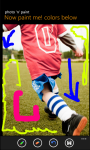
Photo n paint is a simple and handy app to allow you to select which background to use to make free hand paintings.
You have got a choice of:
Selecting an existing photo from your gallery on the phone
Taking a new photo using the phone’s camera
Start with a blank photo (either all white or all black)
It has a ‘tool box’on the application bar for easier access of:
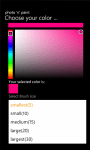
Brush stroke size and color selection
Eraser to erase sections of painting
Undo command to undo changes
Save command to save the painting to your photo gallery on the phone
This is indeed an handy app for your kids to learn and practice their painting skills.
They can also use it to learn their hand writing skills! And they will love it!
And its free!
Come on now, let your wp7 device be a great toy!
Now Photo n Paint 2 with Facebook photo sharing support
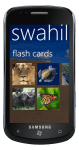
Swahili Flashcards is an easy to use app for quickly learning Swahili translations for some selected animals. The app provides a set of flashcards for preselected groups of animals.
Each flashcard has the English-Swahili translation and is presented in a fluid, user-friendly looping list. Just a flick away from the next flashcard and you will love it!
Swahili Flashcards has the following categories:
I just won Acer Iconia via #wp7 THINK.DEV Rewards
It is not late, you could still be one of the lucky winner in the Weekly Prize Draw.
In addition, you can now earn up to 8 points if your app is published in the marketplace and is a unique and original one! And this means you get to choose from another set of prizes on offer.
Visit the THINK.DEV Rewards website for full details.
Come on THINK, DEVelop those cool apps and you never know you could win something.