SitecoreAI – Unlock massive enterprise scale with Next.js Web Apps on Azure and Multisite Architecture

SitecoreAI implementation architecture adopted from developers.sitecore.com

Context

While serverless hosting remains a popular recommendation for SitecoreAI, many large-scale organizations operate under strict governance, compliance, and infrastructure mandates that necessitate a Microsoft Azure-based strategy.

Sitecore recommends a serverless hosting infrastructure for headless application as these are more performant, scales better, and introduces less complexity. The main reason for not recommending Azure App Services is that it takes a server infrastructure approach to headless hosting, leading to performance implication, manually managed scaling, and additional management complexity.

In this blog post, I will bridge the gap between “standard headless” and “enterprise-ready,” showing you how to maintain the agility of a modern front-end stack while leveraging the robust security and scale of the Microsoft ecosystem.

Recap on SitecoreAI Implementation Architecture

I have shared the SitecoreAI implementation architecture above, which I adopted from developers.sitecore.com.

  • In the architecture, we have SitecoreAI SaaS hosted. This is the Authoring environment for Content management, editing, and setup typically used by Authors and Marketers.
  • The Editing host – WYSIWYG editing experience (Page builder or Design studio) used by Authors for editing only
  • The Front-end hosting – Public website/app rendering for end users (website visitors)
  • The code-base or solution – SitecoreAI decouples the front-end presentation from delivery. You can build your solution with any front-end technology that is supported by the Content SDK

Running Next.js on Azure App Services

Azure App Services supports running both Node and Docker Web Apps. Please note that Next.js is a JavaScript application and JavaScript is a single-threaded language, the Node.js runtime for JavaScript is also single-threaded. Careful considerations have to be taken to avoid performance issues with multisite architecture.

There are two approaches we can leverage here:

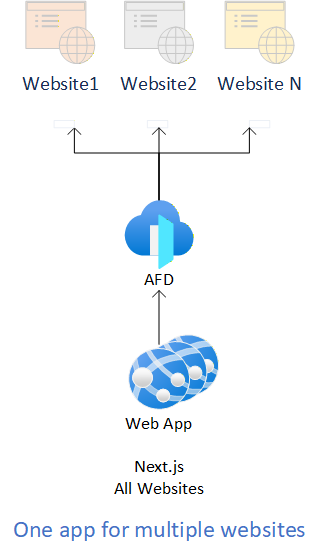
  • One app for multiple websites – deploy a single Next.js web application that will have multiple websites
  • One app per website – deploy a separate Next.js web application for each website

One app for multiple websitesOne app per website
Multiple websites structured within same code baseCan isolate websites to separate code bases
Deployment pipelines will deploy multiple websites together and at the same timeDeployment pipeline can be separated to match code base structure, each website deployed separately
Every deployment to the Web App will affect all sites hosted within the standalone instanceSince the Web Apps are isolated deployments will only affect the relevant website
Hosting small websites that share the same codebase and differ mainly by domain/content, one app for multiple websites is often more resource-efficient.Separate web apps within same Service Plan are usually the better operational choice if the websites have different release cycles, different teams, different dependencies or different performance profiling.

Azure App Service Plan scaling architecture

One of Azure App Services’ biggest limitations is performance. The diagram below helps illustrate how an Azure App Service Plan works and how it hosts web applications.
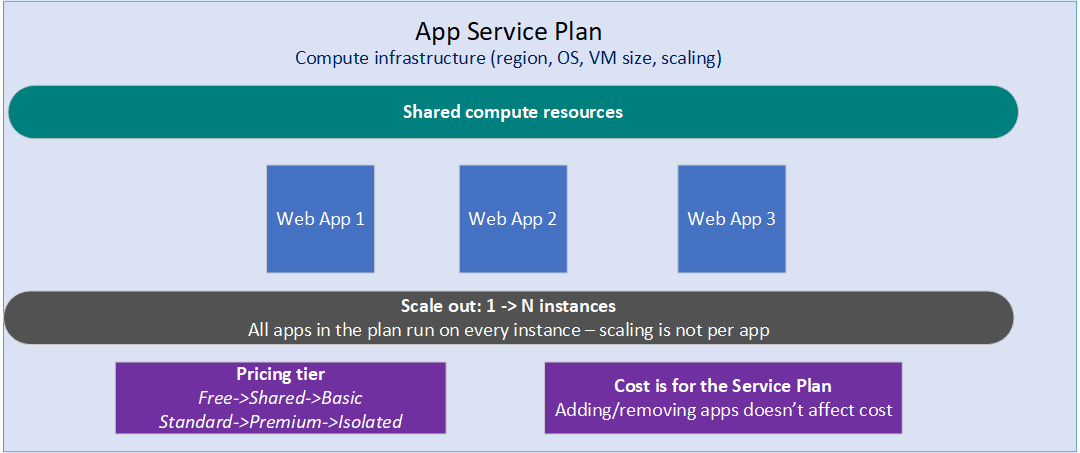
Here is a breakdown of the key concepts shown in the image:

App Service Plan Definition

  • Compute Infrastructure: An App Service Plan defines the physical or virtual resources used to host your apps.
  • Core Specs: It determines the geographic region, Operating System (Windows/Linux), Virtual Machine size, and scaling capabilities.

Resource Sharing

  • Shared Pool: All web apps (Web App 1, 2, and 3) assigned to the same plan share a single pool of compute resources.
  • Shared Assets: They share CPU, RAM, disk space, outbound connections, and auto-scale rules.
  • App Isolation: Each individual app maintains its own unique custom domains, SSL certificates, app settings, and deployment slots.

Scaling Behaviour

  • Plan-Wide Scaling: Scale-out operations happen at the plan level, not the app level.
  • Instance Replication: When you scale out from 1 to N instances, every single app in that plan is automatically deployed and run on every new instance.

Pricing and Cost

  • Pricing Tiers: Capabilities scale across tiers, moving from Free, Shared, and Basic up to Standard, Premium, and Isolated.
  • Fixed Plan Cost: You pay for the App Service Plan itself, not the individual apps.
  • Bill Stability: Adding more apps to the plan or removing them does not change your overall bill.

App Service Sizing considerations and limitations

Consider Tiering App Service based on criticality of your workloads

Critical App Service Plan tier – for Production workloads

For production workloads, consider Premium v3 Plans, which have superior single-threaded performance over Basic and Standard Plans. Premium v3 App Service plans with Availability Zones enabled have been observed to be more reliable during Azure App Service Platform Updates. Also limit the number of Web App deployed in this critical service plan to a minimum.

Non-production Service Plan tier

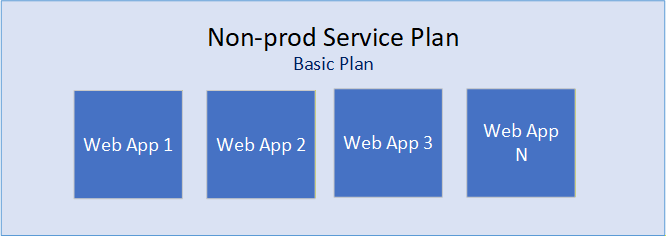
For non-production workloads, consider Basic and Standard Tier plans, as well as deploying many Web Apps to share the service plan, as shown below.
Azure App Services Specific Limitations

Depending on your use cases, you may encounter limited network port capacity for outbound network calls. Official Sitecore docs indicate some customers have hit the network connection limits’ upper bounds, leading to levels of performance degradation.

App Services in an out-of-the-box configuration have a soft limit of 128 ports for outbound connections via SNAT. Exceeding 128 ports can cause SNAT Port Exhaustion, leading to connection failures to Edge or any other public endpoint.

Please review Troubleshooting intermittent outbound connection errors in Azure App Service, specifically the section “Avoiding the problem” which recommends the use of the vNET Integration feature and NAT Gateway, this greatly alleviates SNAT issues, Please also review Azure subscription and service limits, quotas, and constraints for other limits that you may encounter.

Scalability limitations

Efficient scaling requires a content delivery network (CDN). However, Azure App Services does not come with a CDN by default.

Azure does offer the Azure Content Delivery Network service, but the endpoint and caching needs to be manually managed, which will require further monitoring and management.

Azure Front Door is a global, scalable entry-point that uses the Microsoft global edge network to create fast, secure, and widely scalable web applications. It combines Content Delivery Network (CDN) capabilities, global HTTP load balancing, and robust security, including built-in DDoS protection and a Web Application Firewall (WAF)

Next steps

In this blog post, we looked at alternative to Sitecore recommended serverless hosting for SitecoreAI like Vercel or Netlify and looked at Microsoft Azure-based strategy. We explored the Azure App Services including the approach to host multisite architectures and scaling considerations. We also looked at App Service Sizing consideration and some limitation to be aware of. For further reading, consider exploring Sitecore docs on Multisite Architecture resources.

Stay tuned for future posts, feel free to leave us comments and feedback as well.
SitecoreAI – Microsoft Entra ID and SSO integration architectures

Context

In this blog post, we are going to explore options for Sitecore Single Sign-On(SSO) integration strategies for multiple Microsoft Entra ID tenants to a SitecoreAI tenant for a large enterprise company or government scenarios.

A large enterprise company or government will typically consist of one or more independent business units, such as company or brand or a government department. This usually means they have independent Identity and Access Management,they use for their business users.

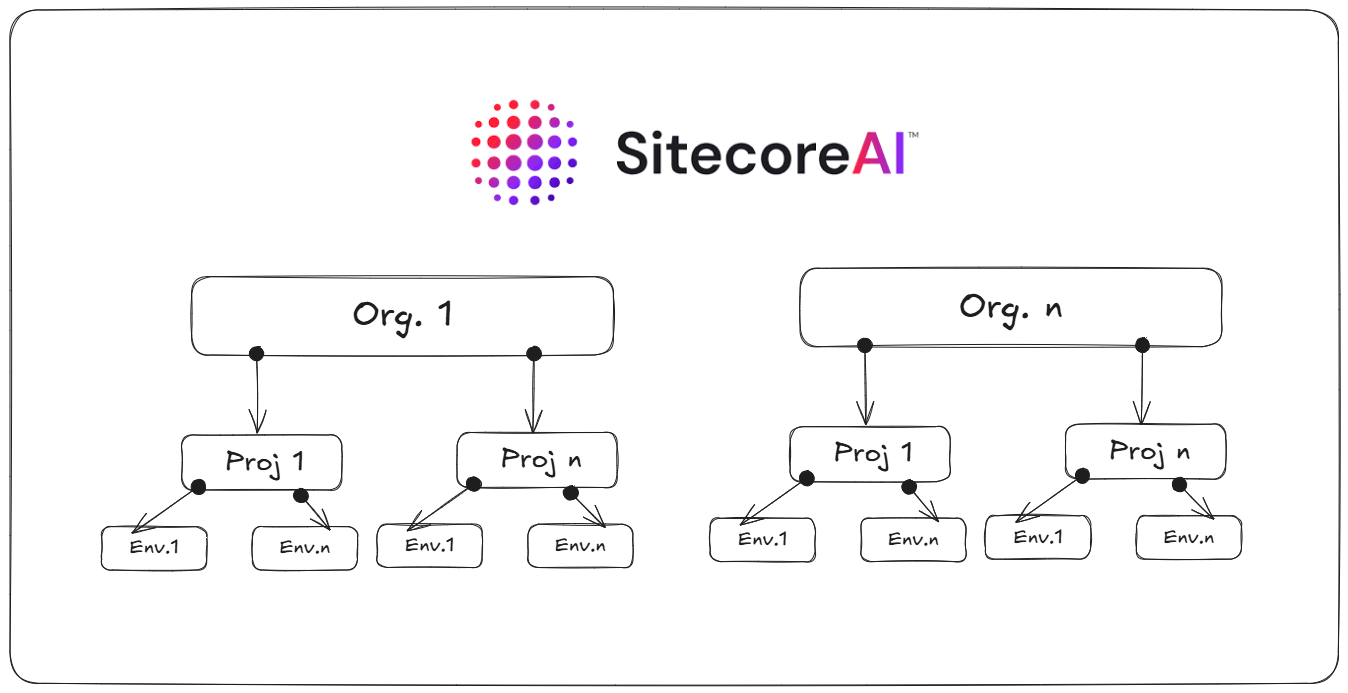
Sitecore has the concept of an organization which represents a business unit, such as a company or brand. This capability enables Sitecore to isolate your related team members and Sitecore products to which you are subscribed. An organization can have one or more Sitecore products, with multiple instances of each product.

How is Sitecore organization structured?

In Sitecore, an enterprise company or a solution partner might have access to multiple organizations, while a smaller company might have one organization. Each organization uses a set of rules to determine who can access each product and what work they can do.

Organization management is handled in the Cloud Portal. Use the portal to create users and manage their access and permissions for all your organization’s products.

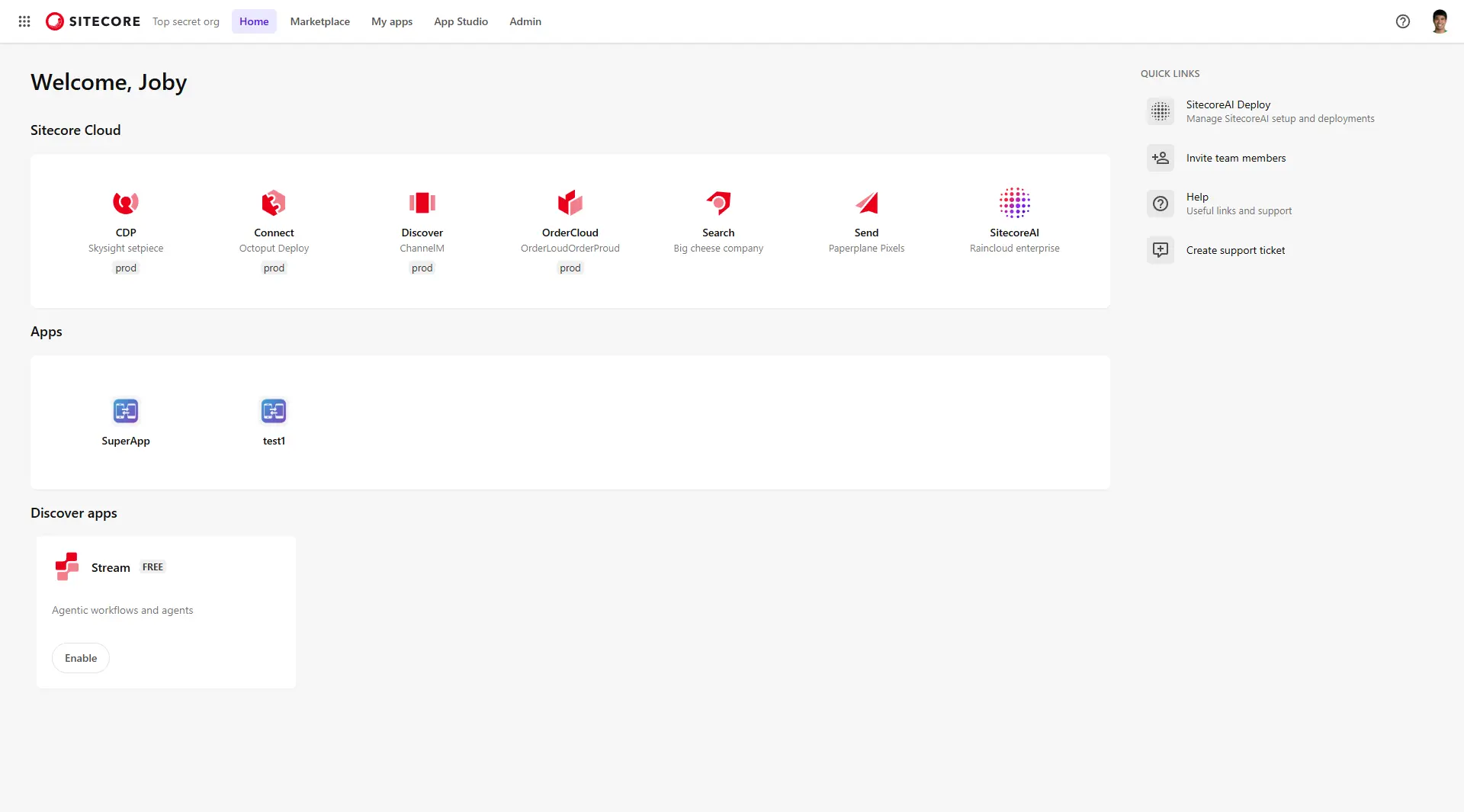
Below is a sample screenshot of the Cloud Portal. In this example, Joby has access to the listed Sitecore products and Apps shown below. We will cover details on how to login into Cloud portal using SSO in a later section.

If Joby belongs to multiple organizations, they can Switch to another organisation using the organisation switcher as shown below.

Sitecore organizations and SitecoreAI

We now have a good understanding of how the organizations are organised and how we leverage them to manage who has access to which products and apps within your subscription.

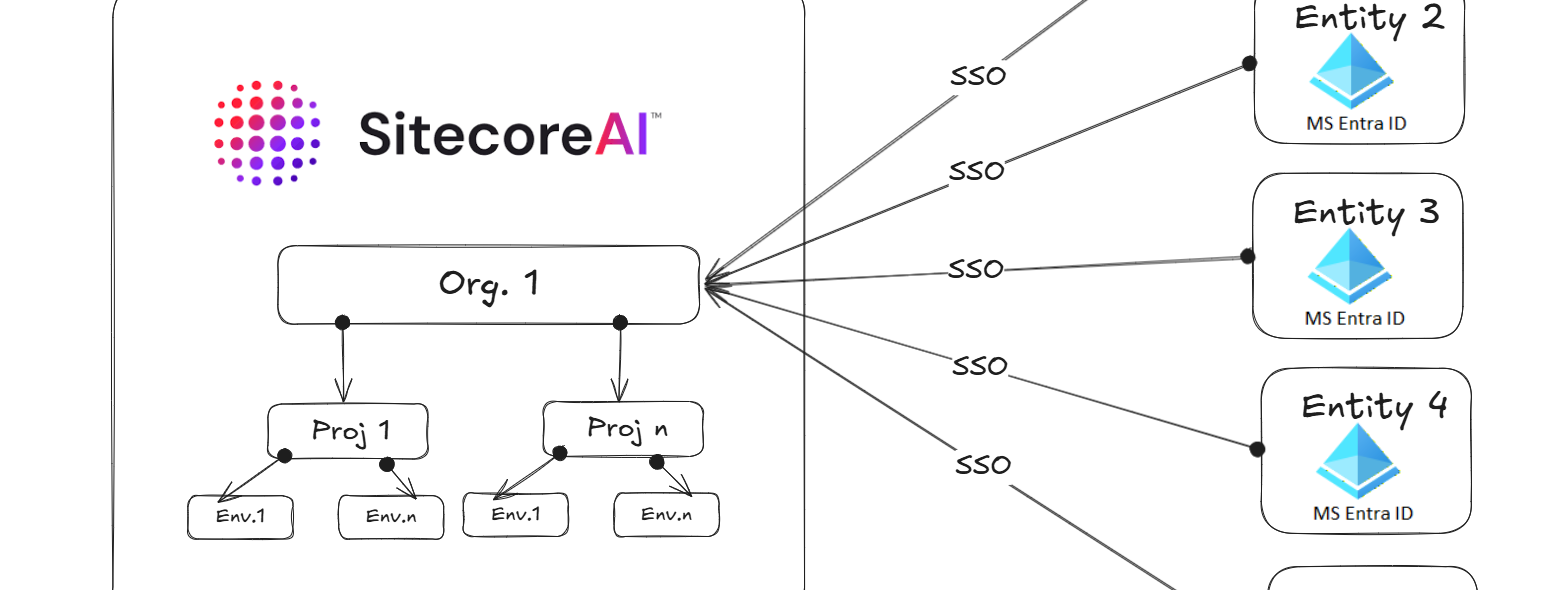
Below is a visual representation that I have used to try and bring into life Sitecore organizations, SitecoreAI projects and environments

In SitecoreAI, a project is a logical grouping of environments. Each project can include several environments, such as a development, testing, and production environment. The number of projects you can create depends on your subscription.

Signing into Sitecore Cloud Portal

You can sing into the Sitecore Cloud Portal using the default Sitecore authentication or SSO. With SSO, members can log in to the Sitecore Cloud Portal and access SitecoreAI (and other Apps) using their existing identity providers.

Sitecore Cloud Portal supports identity providers that use the OpenID Connect (OIDC) protocol or Security Assertion Markup Language (SAML) protocol. We are going to consider Microsoft Entra ID scenarios, although the same concepts will be applicable to supported identity providers as well.

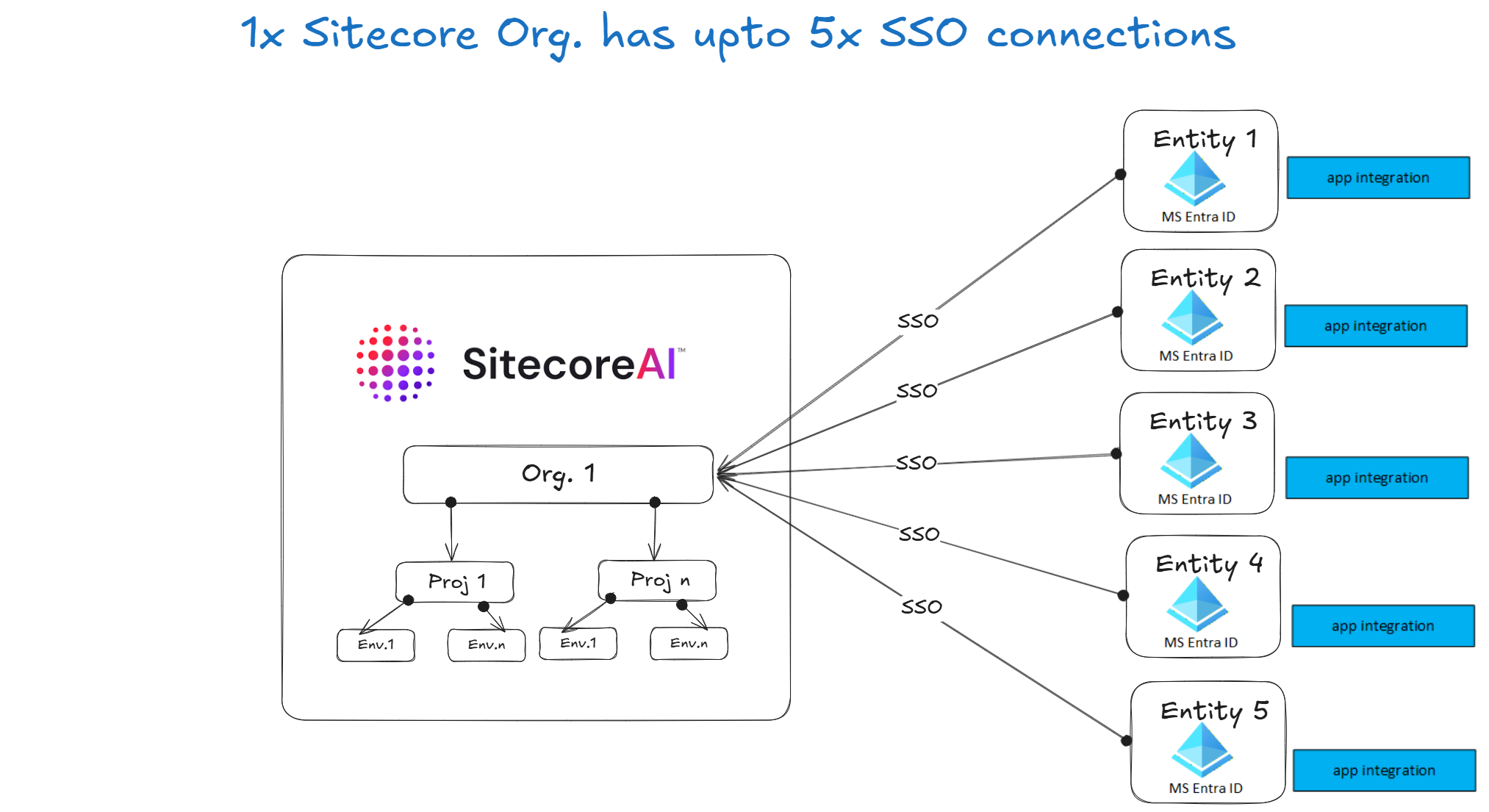
Sitecore Cloud Portal enforces max of five(5) SSO connections per organization

An organization can have up to five(5) SSO connections, with each connection supporting up to 50 domains.

This presents a challenge for a large enterprise company or government which has more than 5 independent brands or entities.

Scenario 1 – SSO Integration architecture with up to 5 connections

This use case will apply to small sized company with up to 5 independent brands or entities.

Below is a reference architecture that illustrates the setup for SSO connection with SitecoreAI.

How scenario 1 works

Each independent brand or entity maintains its own Microsoft Entra ID tenant and registers its own application.
Sitecore is configured with multiple OpenID Connect identity providers, one for each tenant.

Microsoft Entra ID Configuration steps

  • For each Microsoft Entra ID tenant, create an App Registration
  • Configure redirect URI to the Sitecore identity endpoint
  • Enable ID tokens
  • Securely capture these details to be configured within Sitcore Cloud Poral:
    • Tenant ID
    • Client ID
    • Client Secret

Sitecore Cloud Portal configuration steps

Add a separate OIDC identity provider configuration for each Microsoft Entra ID tenant.

Example parameters typically include:

  • Authority URL (tenant-specific login endpoint)
  • Client ID
  • Client Secret
  • Response type (ID token)
  • Scope (openid, profile, email)

Scenario 2 – SSO Integration architecture with 5 or more connections

This use case will apply to medium-to-large sized company or government with more than 5 independent brands or entities.

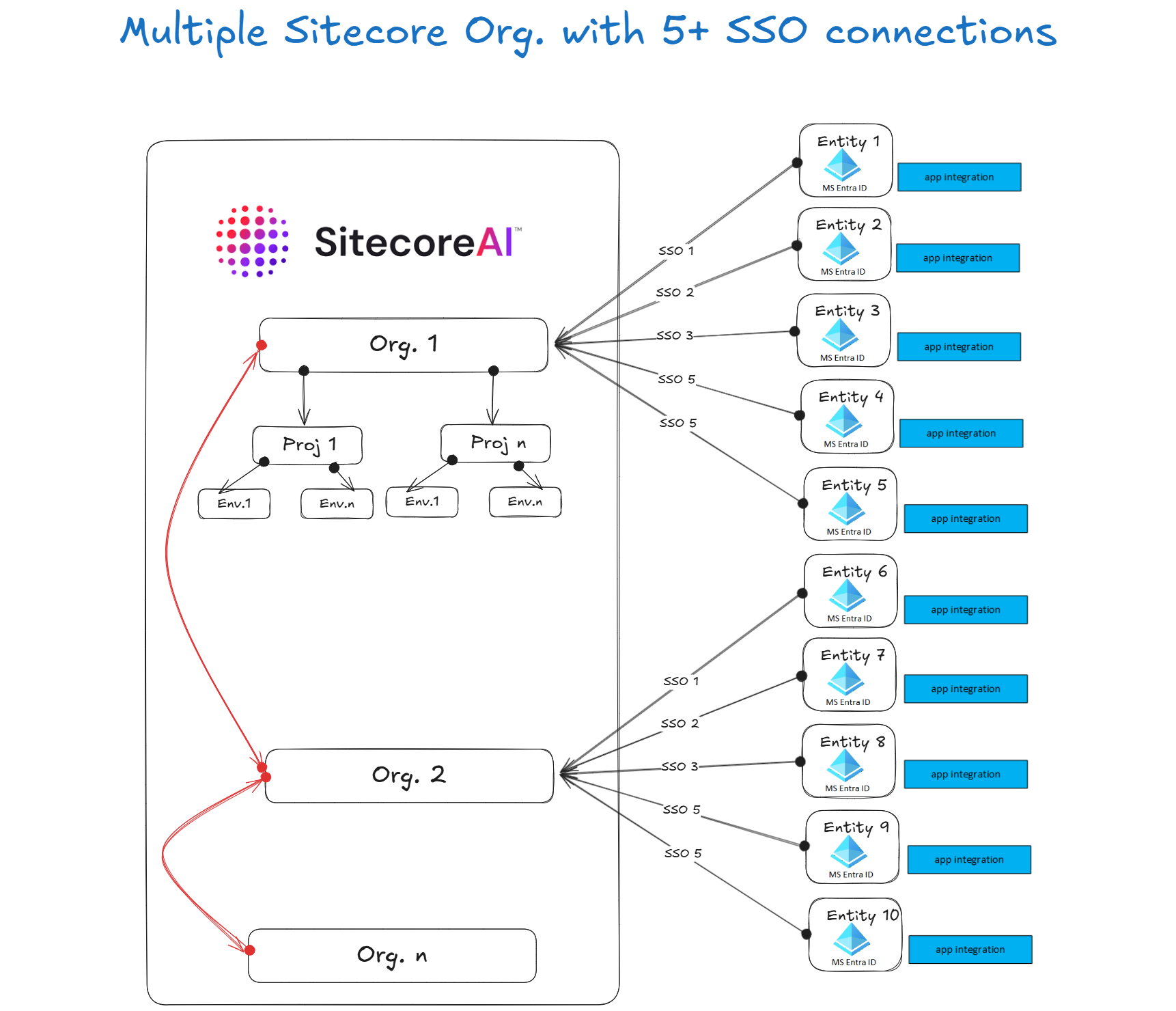
Below is a reference architecture that illustrates the setup for SSO connection with SitecoreAI.

How scenario 2 works – use of “dummy” organizations

In scenario 2, it will work similar way to scenario 1, with an additional constraint that we now have more than 5 Microsoft Entra ID tenants to connect with Sitecore.

This will require creation of additional Sitecore organizations to match the number of Microsoft Entra ID tenants to be connected to Sitecore. The reference architecture above, for example, has two (2) organizations created to map to the ten (10) entities.

In this case, Sitecore will activate the SitecoreAI product only within the main organisation (Org 1) and this will host your SitecoreAI instance. The rest of the additional organisations will be configured as “dummy” organisations.

The concept of “dummy” organisation is a powerful one. Since we can provide users access to multiple organizations, it allows the “dummy” organisations to be used for SSO integration, and users in those “dummy” organizations can then switch to Org1 to access SitecoreAI instance.

Scenario 3 – SSO Integration architecture with Centralized (Federated) Microsoft Entra ID

This use case will apply to large-to-very large sized company or government with very many independent brands or entities.

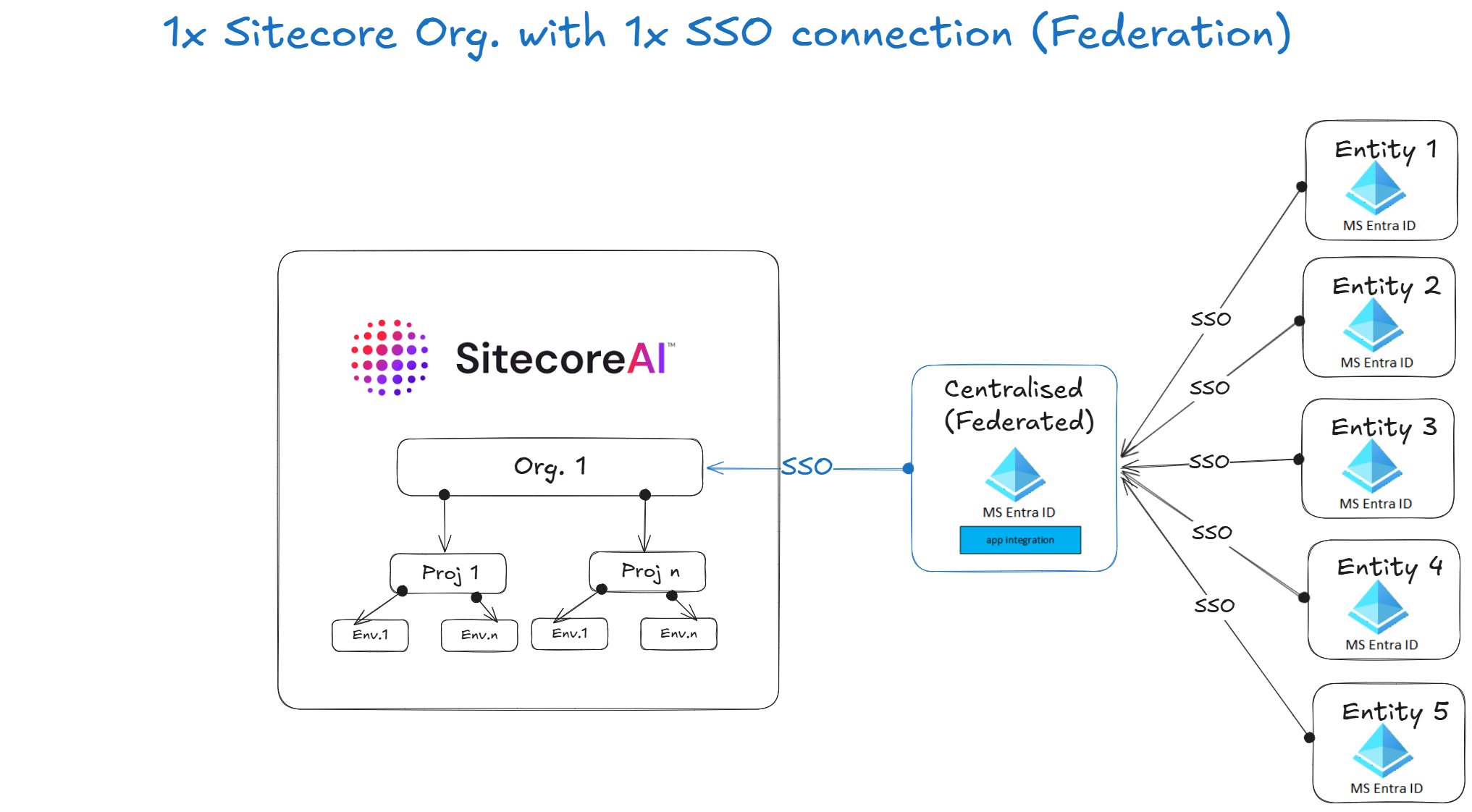
Below is a reference architecture that illustrates the setup for SSO connection with SitecoreAI.

How scenario 3 works – use of “Identity Broker” design pattern

An identity broker sits between multiple Microsoft Entra ID tenants and Sitecore, as shown above.
Sitecore integrates with a single centralized identity provider, and the broker handles federation with multiple Microsoft Entra ID tenants.

This reference architecture assumes Microsoft Entra ID federation. Common broker platforms include identity management services capable of federating multiple identity providers.

Microsoft Entra ID Configuration steps

Each Microsoft Entra ID tenant federates with the Cnetralized identity broker (which is another Microsoft Entra ID)

  • In the Centralized Microsoft Entra ID tenant, Create an App Registration
  • Configure multiple Microsoft Entra ID tenant connections
  • Configure claim normalization rules for each of the multiple Microsoft Entra ID tenants
  • Configure tenant routing logic
  • Enable ID tokens
  • Securely capture these details to be configured within Sitecore Cloud Portal:
    • Tenant ID
    • Client ID
    • Client Secret

Sitecore Cloud Portal configuration steps

Configured with one identity provider connection to the identity broker

Example parameters typically include:

  • Authority URL (tenant-specific login endpoint)
  • Client ID
  • Client Secret
  • Response type (ID token)
  • Scope (openid, profile, email)

Architect’s rubric – which SSO option should you consider?

As architects we often rely on rubrics when we need to make architectural decisions. This means using a set of guidelines or criteria that best helps you assess the business domain problem and come up with the right solution. Below is an example rubric to help with your assessments and criteria which option to leverage with Microsoft Entra ID SSO integration.

CriteriaMultiple Standalone Microsoft Entra IDs (Scenario 1 &2)Centralised Microsoft Entra ID (Scenario 3)
Security1. Full separation of Microsoft Entra ID tenant systems1. Relies on trust between Centralized Microsoft Entra ID and federated tenants
Complexity1. Simpler architecture
2. Sitecore side of integration grows with each Entity count
1.Increased Architectural complexity with introduction of Identity broker
2. Sitecore side of integration remain simple irrespective of Entity count
Management and Support1. Sitecore side of integration has operational overheads when on boarding new entities
2. Identity and claims management managed independently by entities
3. No additional Microsoft Entra ID to manage
1. Sitecore side of integration remains simpler when on boarding new entities
2. Centralized identity and claims management
3. Additional Identity broker platform to manage
Scalability1. No very easy to scale to many brands or entities 1. Easier to scale to many brands or entities

Next steps

In this blog post, we looked at prominent integration architectures for multiple Microsoft Entra ID tenants authenticating to a single Sitecore SaaS platform. We explored Multiple Microsoft Entra ID Providers approach with each organisation independently uses its own Microsoft Entra ID tenant and App registration. We also looked at an Identity Broker approach which intermediates between multiple Entra tenants and Sitecore. We finished with a sample architecture rubric that can be leveraged.

Multiple Microsoft Entra ID tenants can successfully authenticate to a single Sitecore platform while remaining independent identity providers.The appropriate architecture depends primarily on the number of brands or entities, operational overhead tolerance, and identity governance requirements.

Stay tuned for future posts, feel free to leave us comments and feedback as well.