
Context
Welcome to part two of this series about Everything Sitecore AI and value to marketers. In the previous session, we introduced Sitecore Stream and looked at the three main features: Brand aware AI, Copilots & agents and Agentic workflows.
In this blog post, we will explore further How the Brand Aware AI works, by looking at the architecture of Agents and how we bring them to life in our Stream Brand Assistant agent. There is also an accompanying video series on my YouTube channel.
What is an agent?
An agent is simply a software service that uses AI to assist users with information and task automation: An agent does a task, Take this do it and let me know when you are done.
We have three main elements on an Agent, as shown in the architecture below:

- Model – We now have access many Large Language Models and Small Language models that does the thinking
- Knowledge – This is the Instructions, data sources that enable the agent to ground prompts with Contextual data
- Tools – A set of tools that agents can invoke such as retrieving information, Actions such as making API calls, and keeping a thread in memory of current conversation. You can also create custom tools using your own code or Azure Functions
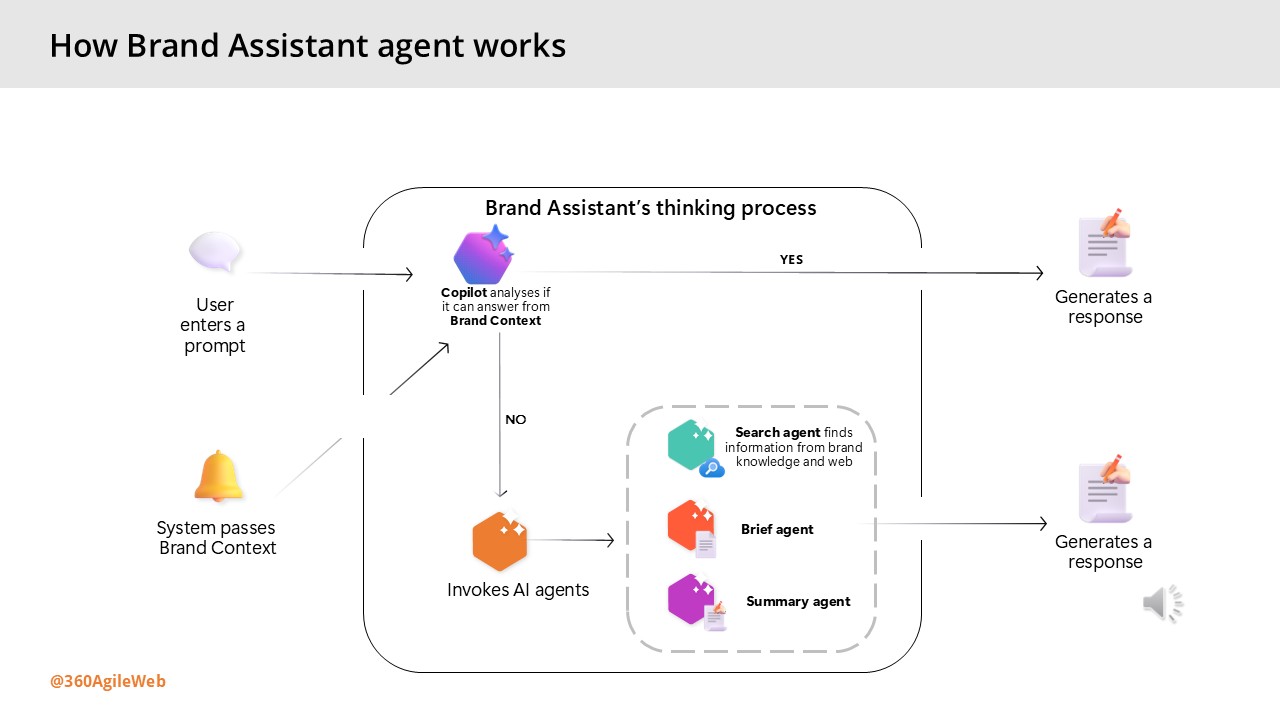
How Brand Assistant agent works
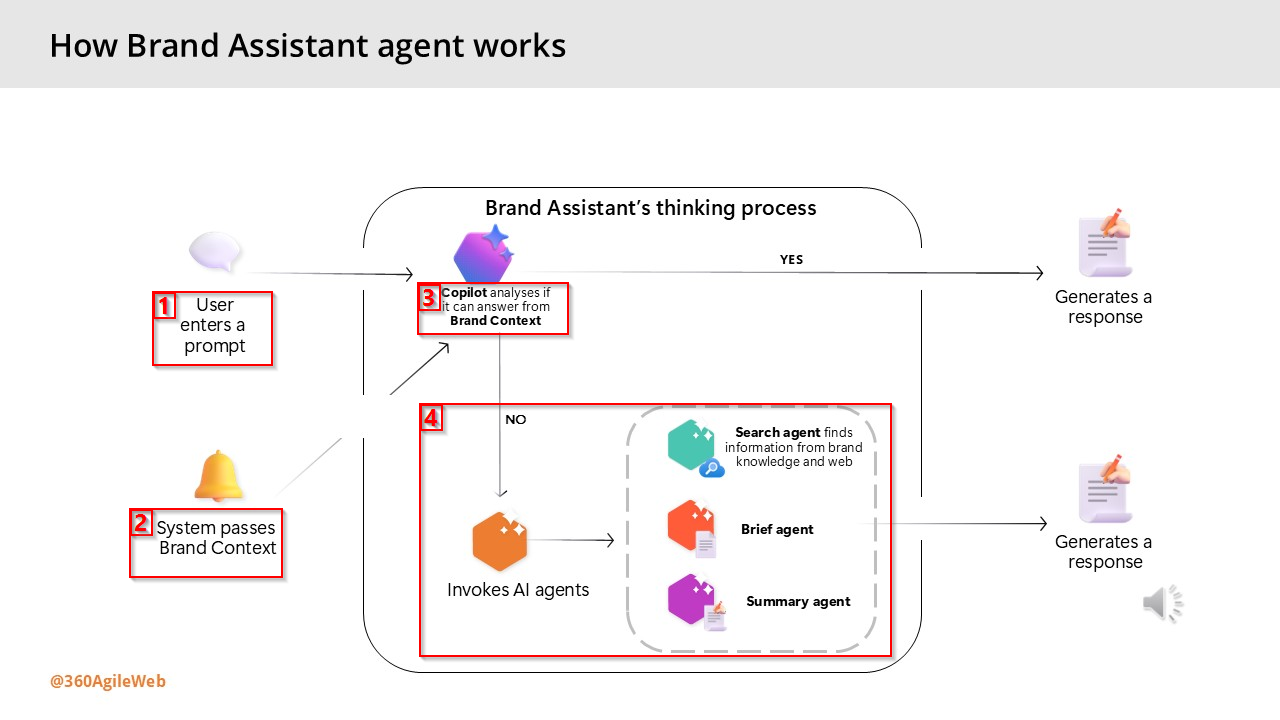
Below are the steps involved when interacting with the Brand Assistant within Sitecore Stream:
- The user enters a prompt – the user enters a prompt in Brand Assistant – such as a question or an instruction as shown during the demo by Alessandro earlier.
- The system passes information from the Brand Context – the system automatically provides information from the Brand Context brand kit section as a system prompt.
- Copilot analyzes if it can answer from Brand Context – the thinking process begins. The Brand Assistant evaluates whether the information passed from the Brand Context alone is enough to answer the prompt.
- Based on the analysis, the process continues in one of two ways:
- Generate a direct response – if the Brand Context provides sufficient information, the Brand Assistant generates a direct response using only that content.
- Invoke other AI agents – if the Brand Context doesn’t answer the prompt and more information is needed, the Brand Assistant automatically activates one or more AI agents to search and organize the information and generate a response:
- Search agent – uses tools to find information from your brand knowledge, web searches, or both.
- Brief agent – activated only when the user specifically requests a campaign or creative brief
- •Summary agent – condenses all retrieved information into a concise, relevant response.
Next steps
Have you started using Sitecore Stream with your Sitecore products yet? You can reach out to Sitecore directly by filling in the ‘Sitecore Steam: Get Your Demo’ form on their website. You can now access our YouTube video series accompanying the blog posts, which is available to watch on demand.
You can also get started integration Sitecore Stream Brand Management APIs with your solution by following this step-by-step guide.
Stay tuned for future posts, feel free to leave us comments and feedback as well.

One thought on “Everything Sitecore AI and value to marketers – part two”