Have you heard of NerdDinner? now we’ve got wp7 app for it!

This is a handy wp7 NerdDinner app to allow you browse the NerdDinner Odata to view:

  1. popular dinners
  2. upcoming dinners
  3. dinners near me
  4. my dinners
  5. search for dinners

You can also view full details for a dinner, including its host, rsvps, phone and location on the bing maps. And its free!

Note: This is not an official app for NerdDinner.com

Jambo Sana app

Quote from NerdDinner.com

Are you a huge nerd? Perhaps a geek? No? Maybe a dork, dweeb or wonk. Quite possibly you’re just a normal person. Either way, you’re a social being. You need to get out for a bite to eat occasionally, preferably with folks that are like you.


Make your wp7 device a great toy with this handy Photo ‘n’ paint app

Photo n paint is a simple and handy app to allow you to select which background to use to make free hand paintings.
You have got a choice of:

  1. Selecting an existing photo from your gallery on the phone
  2. Taking a new photo using the phone’s camera
  3. Start with a blank photo (either all white or all black)

It has a ‘tool box’on the application bar for easier access of:

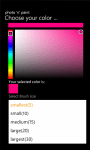
  • Brush stroke size and color selection
  • Eraser to erase sections of painting
  • Undo command to undo changes
  • Save command to save the painting to your photo gallery on the phone

This is indeed an handy app for your kids to learn and practice their painting skills.
They can also use it to learn their hand writing skills! And they will love it!
And its free!
Come on now, let your wp7 device be a great toy!

Now Photo n Paint 2 with Facebook photo sharing support

JamPhoto n paint appPhoto n Paint 2

JamPhoto n paint app

Screen shots

Using C# String.Format “{0:p0}” without the leading space before percentage sign

Simplest expresssion is:  

String.Format(“{0:0%}”, 0.10)

A more elegant solution is:  

Use the NumberFormatInfo.PercentPositivePattern Property:

NumberFormatInfo numberInfo = new NumberFormatInfo();
numberInfo
.PercentPositivePattern = 1;
Console.WriteLine(String.Format("{0}", 0.10.ToString("P0",numberInfo)));

Formatting RDL/RDLC values as percentage

I thought I’d share how to format percentage values in ReportViewer report.
Say your data source has the following fields:

  • TotalLow
  • TotalHigh
  • Total

Suppose we want to display the values for TotalLow and TotalHigh as  percentage of Total.

We can use the following expressions.
=String.Format(“{0:p0}”,Sum(Fields!TotalLow.Value)/Sum(Fields!Total.Value))
=String.Format(“{0:p0}”,Sum(Fields!TotalHigh.Value)/Sum(Fields!Total.Value))

You notice the RDL/C allows you to use .NET String object Format method.

Hope this helps.

Get the Free Windows Azure platform trial

Official Windows Azure website says:

Try Windows Azure and SQL Azure for free with no obligations.

You can run an Extra Small Windows Azure instance free through September 30th, 2011 using the Windows Azure platform free trial. You also get a free 1GB SQL Azure database for the first 90 days of your trial.

Get it from Windows Azure website

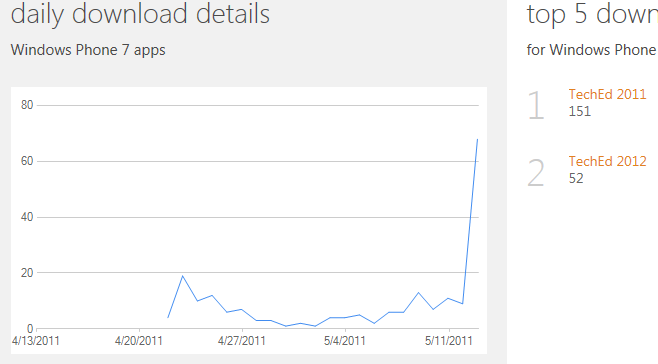
TechEd 2011 OData app marketplace download stats as at May 13th

We released TechEd 2011 OData app on Apr 22nd and TechEd 2012 OData app on May 13th. We like to share the download stats.

Many thanks for checking out these apps. We are impressed that you were as enthusiastic as we are and hope that our apps helped spread the word for Tech.Ed 2011 conference.

See you at TechEd 2012 Europe!

Stats

SQL Service fails to start with error code 126

Got this tweet notification:
 
myitforum

Coding Standards, why the heck?

Coding standards. Yes. Coding standards. Why do we need them?

I was reviewing our companies coding style document and thought I share with you some references I have come across.

The essence of enforcing coding standards is to have coding style – which is good for management of your code base and consistency. And overall, improves productivity of your developers.

Here are some useful links on coding style:

Brad Abrams Internal coding style
MSDN: Design Guidelines for Developing Class Libraries
Google C++ Style Guide

Calling ASP.NET WebMethod with more than one paramaters using JSON

Suppose we have a web method in ASP.NET web form or webservice

 [WebMethod]   
 public void GetItems(string itemName, string itemDesc)
 {

 }
 Using jQuery, we are going to call this method using the code like this below. I am pre-suming there is a search button which we have assigned id #searchNow
 

 $(document).ready(function () {  
  $(‘#searchNow’).click(function () {
  $.ajax({
     type: “POST”,
     url: “SearchItems.aspx/GetItems”,
     data: “{‘itemName’:’book’,’itemDesc’:’toys’}”,
     contentType: “application/json; charset=utf-8”,
     dataType: “json”,
            success: function (msg) {
           
            }
        });
 });
  Our interest is how to pass parameters to the web method.
 In the snippet above the line


 data: “{‘itemName’:’book’,’itemDesc’:’toys’}”,


is used to pass parameters to the GetItems function. Please not that it must be a JSON compliant string


Constructing Javascript Date object using custom date string format e.g. dd/mm/yyyy

The Date object is used to work with dates and times. 
Date objects are created with the Date() constructor.
There are four ways of instantiating a date:

new Date() // current date and time
new Date(milliseconds) //milliseconds since 1970/01/01
new Date(dateString)
new Date(year, month, day, hours, minutes, seconds, milliseconds)

Date(dateString)
This Date constructor only accepts dateString in UTC format.
However, we can write our custom function that accepts a custom format, say dd/mm/yyyy, from which we can extract the date parts and use them to construct a Date object.

function parseDate(input, format) {
  format = format || ‘dd/mm/yyyy’; // somedefault format
  var parts = input.match(/(\d+)/g),
      i = 0, fmt = {};
  // extract date-part indexes from the format
  format.replace(/(yyyy|dd|mm)/g, function(part) { fmt[part] = i++; });
  return new Date(parts[fmt[‘yyyy’]], parts[fmt[‘mm’]]-1,   parts[fmt[‘dd’]]);
}

Usage

parseDate(’01-31-2010′, ‘mm-dd-yyyy’);
parseDate(’31/01/2010′, ‘dd/mm/yyyy’);
parseDate(‘2010/01/31’);