Content Hub gems: Troubleshooting issue when creating asset public links

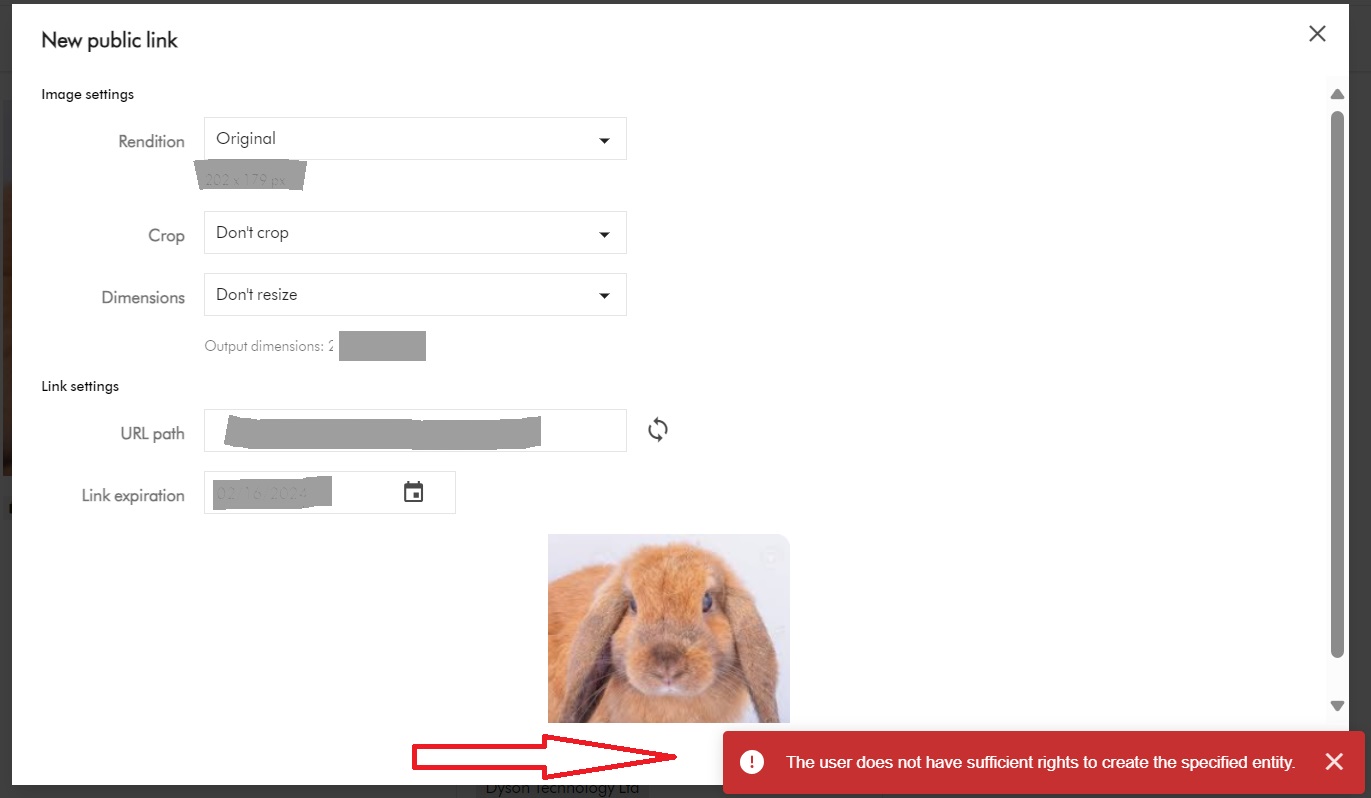
You may encounter this is error “The user does not have sufficient rights to create the specified entity

We will look at how to troubleshoot and resolve it. But first, what are public links?

What are public links used for?

In Content Hub, we use public links to share assets with external partners who typically do not have direct permission to download the assets. This means anyone who has access to this static URL can cache and fetch the file.

Creation of Public Links

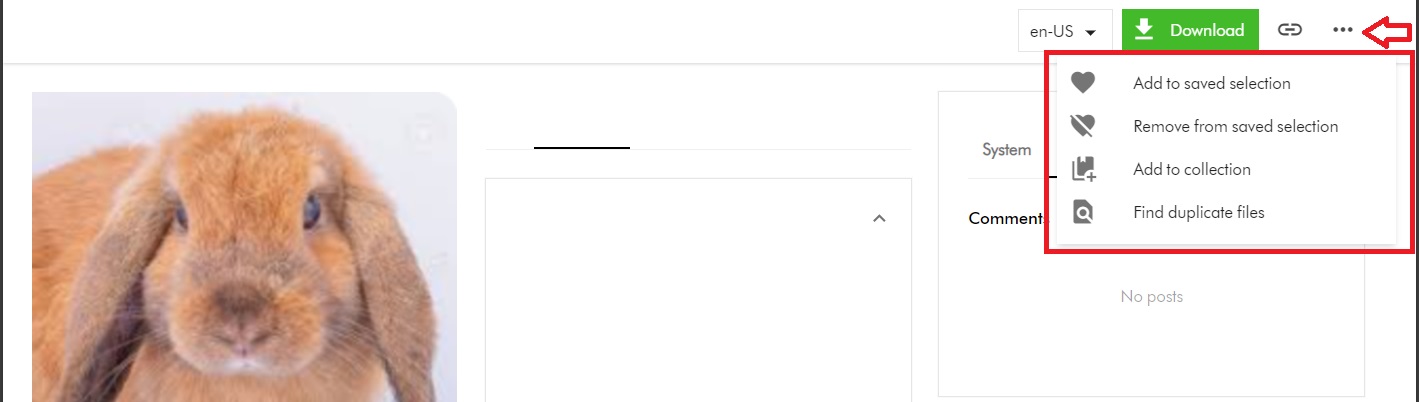
I will start with a scenario where my Content Hub user doesn’t have permission to create public links. My user belongs to my GlobalContentCreator user group. Within Content Hub, on the Asset Details page, when my user tries to access the Public links menu, they notice it is missing as shown below.

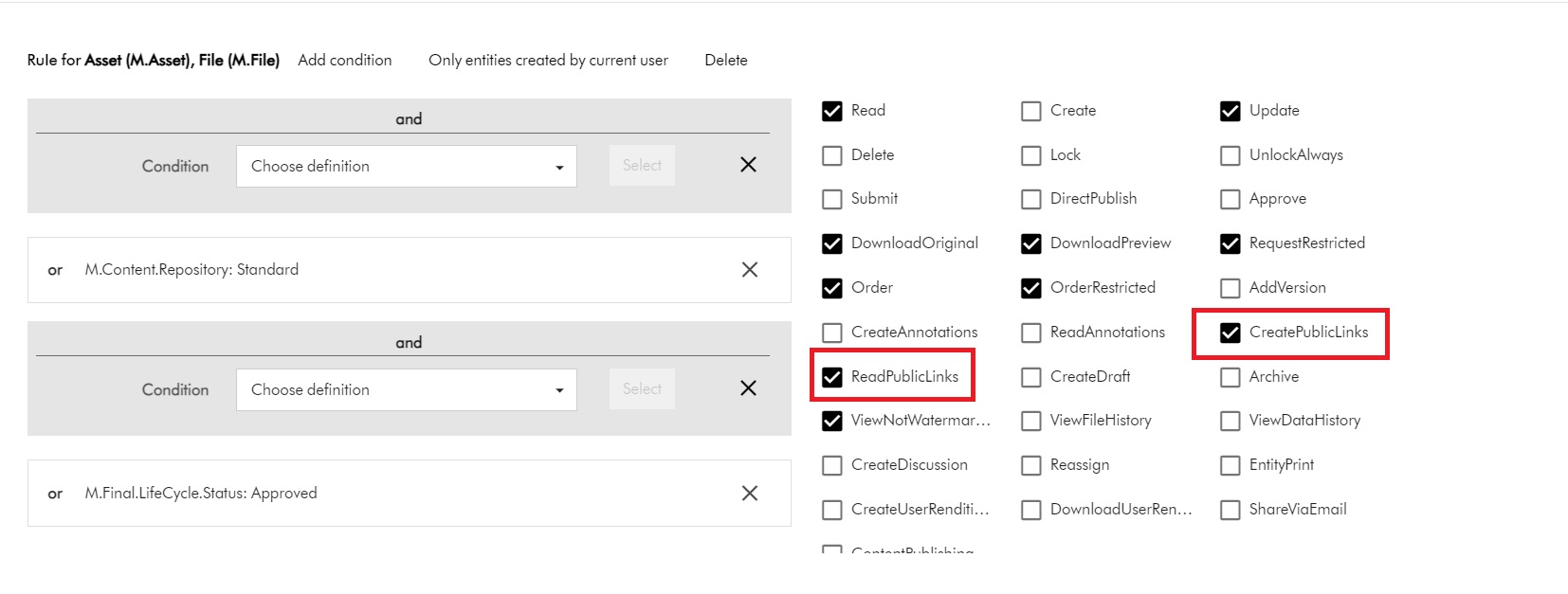
The Public links menu is missing because the required permissions have not been configured within GlobalContentCreator user group. Below is a snippet of the existing permissions for M.Asset and M.File

You notice the CreatePublicLinks and ReadPublicLinks permissions are missing. We need to enable them first, as shown below:

With this change in place, the Public links menu now appears on the Asset Details page for my user, as shown below.

Does this resolve the issue?

I will now let my user to put this to test.

As expected, when my user clicks on the Public links menu, it opens New pubic link popup window. They proceed to fill out the form and submitting it as shown below. However, they are still getting the error. What is going on?

M.PublicLink permissions are needed as well

Asset public links are entities of type M.PublicLink. In fact, M.Asset is Parent of M.PublicLink (using the AssetToPublicLink relationship)

Therefore, I need to assign additional permissions for M.PublicLink. I need to update my GlobalContentCreator user group with the following changes:

The minimum permissions needed are Read and Create to create the public links. However, I have additionally allowed my users to update and delete them as well.

This is it. With this change, the issue is resolved and my users can happily generate public links. Happy days.

Next steps

In this blog post, I have explored steps you need to take to troubleshoot and resolve the issue “the user does not have sufficient rights to create the specified entity” when generating public links.

Stay tuned and leave us any feedback or comments.
Creating and publishing a Content Hub custom connector – Func app settings and debugging

Introduction

In my previous blog post, I covered how to set-up your Func app within Visual Studio. In this post, I would like to walk you through how to configure your Func app to allow you to run and debug it in your local development environement.

Func app local.settings.json file

Within your Visual Studio project, create local.settings.json file at the root of the project. A sample json file is shown below. This will be used to configure all the configuration settings to allow you to run and debug the Func app locally.

The local.settings.json file stores app settings and settings used by local development tools. Settings in the local.settings.json file are used only when you’re running your project locally.

Because the local.settings.json may contain secrets, such as connection strings, you should never store it in a remote repository.

DevOps best practices

Microsoft Azure portal func app application settings

Similarly, you will need to configure all the configuration setting on your Microsoft Azure portal for your test or production Func app instances.

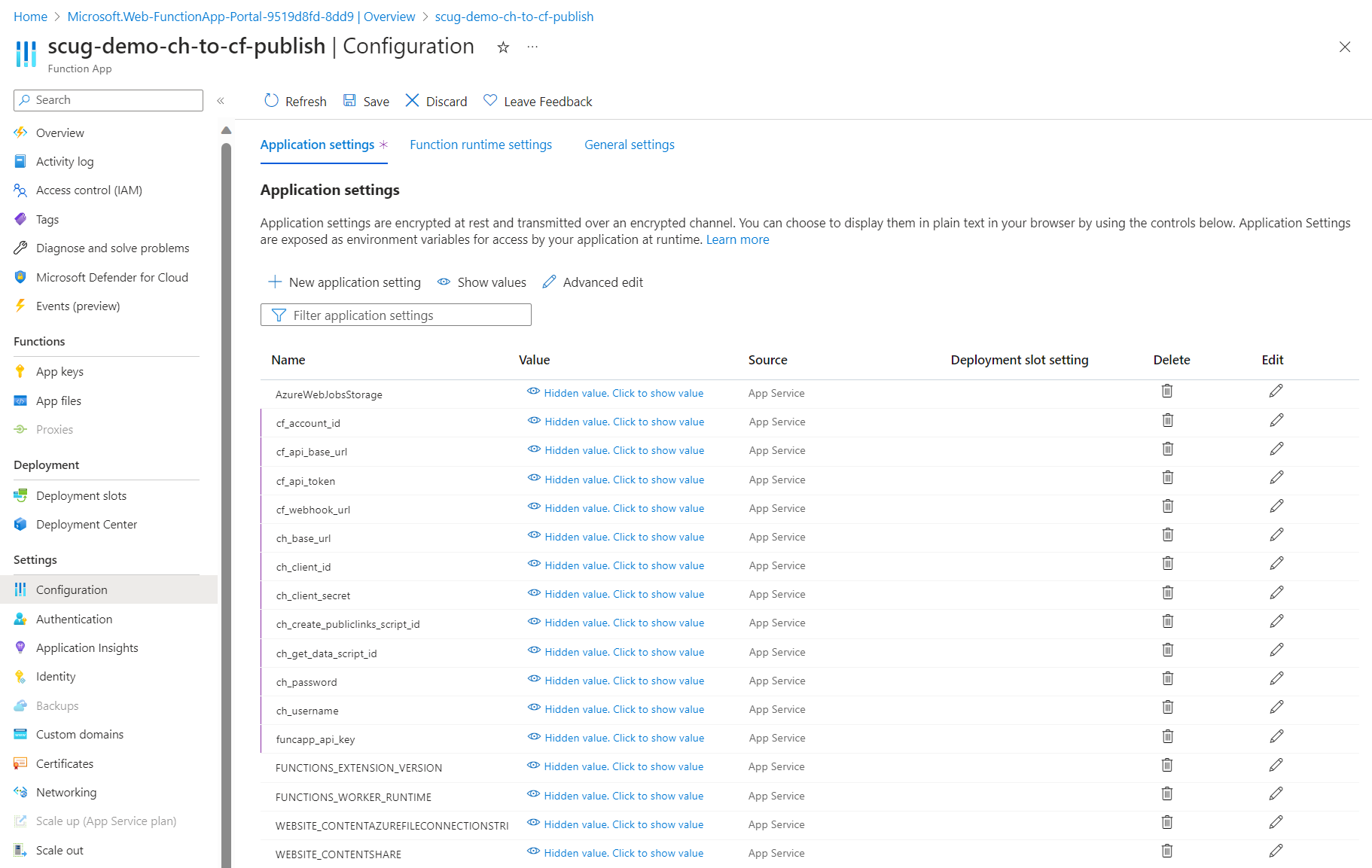
Clicking on Configuration menu, then Application settings tab will launch the page similar to the one shown below.

Depending on your needs, these application settings can be managed manually or very easily automated using DevOps pipelines.

List of required application settings

Below is a complete list of the Func app application settings

  • cf_account_id your Cloudflare account identifier
  • cf_api_base_url your Cloudflare API base URL
  • cf_api_token your Cloudflare API token
  • cf_webhook_url your Cloudflare webhook URL
  • ch_base_url your Content Hub instance base URL
  • ch_client_id your Content Hub instance client identifier
  • ch_client_secret your Content Hub instance client secret
  • ch_create_publiclinks_script_id your Content Hub action scrip identifier for creating public links
  • ch_get_data_script_id your Content Hub action scrip identifier for getting data
  • ch_password your Content Hub integration user password
  • ch_username your Content Hub integration user username
  • funcapp_api_key your custom Func app API key configured within your Content Hub integration

Next steps

In this blog post, we have explored at how to configure your Function app application settings to allow you to run and debug it in your local development environment. We also looked at configuring them on your published Func app on your Microsoft Azure portal.

Feel free to watch the rest of my YouTube playlist where I am demonstrating the end-to-end custom connector in action. Stay tuned.

Creating and publishing a Content Hub custom connector – Visual Studio project set-up guide

Background

I recently shared a video playlist on how I built a Content Hub custom connector that allows you to publish video assets into your existing video streaming platforms

On this blog post, I wanted to share details on how to setup your Visual Studio project and solution as well us how to deploy or publish the connector to your Microsoft Azure cloud.

Create a function app project

Using latest Visual Studio IDE, create a new Azure Functions project, using C# template as shown below

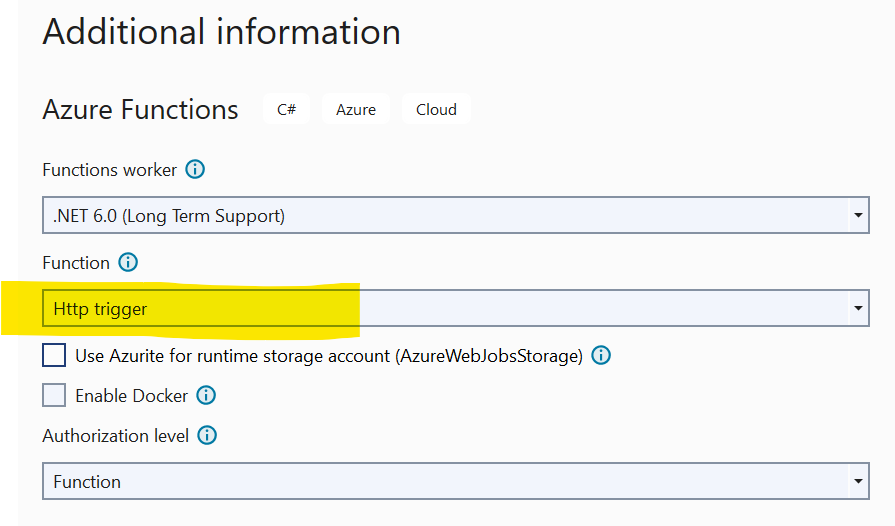
Choose a meaningful name for your project and progress through the next step. Ensure you select Http triggered function as show below.

Finalise the create project wizard to get your project created.

Add Content Hub web SDK reference

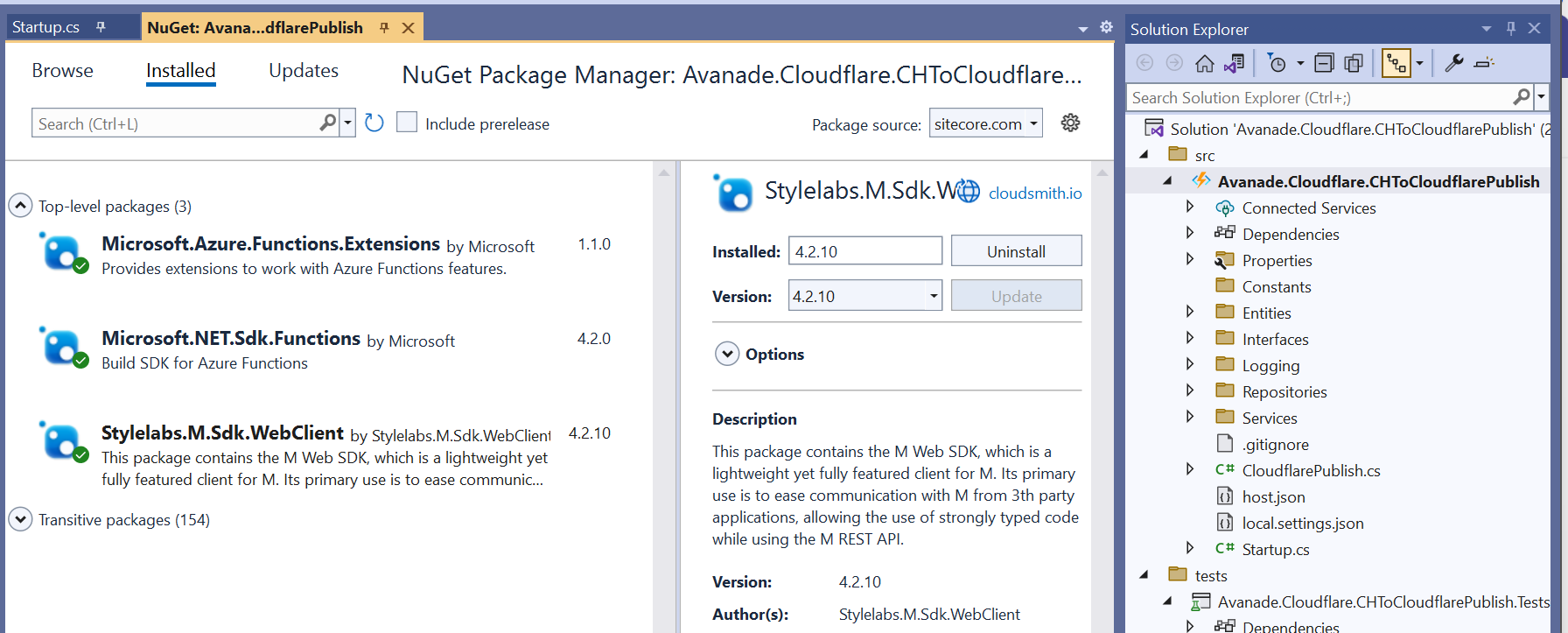
As shown below, add a reference to Stylelabs.M.Sdk.WebClient NuGet Package to your project.

In addition, ensure you have added the Microsoft NuGet Packages below to enable dependency injection to your Func app.

Enabling FunctionStartup in your Func app

To enable dependency injection in your project, add a Startup class similar to the one shown below. The Startup class needs to inherit the FunctionStartup, which allows us to configure and register our interfaces.

Creating Function App on Microsoft Azure portal

As explained in the video playlist, you will need to publish your Func app into your Microsoft Azure subscription.

You will need to create a Function App app in your Microsoft Azure subscription using the create template as shown below. Ensure you select relevant Subscription, Resource Group and .NET Runtime stack.

Progress through the create wizard screens to stand up your Function app in the portal.

Getting publish profile from the Microsoft Azure portal

On your newly created Function app, navigate to the Deployment Center as shown below

Clicking on the the Manage publish profile link should present a pop up window, from which you can download the publish profile. Keep note on the location where you have downloaded this publish profile file.

Importing publish profile into your Visual Studio project

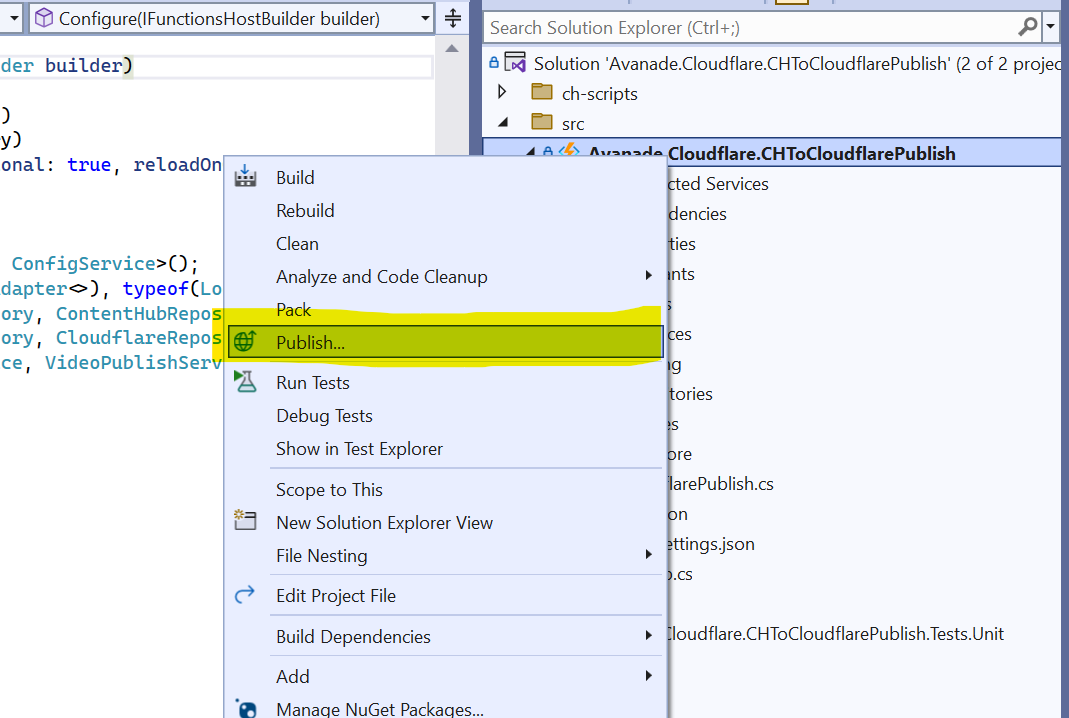
Right-click on your project within VS, which should pop-up the menu shown below.

Click on the Publish… menu to launch the Publish window similar to the one shown below.

Using the Import Profile option will allow you to browse and select the publish profile file that you previously downloaded from Microsoft Azure portal. This will then successfully setup the publish profile to your Microsoft Azure subscription.

Publishing the custom connector from VS into Microsoft Azure portal

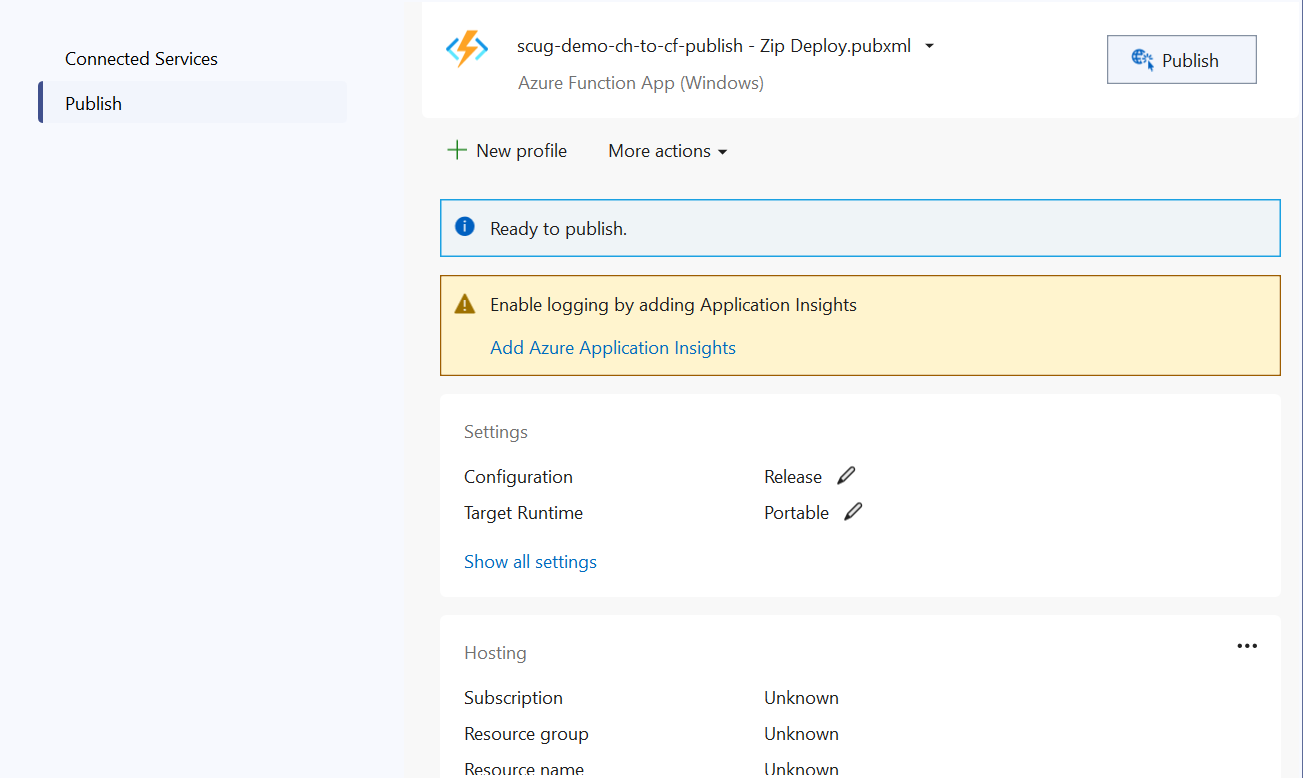
On the Publish window, you will notice your publish profile is selected, similar to one below.

Clicking on Publish button will deploy the Function app to your Microsoft Azure subscription.

Next steps

In this blog post, we have explored at how to set-up a Function app in your local developer environment, add required NuGet Packages as well us publishing it to your Microsoft Azure subscription

Feel free to watch the rest of my YouTube playlist where I am demonstrating the end-to-end custom connector in action. Stay tuned.

My Sitecore contributions in 2023

It is that time of the year once again, where Sitecore MVP 2024 applications are open.

I have had a relatively productive year compared to 2022, and below is a summary of my contributions:

Content contributions

I believe I have created content that adds value mostly within Content Hub, Sitecore Experience Edge, Sitecore Personalize among the Sitecore composable stack. I believe I have produced content that meets expectations in terms of quality, quantity, and visibility and more importantly, add value to our community. This has been through blog posts (x14 Sitecore blogs in 2023, with a total views:  2400+ so far), code sharing via GitHub, reference Architectures, YouTube content among other social channels:

LinkedIn articles:

Sitecore Hackathon 2023:

Code and architectural artifacts:

Public speaking

I am an active member of Sitecore User Group London and been working with Alex Washtell to facilitate the event held at our Avanade offices back in February 2023. I was also a speaker on the event held at Sagittarius on 9th November 2023.

Engagement

Through my social profile, I have driven engagement throughout 2023 to amplify the content I have created.

Next steps

For 2024, I look forward keeping up producing content that meets expectations in terms of quality, quantity, and visibility. Keep up and drive further engagement of wider Sitecore community by leveraging my previous MVP credentials and strong social profile. I am putting myself forward for public speaking events throughout the calendar year. I intent to continue identifying any gaps and filling them, providing product feedback, improvements, and references

Stay tuned and best of luck with those submitting the Sitecore MVP 2024 applications

Streaming Seamlessly: Integrating Content Hub with your existing video streaming platform

Background

Most businesses already have existing investments in some form of a video streaming platform, which they are leveraging to deliver marketing material such as video content to their customers. Their digital marketing teams are already familiar with tools such as YouTube, Brightcove among others, which they work with as part of their daily jobs.

Your company has recently made investments in Content Hub as strategic solution for your DAM needs in your business. With such an investment, your marketing, content, film and production teams will start using Content Hub as single repository for your videos and imagery to cater for all needs in your business.

How do you ensure your video assets within Content Hub are synced with your existing streaming channels?

You will need a connector, but we have you covered

Unfortunately, Sitecore doesn’t provide an out-of-the-box connector that you can leverage for this. You will need to build such a connector yourself, so you can have an integration between Content Hub and your existing video streaming channel.

Speaker at London SCUG on 09 Nov 2023

I had an opportunity to demonstrate this connector during the London Sitecore User Group at Sagittarius – November 09, 2023

I have also recorded a YouTube playlist on how I have build this connector, which you can watch now on my YouTube channel

See you then.

Next steps:

I will also write an accompanying blog post with links to sample code demonstrated on my YouTube channel. Stay tuned.

Content Hub gems: Leveraging action scripts to aggregate CMP content and your linked assets – part 2

Introduction

We previously looked at how to leverage action scripts to simply how to access content and linked assets with a single web API call. In this blog post, we follow up with a deep dive into the code and logic within the action script itself.

The script

The first part of the script is shown below.

  1. Line 1 to 5 has all the required libraries being used in the script
  2. Line Line 7 & 8 has logic for extracting the id of the content item, which we are gathering the data in this script. Data from the web API request is specified in Context.Data, which is a JToken. The script expects it to be a JObject containing a contentId property.
  3. Line 10 to 14 contains logic for checking whether the content id could not be extracted from the data. In which case, a response http status-code 400 (bad request) together with a user-friendly error-message is returned. This is done with help of helper function SetError, as shown below:
  4. Line 16 to 19 contain the EntityLoadConfiguration we are going to use when loading the assets linked to our content item. Only Filename, Title and Description as well as AssetToSubtitleAsset relation will be loaded in our use case.
  5. Line 21 to 24 similarly contain the EntityLoadConfiguration we are going to use when loading the content item (our blog post content type). Blog_Title, Blog_Quote, Blog_Body as well as CmpContentToMasterLinkedAsset & CmpContentToLinkedAsset relations will be loaded here. CmpContentToMasterLinkedAsset relation holds the link to the master image associated with this item. CmpContentToLinkedAsset relation has the assets linked with this item, such as the video asset.
  6. Line 26 to 31 contain the logic for loading the content (Blog post), by leveraging MClient.Entities.GetAsync function and specifying the content id and the EntityLoadConfiguration already defined above. We have a check on line 27 whether the content entity was actually found, and return a response http status-code 400 (bad request) together with a user-friendly error-message, when none was found.
  7. Line 33 to 37 start preparing the output object for our script. We have created a new JObject which has the shown properties. We have added the values of properties Blog_Title and Blog_Quote and Blog_Body. We are going to add more properties as we walk through the rest of the script.

Second part of the script

The code listing from line 39 through to 83 has the logic for loading the video asset linked with this content item.

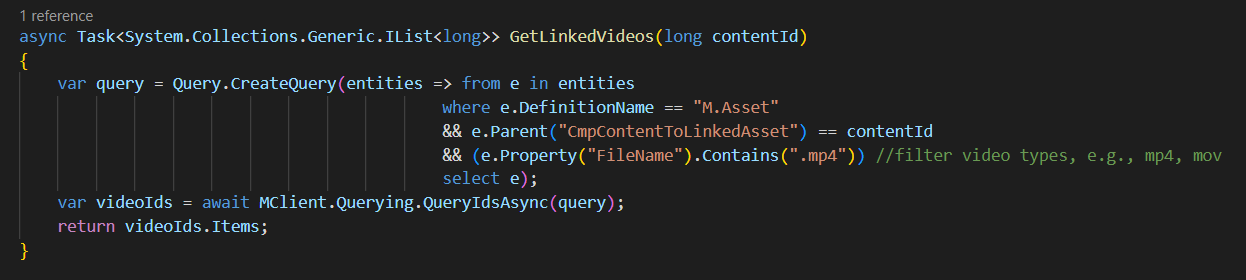
  1. Line 39 get the list of video asset ids by using a helper function GetLinkedVideos shown below. This function makes use of the LINQ query, which filters down only entities of type M.Asset which are linked to current content id (parent in the CmpContentToLinkedAsset relation). In my use case, I have used the file extension .mp4 to identify video asset (but you could use any other property or combination of properties to meet your specific use cases)
  2. Line 40 checks if our GetLinkedVideos found any video ids, in which case the rest of the logic will try and process them
  3. Line 42 extract the first video id that was found. I have used the MCient.Logger.Info method to log user friendly messages that helped me show which video ids were found. These message appear on the Action Script’s View Logs window.
  4. Line 45 to 46 contain the logic for loading the video asset entity, by leveraging MClient.Entities.GetAsync function and specifying the video asset id and the EntityLoadConfiguration already defined before in first part of the script. Line 46 checks to ensure the video asset was found, for us to do further processing
  5. Line 48 and 49 contains the logic for getting the video asset public link, which is required as part of the output from the script. On line 48, I am leveraging GetPublicLinks function, which I have defined as shown below. I am interested in the original rendition of my video asset. Please note that if the video asset does not have original public link generated, nothing will be retrieved.
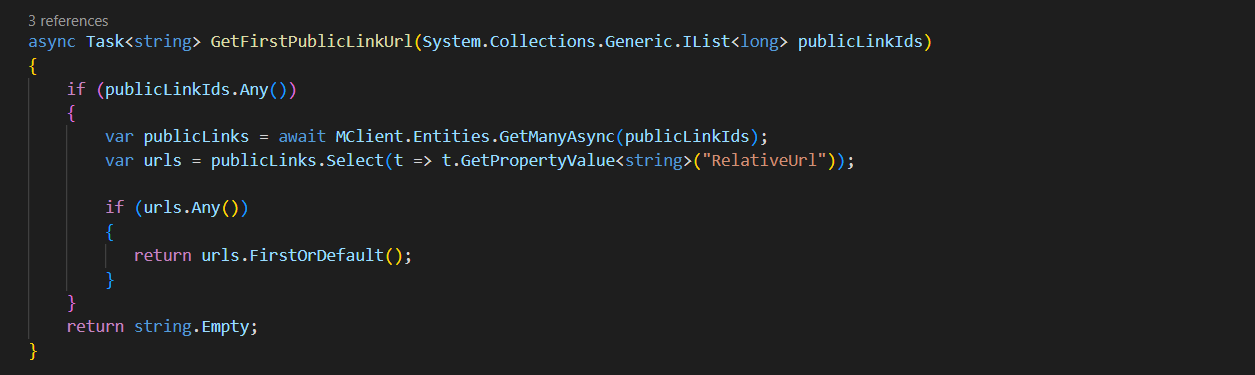
  6. Which is why the code on line 49 further makes use of a function named GetFirstPublicLinkUrl which helps load the M.PublicLink entity and inspect the RelativeUrl property, as shown below.
  7. Line 50 to 55 we are now creating a new JObject which has the shown properties as expected the output of the script. This object is added to videoAsset section of our main result object.
  8. Line 57 contain logic for getting the video asset subtitles. The AssetToSubtitleAsset is a IParentToManyChildrenRelation, so we get hold of subtitles using the Children property from this relation. In essence, a video subtitle is an asset in its own right. So the code listing from Line 59 is trying to load each of the subtitle asset and we are interested in the Title property as well as the Public Link (original rendition). This is now familiar to how we got public link for the video asset itself. We add each of these properties in a JArray, which in turn, is added to the result.

Part three of the script

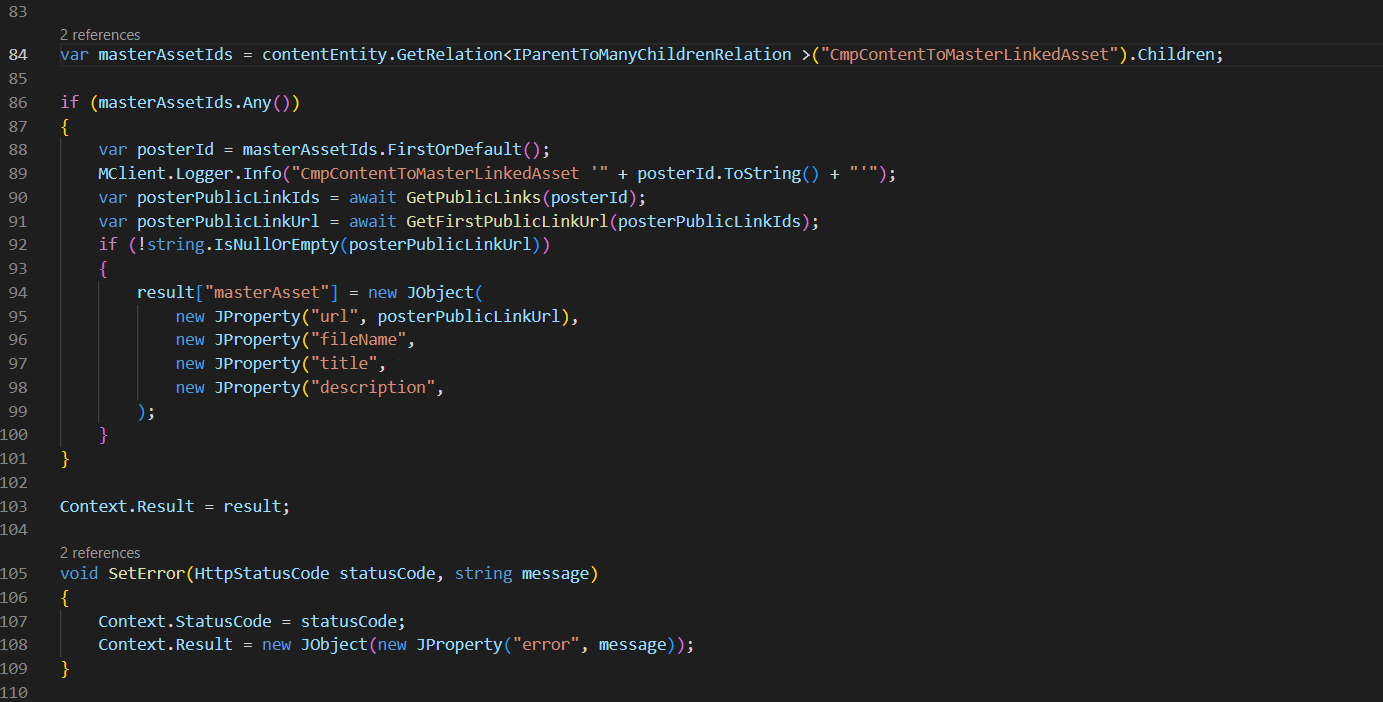
In the last part of the script, we also get the master asset linked to our content item. In this case, we are interested in the asset Public Link, asset file name, Blog_Title and Blog_Body properties. We create a new JObject which has the shown properties as expected and added to the result object.

Line 103 stores our result object that we have been preparing onto the Context. This tells the script to return it to the user.

Final script output

The script output is similar to the one shown below.

This completes the code listing for this script.

Next steps

In this blog post, I have looked at the second part of the Content Hub Action Scripts for Web API use cases. We have taken a deep dive into the source code for the script, covering the various components and how they work together. For a practical use cases, look at my blog post on how I have created a custom connector for publishing video assets from Content Hub into Cloudflare Stream

Stay tuned and leave us any feedback or comments.

Content Hub gems: Leveraging action scripts to aggregate CMP content and your linked assets – part 1

Use case and problem

Within Content Hub CMP, the content metadata can be stored in various places including the properties and related entities. For example, a Blog post content item can have multiple attachments, such as Imagery and Video assets linked from the DAM, as shown below.

Imagine you wanted to query all these metadata for your blog post, plus all the linked attachments. For the assets, you would like to also get video subtitles or even public links for them. Sounds complicated enough?

Well, this blog post will explore a Content Hub hidden gem to save your day. Please read on.

Web Scripts

Luckily for us, Content Hub supports creation of Action scripts that are designed to be executed using a Web API. This is a very powerful capability since we can leverage such a script to aggregate metadata from various Content Hub entities, whether this is stored within properties or relations. We can then execute this script using a single Web API, thereby avoiding unnecessary multiple trips to fetch such data.

How to create an Action Script

  1. To create a new script, navigate to Manage -> Scripts page
  2. Then click on +Script button
  3. This will pop-up a screen similar to this shown below. Enter Name, specify Action Script type and optionally enter Description. Click Save
  4. The Action script will be created and appears on the scripts list, similar to below:

How to add code/edit, build and publish your script

  1. Click on your script from the script list, which will open Script details page
  2. Click on the Edit button on top of the page to enable editor section, as shown below. Use the editor section to add the source code for your script
  3. Click on Build button to compile the source code for your script.
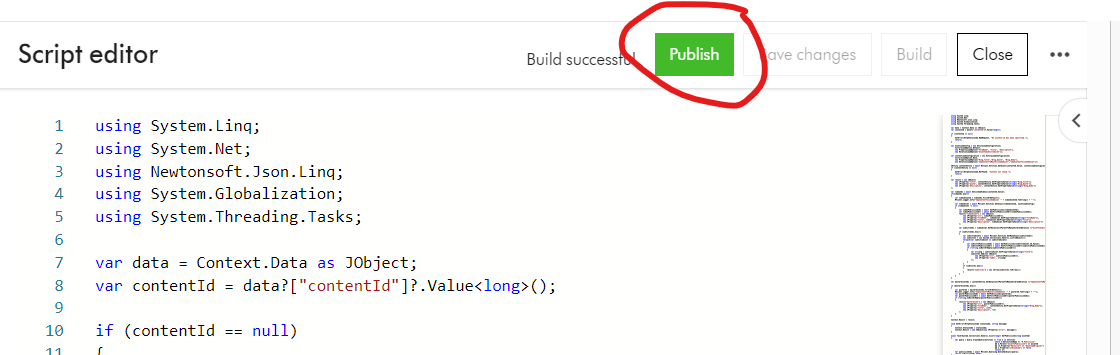
  4. Click on Publish button to publish the script and make code changes take effect.
  5. Finally, remember to Enable the script from the script list, to make it available for use

Executing your Action Script

To execute your Action script, simply send an HTTP POST request to the script endpoint, using a tool such as Postman or CURL. Below is a Postman sample. ch_base_url is your Content Hub instance base URL. SCRIPT_ID is the script identifier

In the sample request above, I have specified the request body with a parameter containing the CMP content identifier that I would like to aggregate all the metadata. I will cover more on the workings of this script in a follow up blog post.

Please note I presume you know how to specify the Authentication for the Web API calls to your Content Hub instance. This involves getting access tokens from your Content Hub instance.

Script output

If successful, you will get an output similar to the one below.

You can see within a single Web API call, we are able to get all the metadata related to a CMP Blog post content item:

  • M.Content properties for the Blog post such as Title, Quote and Description
  • M.Content relations such as CmpContentToMasterLinkedAsset and CmpContentToLinkedAsset
  • M.Asset properties such as Filename, Title and Description
  • M.Asset relations such as AssetToSubtitleAsset
  • Video asset subtitle properties such as Filename, Title and Description
  • M.Asset public links such as DownloadOriginal URLs

Next steps

In this blog post, I have introduced the first part on Content Hub Action Scripts for Web API use cases. We have walked through steps of creating a new script, editing and build the source code, publishing and enabling it for use. We have also looked at how to execute the Web script using a Postman tool.

In the second part, we will deep dive into the source code for the script that I used to produce the sample output above. Stay tuned and leave us any feedback or comments.

Unlocking the Potential: Tips and Tricks for Working with GraphQL Queries and Sitecore Experience Edge

Adapted from
adapted from www.wallarm.com

What is GraphQL

GraphQL is a kind of query language and server-side runtime technology used widely for application programming interfaces (APIs) that ensure that the client gets the required data. Nothing less or nothing more. Created by Facebook, GraphQL has a lot of aims and functions:

  • A powerful data-fetching API
  • API interface that’s easy to learn and work with
  • An open-source query language making APIs fast and flexible
  • An effective method to streamline security management for the API
  • A way to give developers and business analysts the ability to develop APIs with desirable methods
  • A query language that gets along with a given integrated development environment easily and effectively
  • The facility to develop APIs that will function the way the client/end-user wanted or expected

GraphQL Playground

The easiest way to compose GraphQL queries to query your Sitecore Experience Edge is to make use of the GraphQL playground. I am presuming that you already have your Sitecore Experience Edge instance
connected to your Sitecore Content Hub instance or Sitecore XM Cloud instance.
To refresh your memory, you can visit this blog post where I have detailed steps to help you with the set up

In this blog post, I will be working with my Sitecore Content Hub instance to share a few tips and tricks. You will find these tips and tricks applicable to Sitecore XM Cloud as well.

Preview and Delivery APIs

Before you can access the GraphQL playground, you need to decide whether you are going to be using the Preview API or the Delivery APIs.

  • Preview API: The Preview API is a GraphQL endpoint that exposes a preview of your content. Use the Preview API to access content that is not approved yet, including drafts. This can be useful when you want to test content in a staging environment before going to production. This is accessible using endpoint {ContentHubURL}/api/graphql/preview/v1 where ContentHubURL is your Sitecore Content Hub instance url.
  • Delivery API: The Delivery API is a GraphQL endpoint that exposes approved and published content. Use this API for all production-related actions. This is accessible using endpoint https://edge.sitecorecloud.io/api/graphql/v1

You will also need access to API Keys to use with your Preview or Delivery APIs. You can obtain your API keys as follows:
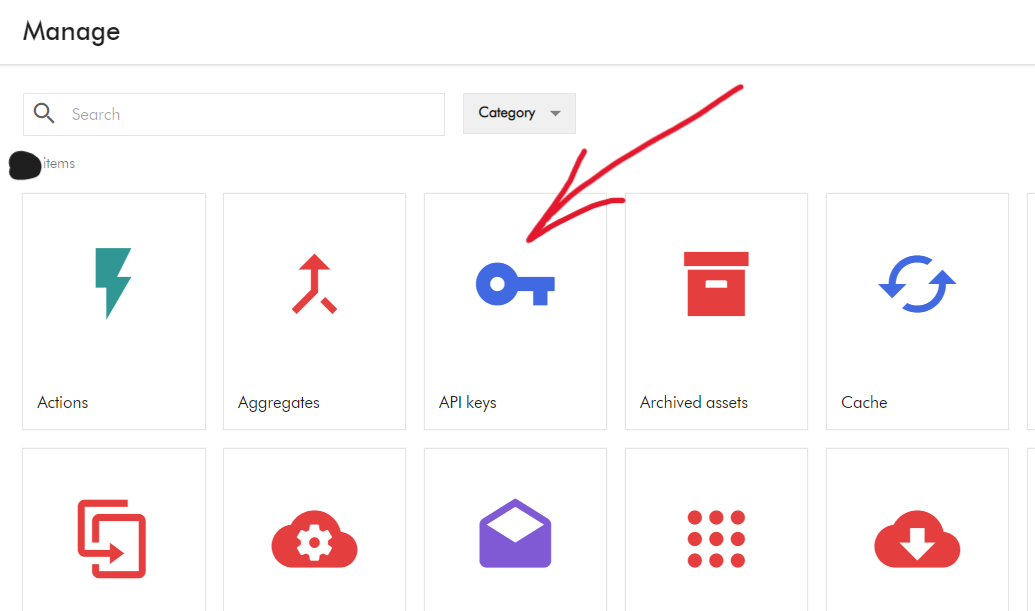
  • Navigate to Manage -> API Keys to launch the API Keys management screen
  • On the API Keys screen, you need to provide the required name and scope of the API Keys, then click the call to action to generate the Preview or Delivery API keys. Please keep a note of them as you get only once chance to view and copy them. I recommend storing these keys securely on your Key Vault or similar tool.

Launching GraphQL Playground

To launch the GraphQL playground, open your browser and specify the following URL:

  • Preview IDE: {ContentHubURL}/api/graphql/preview/ide This will launch the Preview API playground
  • Delivery IDE: https://edge.sitecorecloud.io/api/graphql/ide This will launch the Delivery API play ground

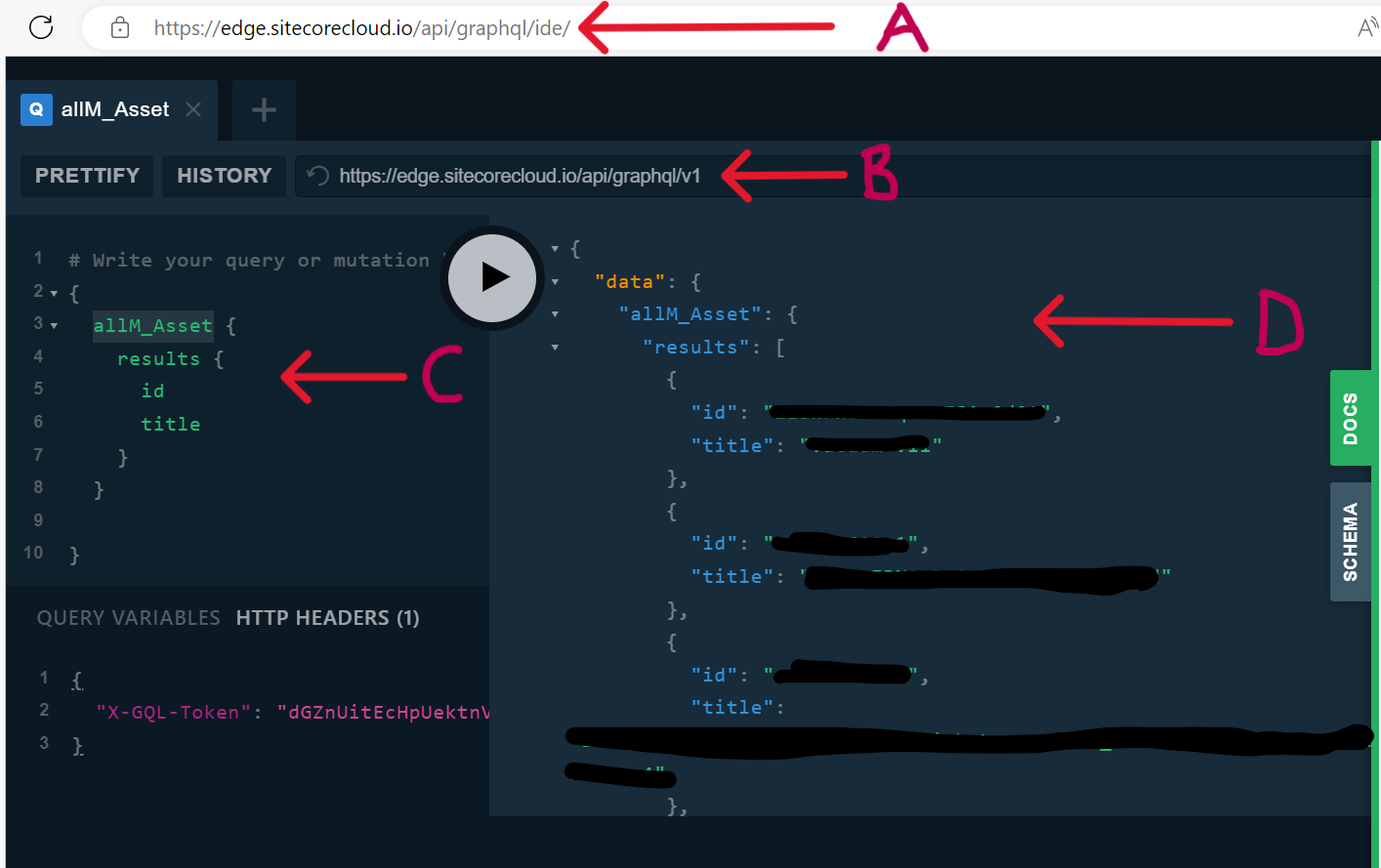
Below is a screenshot of Delivery API playground

  • A – This is the Delivery IDE URL
  • B – This is the Delivery API endpoint
  • C – This the GraphQL query section, where you will specify the queries. In my example, this the query to list all published assets, by using the predefined object allM_Asset
  • D – This is the output of the GraphQL query, showing the results as JSON object. Notice only the id and title are returned, as specified in my query. This is one of the main advantages of using GraphQL, you get nothing less or nothing more than what you specify.
  • HTTP Header – this is where we specify our API Key using the “X-GQL-Token” header. In this example, I have used the Delivery API key as I am querying my Delivery instance.

Troubleshooting tips and tricks

I am presuming you have so far been successful getting your GraphQL playground working. If you encounter any issues, try and troubleshoot as follows:

  • Do you have your Delivery Platform setup correctly? ?Check that your Sitecore Content Hub has a license for Delivery platform, and this has been enabled. One way of verifying this is by having Manage -> Delivery Platform icon on your dashboard, as shown below. If you are missing it, contact Sitecore Support to have it enabled.
  • Are you using correct Delivery API or Preview API Keys? Do not get the Delivery or Preview API keys mixed. To avoid any potential mix up, ensure you assign your API keys names to reflect Delivery or Preview scope when generating them. If you are not sure anymore, you can always discard and generate new ones (Please note in Production environments, deleting and generating new API keys may affect production services, plan this carefully
  • Are you accessing the correct GraphQL Playground? Similarly to above, ensure your browser is pointing to Delivery IDE or Preview IDE accordingly. For example, if you haven’t published all your Assets, you may get discrepancy in the assets output within Delivery IDE and Preview IDE. Please note Preview IDE will show content that is not approved yet, including drafts.
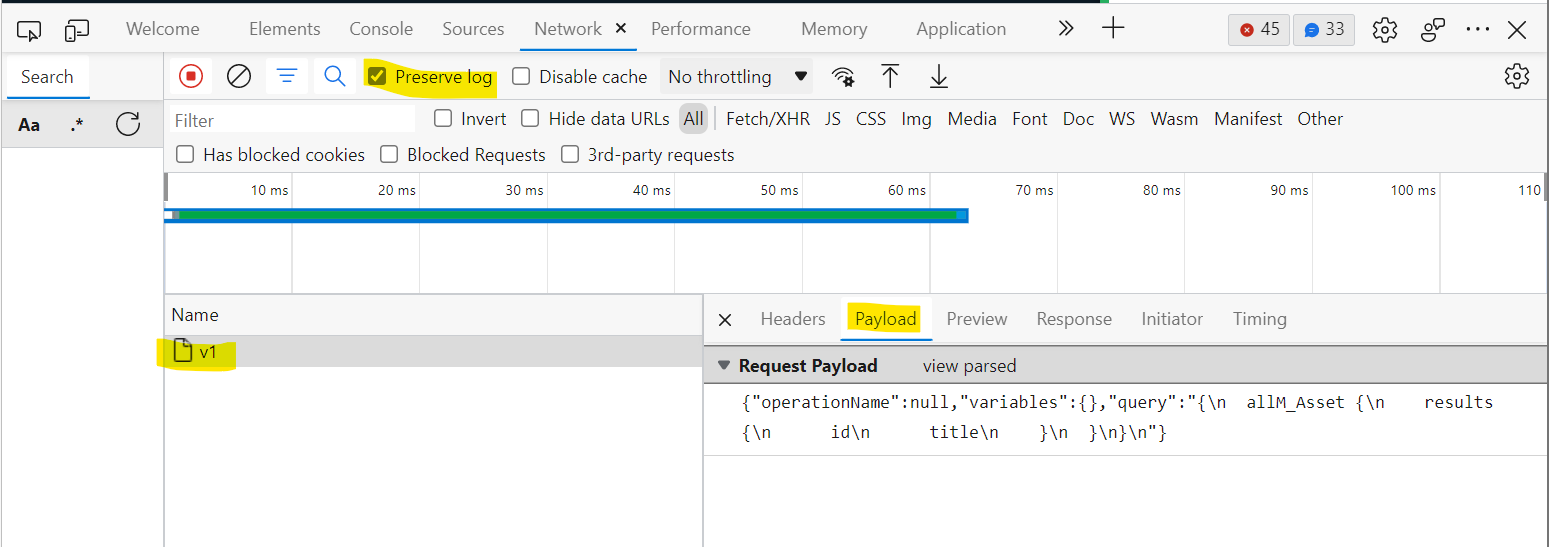
  • Have you checked Browser Developer Tools? Your browser “Network” section captures detailed logs on requests and responses. An example screenshot below will help verify the response coming back from GraphQL server:

GraphQL tips and tricks

Using filters with your query

Suppose you want to control how many items to query, then you will need to filter the query results. Below is an example, where we are getting a single asset with id value of "some_asset_id"

Using parameters with query filters

Suppose you want to use a parameter with your filter the query. A use case is to be able to dynamically filter the list of assets based on some condition. Below is an example, where we are using a parameter for the id value of "some_asset_id"

  • A – We make use of the Query Variables section to define parameters. In this case it is named "assetId"
  • B – We define the parameter using the arguments to the query as shown here. ID is the strong scalar type for the Asset Identifier field

Next steps

This completes this blog, where I have walked you through GraphQL and Sitecore Experience Edge. I hope you find this useful, and feel free to leave me any comments or thoughts. See you soon in my next blog post.

Sitecore personalize and mobile app projects series – part 4b

Sitecore Personalize APIs integration architecture

Introduction

On this series of blog posts, I am documenting my journey of delivering personalized content to end users of a mobile app.

Sitecore Personalize API Flow executions

As follow up to the previous blog post on Personalize APIs, let us look at how you can leverage the Personalize REST API flow execution service to automate running a flow for you experiments or experiences.

Experiences vs Experiments

Below is a summary key capabilities with experiences and experiments:

  • Experiences – Web allows you to add experience to your website and monitor performance.
  • Experiences – Full stack drives API triggered and interactive experiences.
  • Experiences – Flows export segments to external third-party systems for highly targeted campaigns
  • Experiments – Web runs A/B tests for your website
  • Experiments – Full stack runs A/B tests on API driven triggered and interactive experiences

Characteristics of API flow execution service

A flow execution service allows you to run a flow for either web-based or mobile apps, in order to deliver great personalization in real-time. A simple use-case will be trying to encourage your guest to add a product into their shopping basket.

Below are characteristics of a flow execution service:

  • Facilitates personalization in experiences and experiments, including interactive and web
  • Invokes real-time responses
  • Supports using decision models in interactive experiments to return the next best offer or action

How to send a flow execution request

Two options are available:

  • You can send a flow execution request using either the browserIdemail, or identifiers attribute. This flexibility is particularly useful when interacting with guests who have never been identified online and do not have a browserId attribute. You can use the email or identifiers attribute to execute a flow that uses a decision model to return the next best offer or action.
  • You can also send a flow execution request for an experiment or experience when you want to send the output of the decision model in real-time to an external system such as a marketing cloud. The browserId attribute is not relevant or captured by this type of external system, so we recommend using the email or identifiers attribute to execute the flow

Calling the Personalize API

You will typically initiate an asynchronous call using POST REST API.

Below is a sample request to achieve this.

HTTP POST
/v2/callFlows

This will run an interactive experiment over any web-based or mobile app. As expected, you will need to specify either browserId or email or identifiers

Flow execution request using browserId

HTTP POST {{apiEndpoint}}/v2/callFlows
{
    "clientKey": "{{ClientKey}}",
    "channel": "MOBILE_APP",
    "language": "en",
    "currencyCode": "EUR",
    "pointOfSale": "{{myPOS}}",
    "browserId": "{{ref}}",
    "friendlyId": "{{friendlyId}}"
}

Where:

  • {{apiEndpoint}} will be the base url to your Personalize tenant, .e.g., api-engage-eu.sitecorecloud.io
  • {{ClientKey}} will be your public Client key
  • {{myPOS}} will be your Point of Sale
  • {{ref}} will be your browserId 
  • {{friendlyId}} when you create an experiment or experience, Sitecore Personalize automatically creates an ID when you name the experiment or experience.

Next Steps

This completes this blog, where I have walked you through Personalize API Flow executions. I hope you find this useful, and feel free to leave me any comments or thoughts.

In my next blog, I will be looking at sharing more details on my Sitecore Personalize integrations with my mobile app project. Stay tuned.

Sitecore personalize and mobile app projects series – part 4a

Sitecore Personalize APIs integration architecture

Introduction

On this series of blog posts, I am documenting my journey of delivering personalized content to end users of a mobile app.

Sitecore Personalize APIs

I have shared a reference architecture of the Sitecore Personalize APIs to demonstrate the different types as well as the recommended the integrations to your mobile app at the top of this page. We will now look into this in detail.

Orchestration layer

This architectural piece allows you to manage the integrations between your mobile app and Sitecore Personalize API. All it is a middleware or proxy layer that allows us to communicate with Personalize APIs. You can build this as a server-side application in any language of your choice. Alternatively, you could leverage Serverless capabilities such as Azure Function apps.

Below is a summary of the benefits:

  • Securely manage Client Keys and Client Secrets. The proxy layer protects your Client Keys and Secrets from potential malicious users of your mobile app.
  • Loose coupling – The orchestration layer means your mobile app is not strongly coupled with Sitecore Personalize APIs, making it easier to manage your mobile app releases and any changes to APIs.

Stream API

Stream API is designed to capture real-time, high velocity, and high-volume behavioral data. This includes both Browser and Event APIs

  • The Browser API provides capabilities to extend functionality and manage cookies that help identify guests. These Browser APIs are used for capturing and consuming data. They create, update, read, and delete data. This is the first API that you will make from your mobile app, to uniquely identify the guest/user.
  • The Event API provides capabilities for event driven processing, such as setting and sending custom events from your mobile app to Sitecore Personalize.

You will need a public Client key to access these APIs. You can get your key from your Sitecore Personalize tenant.

Interactive API

Interactive API is a set of REST APIs that provide synchronous interaction with CDP/Sitecore Personalize capabilities. These APIs support the CRUD operations that that you can operation on, say, guest profile data.

You will need a both public Client key and private Client secret to access these APIs by specify Basic Authentication token on the headers. You can get your keys and secrets from your Sitecore Personalize tenant.

You can access full documentation and how to send data with these events from Sitecore.

Mobile app integration

You will typically initiate an asynchronous call to Browser API (Stream API) to get a unique identifier.

Below is a sample request to achieve this.

HTTP GET
https://{{apiEndpoint}}/v1.2/browser/create.json?client_key={{ClientKey}}&message=

Where:

  • {{apiEndpoint}} will be the base url to your Personalize tenant, .e.g., api-engage-eu.sitecorecloud.io
  • {{ClientKey}} will be your public Client key

Below is the response, which will contain the unique browser ref

{
    "status": "OK",
    "version": "1.2",
    "client_key": "<your public client key>",
    "ref": "the unique browser ref guid",
    "customer_ref": "the unique customer ref guid"
}

Personalize API postman

Dylan Young has shared unofficial API Swagger definitions on his Git Hub. I will recommend you have a look to get started on your integrations.

Next Steps

This completes this blog, where I have walked you through Sitecore Personalize APIs and some security considerations to go with them. I hope you find this useful, and feel free to leave me any comments or thoughts.

In my next blog, I will be looking at sharing more details on my Sitecore Personalize integrations with my mobile app project. Stay tuned.