
Sitecore AKS blue-green Search indexes deployments

This is a follow up to my Sitecore Zero Down time deployments series of blogs. I have also previously presented on this top during the Sitecore Symposium 2021.

If you haven’t read my previous blogs or watched my Sitecore Symposium 2021 session, I suggest you please pause now and go have a read or watch before proceeding with this blog post.

In this blog post, I will deep dive into the approach for Zero down-time deployments for Sitecore Indexes. I am going to use the Sitecore AKS workload for my scenario, although the same concepts can be applied for your Sitecore PaaS workloads too.

Blue-Green Web Index deployment strategy

To ensure complete isolation of your Sitecore Web Index during the Zero down-time deployments, you need to create two sets of the Web indexes:

  • Web Green Index to correspond to your CD green instance
  • And Web Blue Index to correspond to your Blue CD instance

This means during a deployment; you can do a full re-indexing of your staging CD without risk of breaking your LIVE CD

Blue Green Sitecore Web Index deployment strategy

This infographic captures the initial state when CD GREEN is LIVE and shows the transition when we do a new deployment.

You will notice that in the final state we have swapped CD BLUE to serve the live traffic, achieving Zero down-time deployments.

CI/CD Pipelines

How do you implement this?

Below, I am sharing a high-level CI/CD pipeline that I have used in my scenario for reference.
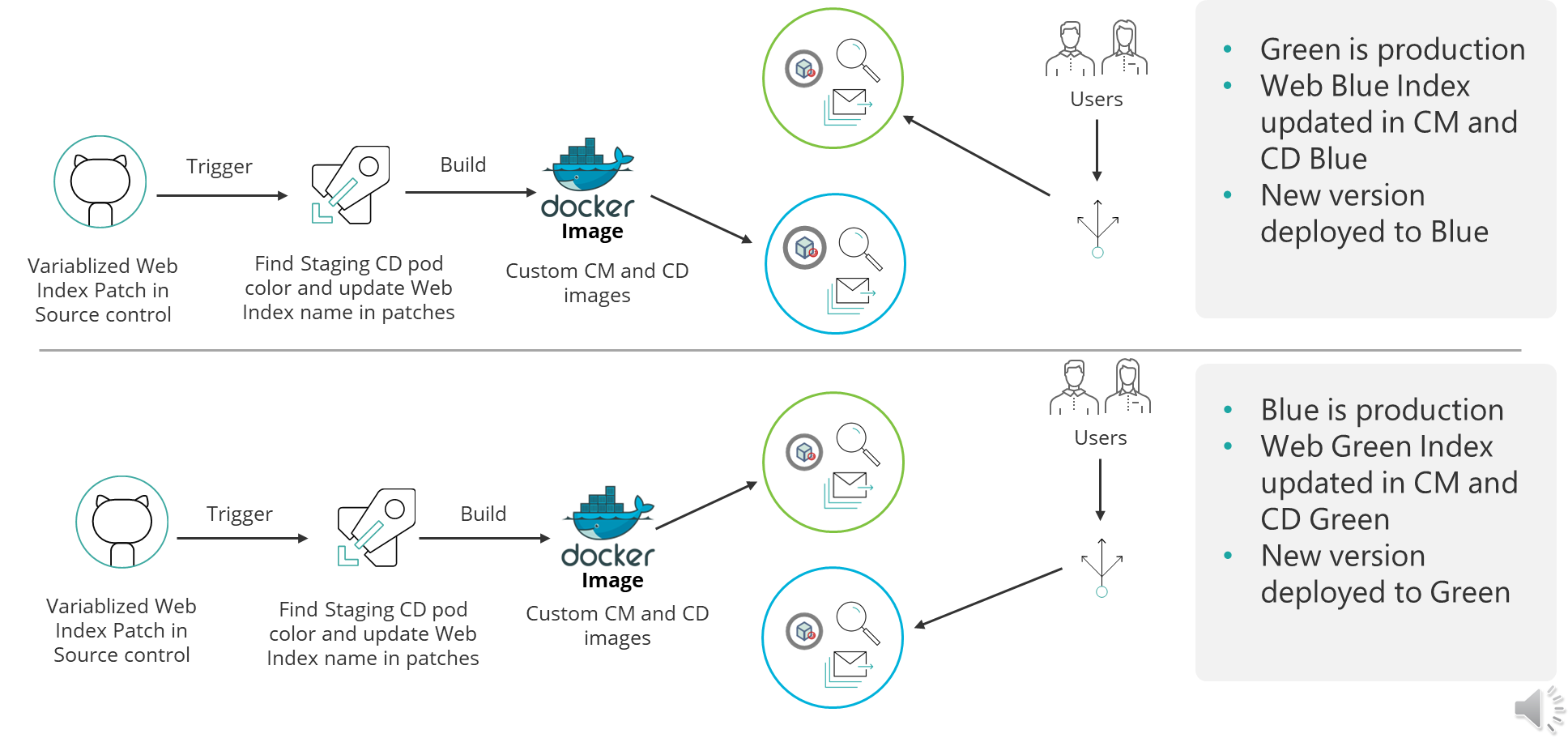
Sample CI/CD pipelines

In Blue-Green deployment strategy, you typically deploy to Blue CD instance, when Green CD is currently in production and serving LIVE traffic OR vice-versa. This is how we achieve zero downtime deployments. 

You can now extend your CI/CD pipelines to be aware of Web Blue Index and Web Green Index. You do this by ensuring that you update you Content Management (CM) instance configuration to point to the correct Web Blue or Web Green Index. This is achieved by parameterizing the Sitecore Index configuration patch files.

Your CI/CD process will then update your CM and CD images with correct Web Blue or Web Green index, before building them accordingly as show above. And that is it.

Prefer to watch the video instead?

If you prefer to watch my video instead, I have included the link below.

Video to walk you through the Sitecore AKS Blue-Green Search Index strategy

Next steps

If you have any feedback or questions, please leave me a comment, and I am happy to get back to you.

Also, you can subscribe to my YouTube channel, so you don’t miss out on latest updates.
What is new in Sitecore XP 10.0

Sitecore Experience Platform 10.0 is available now, a testament to Sitecore’s vision not only the global leader in digital experience management software, but to embrace latest cloud technologies and respond to end users and developer community.

In this version, Sitecore now officially has support for Docker, Kubernetes and other image repositories. This is a feature that will bring smiles to Sitecore community given the already buzz around containerisation and breadth of knowledge in the Sitecore community. This for sure will help delivery teams move to now famous continuous delivery model, making infrastructure-as-code deployments for Sitecore “bread and butter stuff”.

In my previous posts, I have extensively looked in Sitecore Host. In this version, Sitecore has delivered the addition of the ASP.NET Core SDK and headless rendering host architecture also provides developers with a new way of building their solutions allowing for faster development iterations. With .NET 5 release on the horizon, you get a feeling Sitecore still watching this space before committing to a long term strategy with Sitecore Host.

Other key highlights

This version focuses on product updates and enhancements that provide more development and deployment options, increase usability and improve overall performance – all centered around enabling both Marketing and IT teams equally, thus making it easier and faster to launch and evolve digital customer experiences.

  • Sitecore CLI and Sitecore for Visual Studio bring headless serialization working both with TDS and Unicorn
  • Audience analytics filters allow for deeper insights on audience engagement and segmentation to drive powerful personalization across all your channels.
  • Additional HTML Email Templates for EXM provide more options when crafting emails.
  • Horizon editing interface updates give marketers in-context insight across multilingual and multisite experiences.
  • Stronger CMP integration supports additional field types and allows for persistent taxonomy associations.
  • Salesforce Marketing Cloud (SFMC) connector updates
  • New marketing automation capabilities
  • Support for GDPR compliance journeys

I am looking forward to installing this latest version and sharing in detail the experience on this blog.

Until next time.