
Sitecore Zero-downtime deployments – Part 3

Blue-Green Deployments

With modern and mature DevOps, we all want smooth, sleek and painless automated deployments with zero-downtime. Sitecore deployments are no exception. Have you embraced zero-downtime deployments? This is not a new topic. If you look around Sitecore community, you see an odd question popping here and there regarding this topic.

The journey towards achieving zero-downtime deployments for any application in fact starts with your code base. So, in this series of blog posts, we will refresh ourselves on concepts like “Code Freeze” and the CI/CD process before deep diving into implementing Sitecore zero-downtime deployments.

Blue-Green deployments architecture

Blue-green deployments strategy

In software engineering, blue-green deployment is a method of installing changes to a web, app, or database server by swapping alternating production and staging servers

Wikipedia

Key Concepts

In its purest form,  true BLUE/GREEN deployments means that we need two separate but identical environments, one is live (BLUE) and the other is on stand-by (GREEN). When you have  new version of your application, you deploy to the staging environment (GREEN) , test it without affecting BLUE. When you are happy with this new version, you can then swap it to be LIVE instance.

However, in practice, it doesn’t always make sense to run a copy of every resource. Furthermore, this may introduce some complexity to the process.

This is why we now have some shared resources as you can see in the infographic above, while others belong to BLUE or GREEN environment.

As part of this architecture, we need some way of switching or routing incoming traffic between the two environments.

Blue-Green deployment strategy effectively enables us to achieve zero down time deployments. This is because your users will not notice any downtime during deployments.

CI/CD process for Blue-Green deployments

CI/CD process for Blue-Green deployments

On the top part of the infographic above, – BLUE is currently production environment and our users accessing this environment. When we have, a new version of our application, it is deployed to GREEN environment, without affecting our users.

On the bottom part of the infographic above, – now GREEN is the production environment and our users are accessing this environment.  This leaves the BLUE environment available for us to deploy the next version of our application

We deploy to BLUE and GREEN in turns, this achieving zero downtime deployments. The process repeats in each deployment cycle.

Some benefits of Blue-Green strategy

If you haven’t already adopted the cloud for your Sitecore workloads – be it PaaS or Containers, then perhaps you need to start thinking about this seriously as there are benefits you will get.

“Blue-green deployments made easier with the cloud.”

fact

The cloud provides tooling you need to:

  • Automate your provisioning and tearing down of environments
  • Automate starting or stopping of services
  • Kubernetes simplifies container orchestration for us,  the Azure Kubernetes Service (AKS) provide a Control Plane for free
  • The flexibility and cost reductions the cloud offers makes blue-green deployments within everyone’s reach at this time and age, please embrace them.

Next steps

Hopefully, these blog post help you understand key concepts about BLUE-GREEN deployments.

In the next blog post in this series, we will look at implementing Sitecore Zero Downtime deployments.

Sitecore Zero-downtime deployments – Part 2

Sitecore Container based CI/CD Flow

With modern and mature DevOps, we all want smooth, sleek and painless automated deployments with zero-downtime. Sitecore deployments are no exception. Have you embraced zero-downtime deployments? This is not a new topic. If you look around Sitecore community, you see an odd question popping here and there regarding this topic.

The journey towards achieving zero-downtime deployments for any application in fact starts with your code base. So, in this series of blog posts, we will refresh ourselves on concepts like “Code Freeze” and the CI/CD process before deep diving into implementing Sitecore zero-downtime deployments.

Sitecore container based CI/CD flow

Sitecore Deployment options

Sitecore can be deployed to the cloud using IaaS, PaaS or Containers.  Microsoft Azure cloud  is preferred, although you can deploy to other providers like AWS

  • IaaS makes use of Virtual Machines
  • PaaS makes use of Azure App Service to run Sitecore web apps
  • Containers makes use of Azure Kubernetes Service (AKS)

How working with containers is different

When working outside of containers, you would typically build your application and then push it directly to the IaaS or PaaS instances hosting them. Using Containers changes this process slightly. The infographic below captures this process in detail

Sitecore containers CI/CD process summary

Explanation of the CI/CD process

  1. So developers make changes to the codebase.
  2. They then commit their changes into the repository, in this case stored in GitHub
  3. An Azure DevOps Pipeline monitors this repository and triggers a new image build each time there is a commit into the repo
  4. These images are built by Azure DevOps and the new image version is pushed into an Azure Container Registry (ACR) instance
  5. We have Other triggers for a base images that might have changed. For example, an update to the base Windows image or Sitecore image that can also trigger a new image build to occur. This is where the CI part of the process ends. We now have our new images built and available for deployment.
  6. So this is where the CD element starts. A release element is going to execute to start the deployment process.
  7. The first thing the CD element does is to push the new version of the k8s Specs into AKS, including pinning the deployments to the unique tag of the new images.
  8. AKS will now connect to the ACR instance to pull down these new images and build new deployments based on them.
  9. Of course any Sitecore deployment isn’t complete without a push of the content changes. Once the specs have been deployed the content is then also pushed to the CM instance running in AKS and a publish is executed.
  10. Once this has happened your end users can now browse the site and interact with the new containers running in AKS.

Hopefully, these blog post help you understand how to manage Sitecore Container based CI/CD process going forward. If you still struggling, engage your digital partners to look for long term solutions.

Next steps

In the next blog post in this series, we will look at BLUE-GREEN deployments and how to leverage this strategy to implement Sitecore Zero Downtime deployments.
Sitecore Zero-downtime deployments – Part 1

Why Zero-downtime deployments?

With modern and mature DevOps, we all want smooth, sleek and painless automated deployments with zero-downtime. Sitecore deployments are no exception. Have you embraced zero-downtime deployments? This is not a new topic. If you look around Sitecore community, you see an odd question popping here and there regarding this topic.

The journey towards achieving zero-downtime deployments for any application in fact starts with your code base. So, in this series of blog posts, we will refresh ourselves on concepts like “Code Freeze” and the CI/CD process before deep diving into implementing Sitecore zero-downtime deployments.

Code freeze? “Thing of the past”

A Code freeze is an adopted milestone from the Waterfall days.

“No changes whatsoever are permitted to a portion or the entirety of the program’s source code. Particularly in large software systems, any change to the source code may have unintended consequences, potentially introducing new bugs”

Wikipedia

Typical Code Freeze Challenges:

  • Complex Sitecore solution with several dependencies
  • Very large code bases possibly with legacy code
  • Multiple teams from multiple geographies
  • Complex and painful code merges
  • Dedicated QA testing window
  • Multiple languages and frameworks

All these challenges may mean you introduce some “code freeze” when preparing for your deployments. Naturally, this is not where you want to be. If not managed properly, this becomes a blocker, a barrier from a true CI/CD process and your journey to your Sitecore zero down time deployments. Let’s refresh ourselves on some tips to help address some of the issues.

Solving Code Freeze Challenges:

  • Adopt a code branching strategy
  • Adopt “clean code” principles
  • Adopt microservices architecture
  • Embrace modern CI/CD processes
  • Embrace containers

Git Branching Strategy

Git Branching Strategy
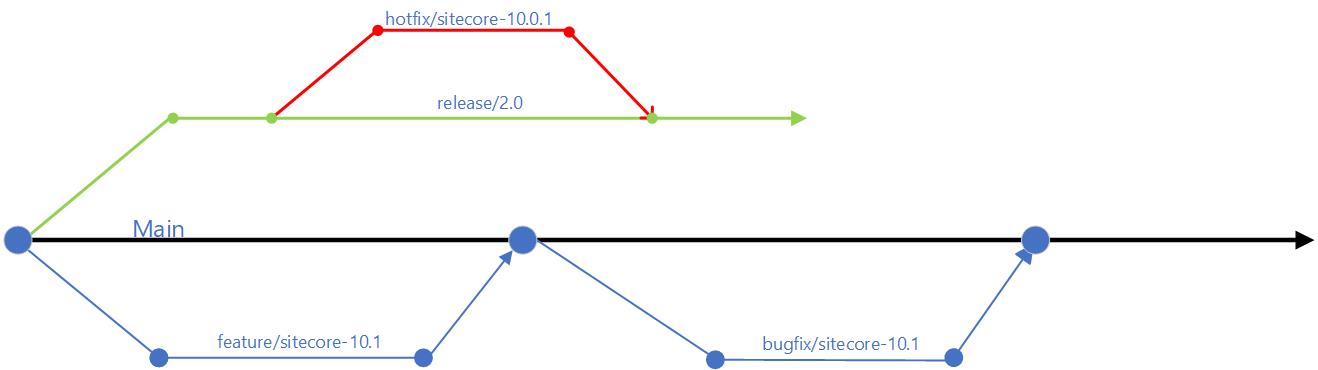
  • use of feature branches off the main branch – this will isolate work in progress from completed work, avoiding “code freezes” sessions when preparing for a release. Always use Pull Requests to merge feature branch into main branch. Make use of descriptive naming of your branches as best practice
  • use of release branches off main branch when close to your release, at end of your sprint or cycle. Make use of bugfix branches for any bugs fixes in your release and merge them back to release branch
  • There are other branching options available, such as the Release flow branching strategy

Embracing Microservices

Diagram of a CI/CD monolith
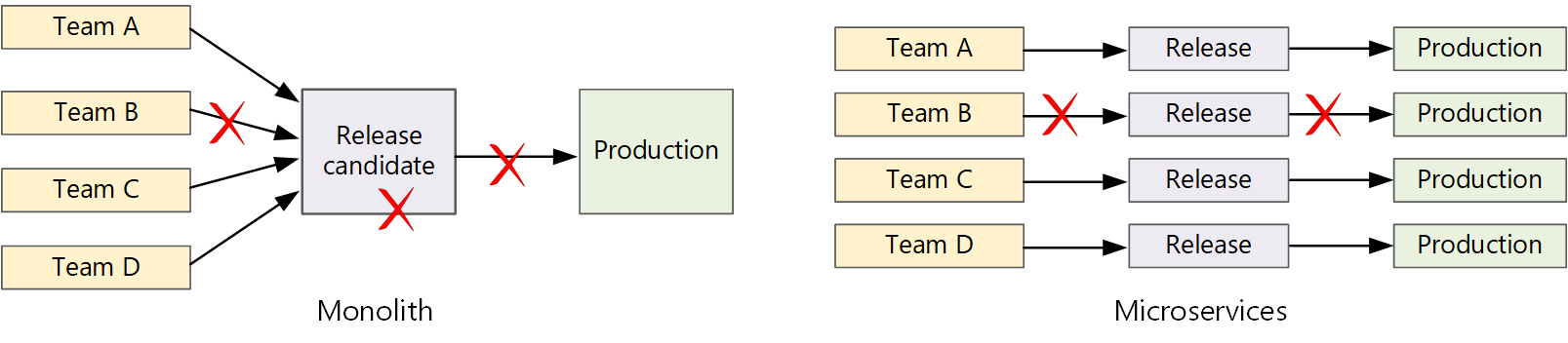
CI/CD monolith v Microservices – courtesy of Microsoft Docs

Let us now look how Microservices make life easier.  A traditional monolithic app on the left, there is a single build pipeline whose output is the application executable. All development work feeds into this pipeline. If team B break, the whole thing breaks. In contrast with microservices philosophy on the right, there should never be a long release train where every team has to get in line. The team that builds service “A” can release an update at any time, without waiting for changes in service “B” to be merged, tested, and deployed.

Next steps

Hopefully, these tips help you address “Code Freeze” problem going forward. If you still struggling, engage your digital partners to look for long term solutions.

In the next blog post in this series, we will look at Sitecore CI/CD processes to support Sitecore Zero Downtime deployments.
My top 10 .NET web development productivity tools, which are yours?

Productivity

So I write software for a living. I have been doing this for more than 10 years. I have written all sorts of web applications while working for different organisations. I also write Windows native apps on my own spare time.

I believe there are many ways to deliver a software project, hence the phrase there’s more than one way to skin a cat! However from time to time we choose to do things in a certain way based on several factors. For me, productivity has to be on top of the list.

Below I share my top 10 .NET web development tools that make me more productive in the software projects I do.

Text editors and IDE

  • Textpad – This is a free simple and yet a very powerful text editor for quickly editing your code files including web pages. It features a powerful expression engine compatible with Perl and Javascript with syntax highlighting. It can handle very large file sizes and can be handy for quick find and replace tasks in large text based files
  • Notepad++ – This a free source code editor which is optimised to ensure higher execution speed and smaller program size. It is very hand if you want to develop in other languages other than English
  • Visual Studio – Probably the best IDE available and very popular with MSDN community. Powerful, Versatile and Extensible tool enabling building apps for any platform
  • Brackets – This is a very modern open source text editor that understands web design. A lightweight, yet powerful tool if you need an easy way to get a quick, clean, minimal CSS HTML document flow going.

Typography for the web

  • Adobe Typekit – Visually design and package beautiful fonts you want, anywhere, anytime
  • Google Fonts – Probably doesn’t require much introduction. Just Google it J
  • Font squirrel – If you need 100% free fonts for commercial use then you’ve got it. Visually design and package your fonts
  • Modular Scale – So have you ever wondered why they use Pixels, Ems and not Inches? And do you know what is Ems@16 ?This utility will help you convert between these units, and scale up or down your font sizes while keeping meaningful ratio between them
  • Adobe Color CC – Talk of colour schemes or themes, this tool from Adobe allows you to visually play with various to achieve the best contrast for your brands
  • CSS with vertical rhythm – If you have designed for the web then probably this is one of your favourite tools. If you have not used it, try it you won’t regret it.

CSS and styling

  • Bootstrap – Probably the most popular HTML, CSS and Javascript framework for developing responsive, mobile first brands. Its open source and available on GitHub.
  • CSS Reset – Get yourself scripts to quickly reset your styling of all HTML elements to a consistent baseline. You never need to scratch your head again asking Which CSS Reset should I use?
  • Browser reset – Another free browser reset script to get you started if you want to reduce browser inconsistencies in things like default line heights, margins and font sizes of headings, and so on

Entity Framework

  • MvcScaffolding NuGet package – This is a fast and customizable way to add controllers, views, and other items to your ASP.NET MVC application. You will love this at first sight.
  • EF Power Tools Visual Studio extension – There we go again. I love code first and not database first. Well, if you got an existing database or go for database first, this extension will reverse engineer an existing database and get you all those POCOs
  • EF Profilerby hibernating rhinos – Unfortunately you will need to pay for this tool but you won’t regret it. Using Entity Framework means much of the database work happen under the covers. Now you got a tool to profile all that.

Regex

Learn, build, & test Regular Expressions – This is a very handy tool to quickly build and text RegEx before you include them in your source code. You can also choose for an existing list of commonly used RegEx such as the one for validating an email address. It comes with excellent text editor with highlight syntax for all the RegEx matches.

Source code re-factoring and experience

  • ReSharper – This probably does not require much introduction. A popular productivity tool for Visual Studio, improving navigation within your project code files, code inspection and refactorings.

Source code repository

  • GitHub – Everyone is using it. If you can’t beat them you can as well join them.
  • Visual Studio Online – Not to be confused with Visual Studio IDE, this cloud based solution allows you to host your source code on the cloud for free for 5 basic user licences

Rich media

  • Windows snipping tool – Allows you to quickly capture screen shots on your desktop
  • Pixlr – Free and yet powerful online tool to quickly edit your rich media without installing anything
  • Paint net – A free image and photo editing software for your desktop

Console and Scripting Tools

  • Cmder. A nice looking and portable console emulator for Windows. It looks very sexy from the start
  • Windows PowerShell – We all love the power of scripting in Windows. Quickly create and test PowerShell scripts for automating your tasks

Online resources and Collaboration

  • Programming books repository on GitHub has a comprehensive list of books for almost anything you will ever need to know about programming.
  • Stackoverflow – It does what it says on the tin. We have all gotten or seen a “Stack overflow “error at some point. If you got any questions on anything programming related, Stackoverflow has got the answer for it already. You don’t believe me? Just try them.

So this is me. Which are yours?