
Sitecore Zero-downtime deployments – Part 2

Sitecore Container based CI/CD Flow

With modern and mature DevOps, we all want smooth, sleek and painless automated deployments with zero-downtime. Sitecore deployments are no exception. Have you embraced zero-downtime deployments? This is not a new topic. If you look around Sitecore community, you see an odd question popping here and there regarding this topic.

The journey towards achieving zero-downtime deployments for any application in fact starts with your code base. So, in this series of blog posts, we will refresh ourselves on concepts like “Code Freeze” and the CI/CD process before deep diving into implementing Sitecore zero-downtime deployments.

Sitecore container based CI/CD flow

Sitecore Deployment options

Sitecore can be deployed to the cloud using IaaS, PaaS or Containers.  Microsoft Azure cloud  is preferred, although you can deploy to other providers like AWS

  • IaaS makes use of Virtual Machines
  • PaaS makes use of Azure App Service to run Sitecore web apps
  • Containers makes use of Azure Kubernetes Service (AKS)

How working with containers is different

When working outside of containers, you would typically build your application and then push it directly to the IaaS or PaaS instances hosting them. Using Containers changes this process slightly. The infographic below captures this process in detail

Sitecore containers CI/CD process summary

Explanation of the CI/CD process

  1. So developers make changes to the codebase.
  2. They then commit their changes into the repository, in this case stored in GitHub
  3. An Azure DevOps Pipeline monitors this repository and triggers a new image build each time there is a commit into the repo
  4. These images are built by Azure DevOps and the new image version is pushed into an Azure Container Registry (ACR) instance
  5. We have Other triggers for a base images that might have changed. For example, an update to the base Windows image or Sitecore image that can also trigger a new image build to occur. This is where the CI part of the process ends. We now have our new images built and available for deployment.
  6. So this is where the CD element starts. A release element is going to execute to start the deployment process.
  7. The first thing the CD element does is to push the new version of the k8s Specs into AKS, including pinning the deployments to the unique tag of the new images.
  8. AKS will now connect to the ACR instance to pull down these new images and build new deployments based on them.
  9. Of course any Sitecore deployment isn’t complete without a push of the content changes. Once the specs have been deployed the content is then also pushed to the CM instance running in AKS and a publish is executed.
  10. Once this has happened your end users can now browse the site and interact with the new containers running in AKS.

Hopefully, these blog post help you understand how to manage Sitecore Container based CI/CD process going forward. If you still struggling, engage your digital partners to look for long term solutions.

Next steps

In the next blog post in this series, we will look at BLUE-GREEN deployments and how to leverage this strategy to implement Sitecore Zero Downtime deployments.
Sitecore Zero-downtime deployments – Part 1

Why Zero-downtime deployments?

With modern and mature DevOps, we all want smooth, sleek and painless automated deployments with zero-downtime. Sitecore deployments are no exception. Have you embraced zero-downtime deployments? This is not a new topic. If you look around Sitecore community, you see an odd question popping here and there regarding this topic.

The journey towards achieving zero-downtime deployments for any application in fact starts with your code base. So, in this series of blog posts, we will refresh ourselves on concepts like “Code Freeze” and the CI/CD process before deep diving into implementing Sitecore zero-downtime deployments.

Code freeze? “Thing of the past”

A Code freeze is an adopted milestone from the Waterfall days.

“No changes whatsoever are permitted to a portion or the entirety of the program’s source code. Particularly in large software systems, any change to the source code may have unintended consequences, potentially introducing new bugs”

Wikipedia

Typical Code Freeze Challenges:

  • Complex Sitecore solution with several dependencies
  • Very large code bases possibly with legacy code
  • Multiple teams from multiple geographies
  • Complex and painful code merges
  • Dedicated QA testing window
  • Multiple languages and frameworks

All these challenges may mean you introduce some “code freeze” when preparing for your deployments. Naturally, this is not where you want to be. If not managed properly, this becomes a blocker, a barrier from a true CI/CD process and your journey to your Sitecore zero down time deployments. Let’s refresh ourselves on some tips to help address some of the issues.

Solving Code Freeze Challenges:

  • Adopt a code branching strategy
  • Adopt “clean code” principles
  • Adopt microservices architecture
  • Embrace modern CI/CD processes
  • Embrace containers

Git Branching Strategy

Git Branching Strategy
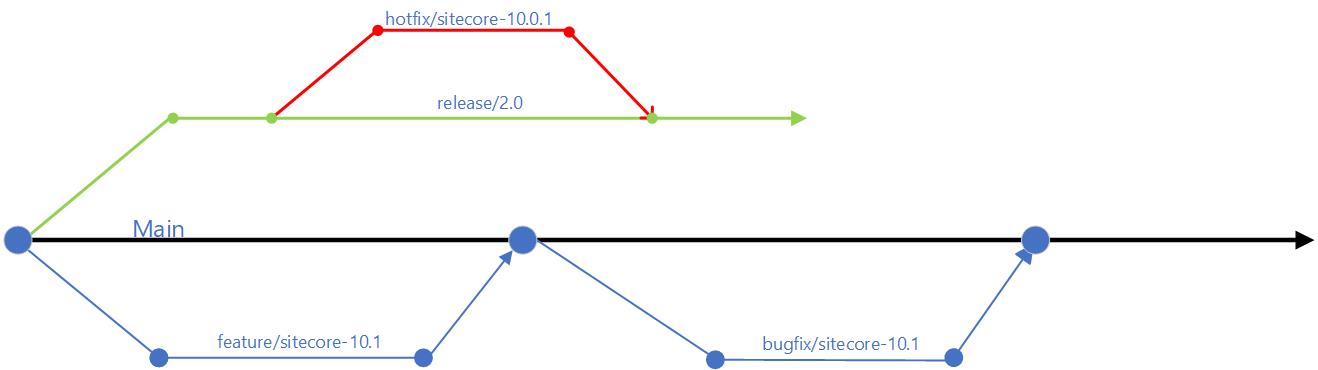
  • use of feature branches off the main branch – this will isolate work in progress from completed work, avoiding “code freezes” sessions when preparing for a release. Always use Pull Requests to merge feature branch into main branch. Make use of descriptive naming of your branches as best practice
  • use of release branches off main branch when close to your release, at end of your sprint or cycle. Make use of bugfix branches for any bugs fixes in your release and merge them back to release branch
  • There are other branching options available, such as the Release flow branching strategy

Embracing Microservices

Diagram of a CI/CD monolith
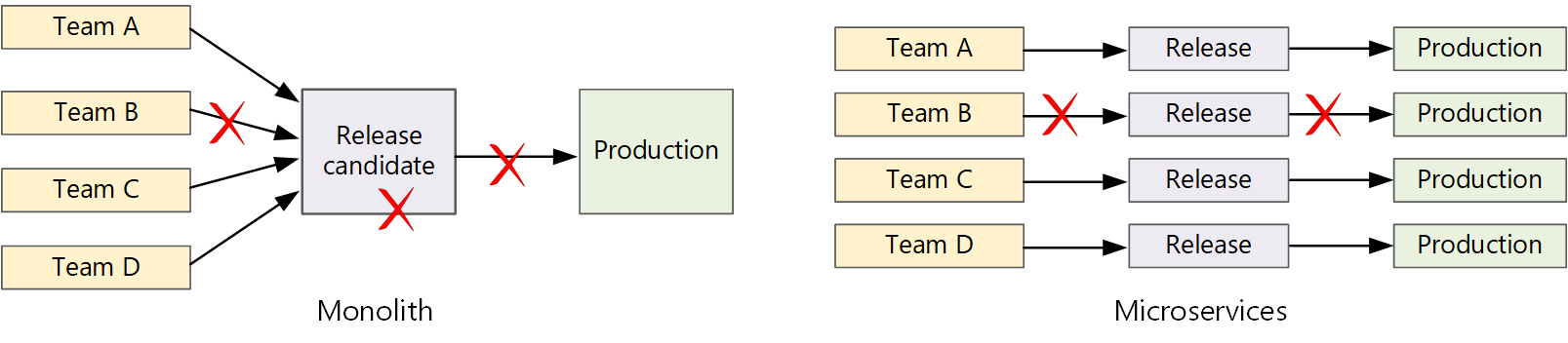
CI/CD monolith v Microservices – courtesy of Microsoft Docs

Let us now look how Microservices make life easier.  A traditional monolithic app on the left, there is a single build pipeline whose output is the application executable. All development work feeds into this pipeline. If team B break, the whole thing breaks. In contrast with microservices philosophy on the right, there should never be a long release train where every team has to get in line. The team that builds service “A” can release an update at any time, without waiting for changes in service “B” to be merged, tested, and deployed.

Next steps

Hopefully, these tips help you address “Code Freeze” problem going forward. If you still struggling, engage your digital partners to look for long term solutions.

In the next blog post in this series, we will look at Sitecore CI/CD processes to support Sitecore Zero Downtime deployments.
Deprecated AD Module: Your upgrade options

Sitecore Identity Server Data flows

Faced with deprecated AD module, let us look at possible  upgrade options to Sitecore version 9.3 or 10 to for your Sitecore Identity Management

1. Do not use on-premises Active Directory?

If you choose to stop using on-premises AD with your Sitecore instance, THEN:

  • You will need to upgrade from 8.2 to 9.3 or version 10 using Sitecore provided Security Database Scripts
  • You will then need use the default Sitecore Identity provider for Sitecore local users
  • This option means you will keep all existing CMS users after the upgrade
  • There will be no more on-premises AD sync needed
  • Your upgraded Sitecore Security Database is now your single source of truth for Identity Management

2. Keep on-premises Active Directory?

If you choose to keep your on-premises AD with your Sitecore instance. THEN you will need to make it work with latest Sitecore 9.3 or 10. To achieve this:

  • You will need to do a vanilla 9.3 or 10 setup, no Sitecore Security DB upgrade is necessary in this case
  • Use a custom ADFS Sitecore Identity Host plugin. You can watch a demo for this later on my YouTube channel.
  • Now we have your on-premises AD working with Sitecore Identity, so your on-premises AD users can access Sitecore instance
  • No on-premises AD sync is needed as we are using Sitecore Identity
  • On-premises AD is now your single source of truth for Identity management

3. Switch into Azure Active Directory?

Depending on your cloud transformation strategy, this is probably what you should be considering at some point

We have a couple of options here such as using Azure AD Connect or Azure AD connect Health to help with the transformation. I will also recommend working with your digital transformation partner to explore further options.

  • IF you choose to switch into Azure AD instead, THEN
  • You will need to do a vanilla 9.3 or 10 setup as we did in previous option, no Sitecore Security DB upgrade is necessary
  • Use the Azure AD Sitecore Identity Plugin that ships out of the box with Sitecore
  • Now we your Azure AD users can access your Sitecore instance
  • No Azure AD sync is needed as we are using Sitecore Identity
  • Azure AD is now your single source of truth for Identity management

Sitecore Identity Server is your answer going forward!

Next steps

You can now watch the accompanying videos on my YouTube channel. You can also read on detailed step-by-step guide on creating an ADFS plugin. Stay tuned for more posts!