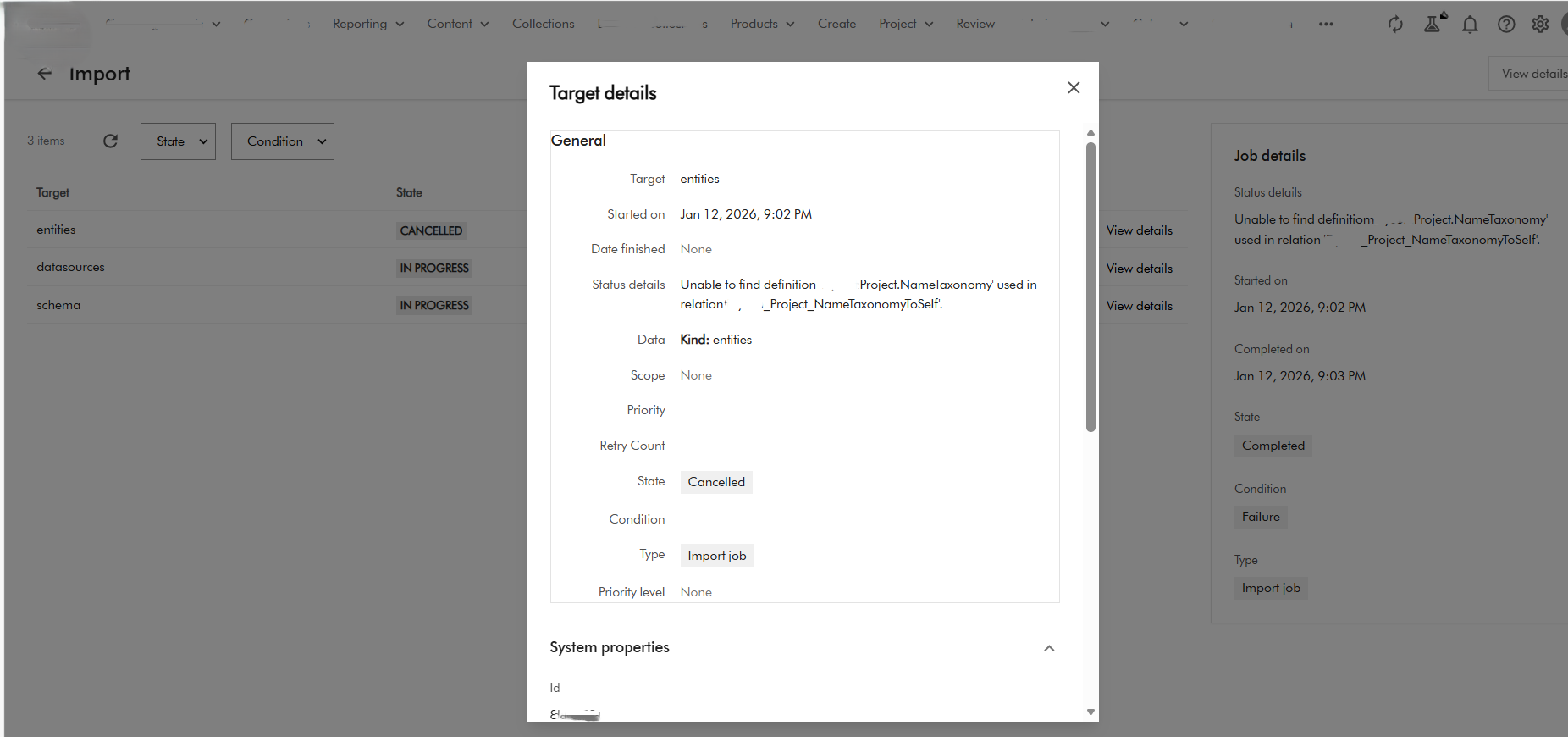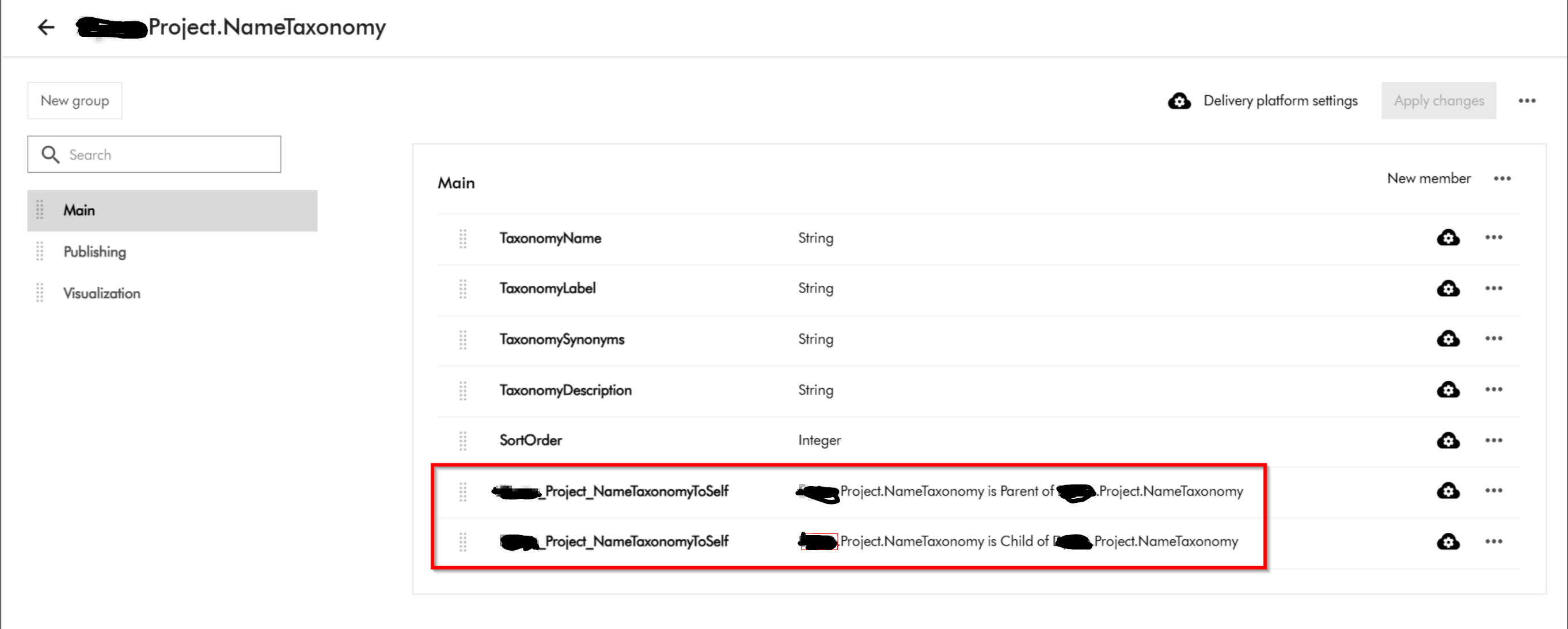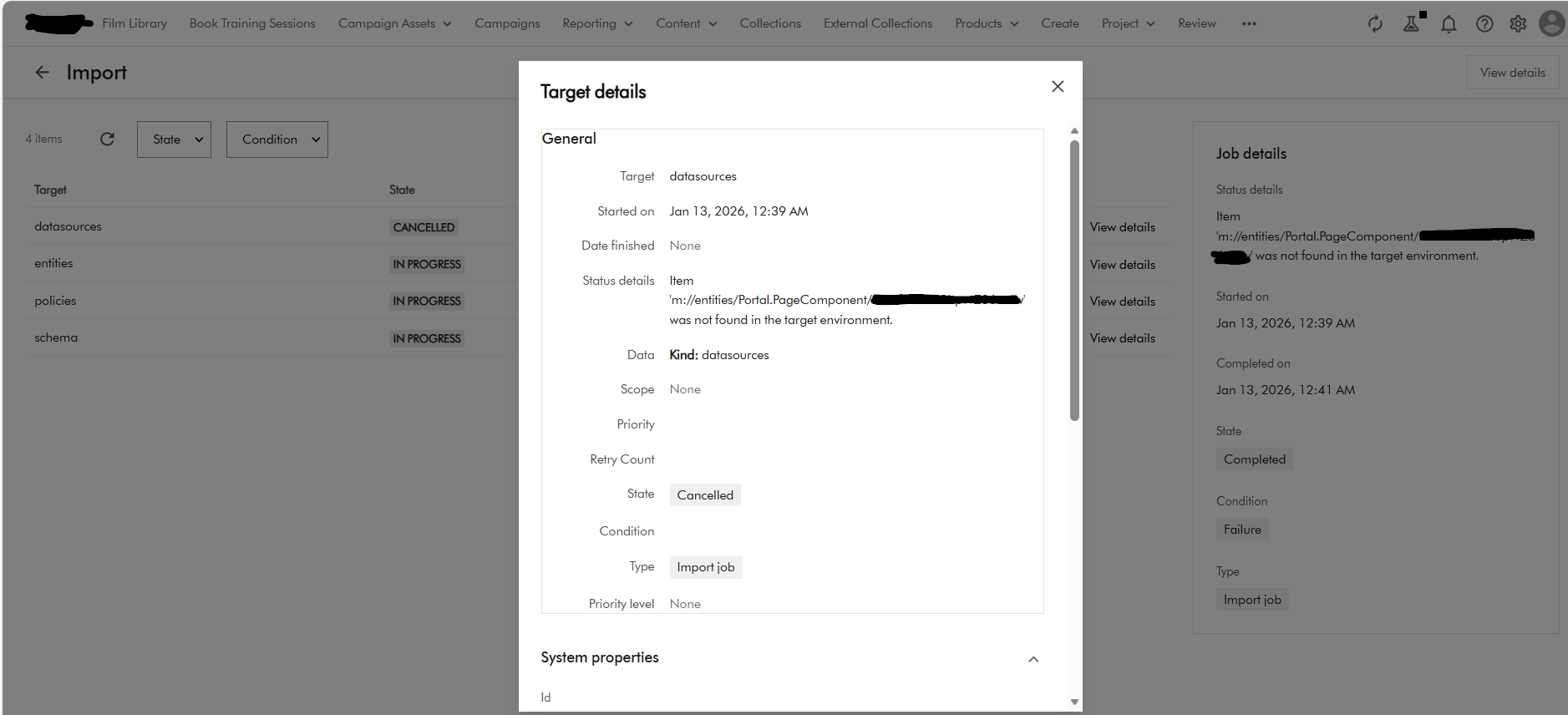
Sitecore Content Hub DevOps: New Import/Export engine with breaking changes is now default

Context and background

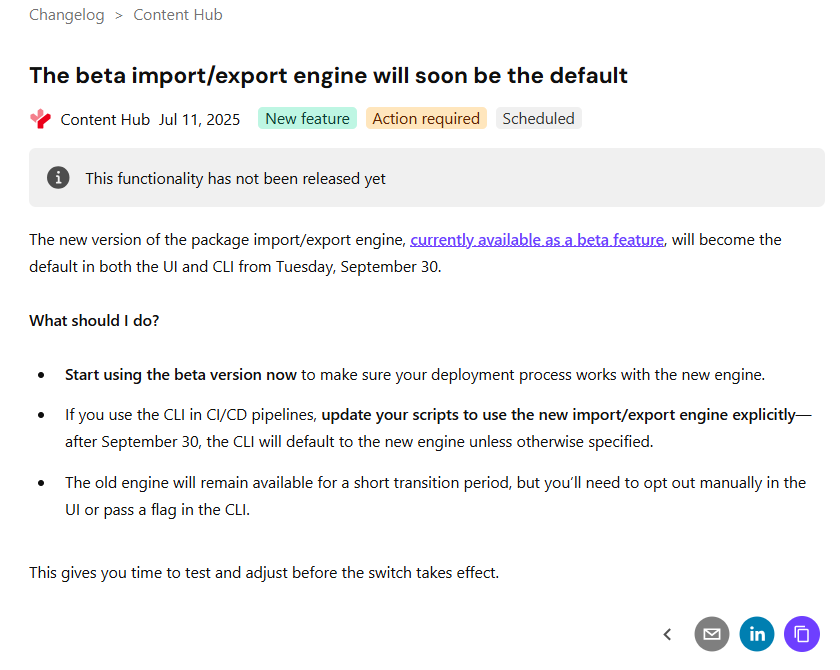
If you already using DevOps for deployments with your Content Hub environments, then you probably already aware of the breaking change that Sitecore introduced a few months ago. You can read the full notification on the Sitecore Support page The new version of the package import/export engine become the default in both the UI and CLI from Tuesday, September 30 according to the notification. Because of the breaking changes introduced, this means existing CICD pipelines won’t work. In fact, there is a high risk of breaking your environments if you try use existing CICD pipelines without refactoring.

In this blog post, I will look into details what breaking changes were introduced and how to re-align your existing CICD pipelines to work with the new import/export engine.

So what has changed in the new Import/Export engine?

Below is a screenshot from the official Sitecore docs summarizing the change. You can also access the change log here.

There is no further details available from the docs on specifics of the breaking change. However, it is very straightforward to figure out that Sitecore fundamentally changed the package architecture in the new import/export engine.

Resources are grouped by type

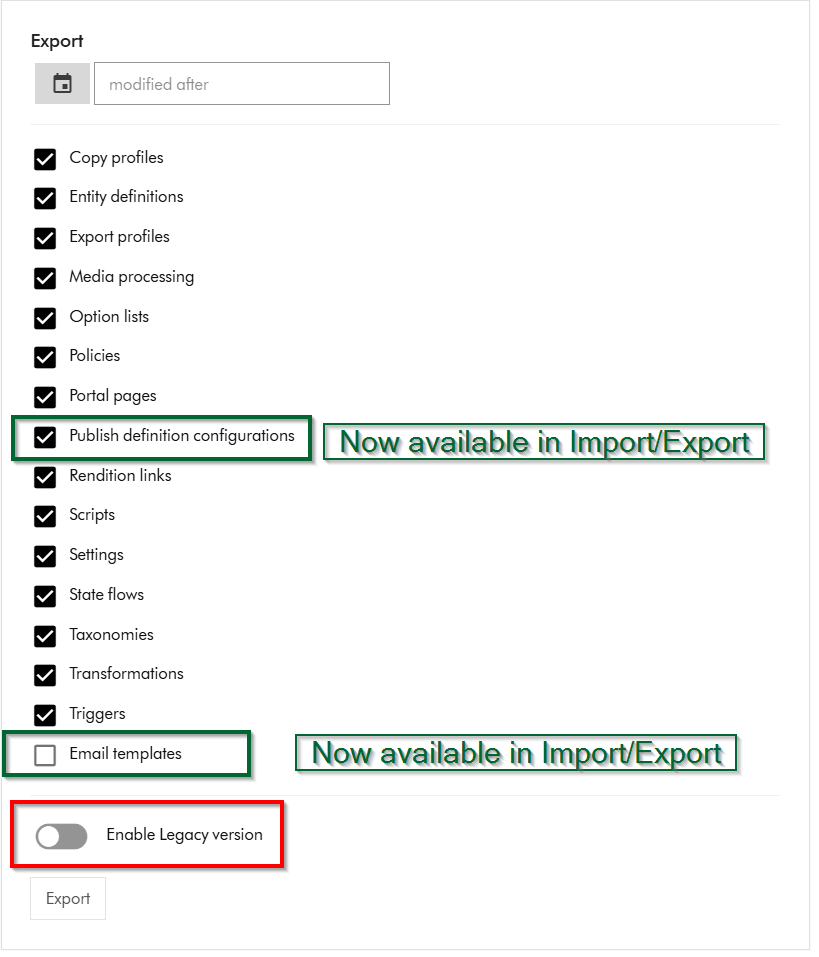
Within Sitecore Content Hub Import/Export UI, you have an option to Export components using both the previous/legacy engine and the new engine. As shown below, you can notice a toggle for Enable Legacy version, which when switched on will allow you to export a package with previous/legacy engine.

Also we can note that Publish definition configurations and Email templates are now available for Import/Export with the new engine. Email templates are unchecked by default.

If you did a quick comparison between the export package from the old/legacy engine vs the new engine, it comes clear that Sitecore has updated the packaging structure to organise content by resource type rather than by export category

This change makes navigation more straightforward and ensures greater consistency throughout the package.

Summary of the changes between legacy and new export packages

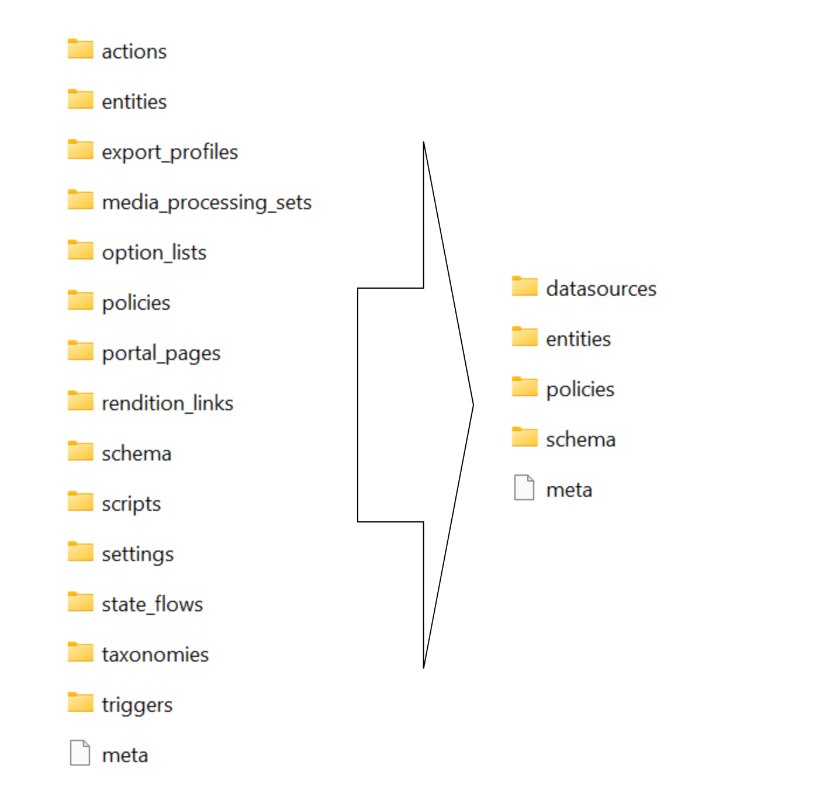
Below is a graphic showing how the package structure was changed. On the left hand-side, we have the legacy/old package and on the right hand side is the new one.

Full comparison of package contents between old and new

Below is a more detailed comparison, showing how the packages differ.

ComponentLegacy package sub foldersNew package sub folders
Copy profilescopy_profilesentities
Email templatesn/aentities
Entity definitionsentities
schema
option_lists
datasources
entities
schema
Export profilesexport_profilesentities
Media processingmedia_processing_setsentities
Option listsoption_listsdatasources
Policiespoliciesdatasources
entities
policies
schema
Portal pagesentities
portal_pages
datasources
entities
policies
schema
Publish definition configurationsn/aentities
Rendition linksrendition_linksentities
Settingssettingsentities
State flowsstate_flowsdatasources
entities
policies
schema
Taxonomiestaxonomiesdatasources
entities
schema
Triggersactions
triggers
entities
Scriptsactions
scripts
entities

Resources are grouped by type

Instead of separate folders like portal_pages, media_processing_sets, or option_lists, the new export engine places files according to their resource type. ​

For example:​

  • All entities are stored in the entities/ folder.​
  • All datasources (such as option lists) are found in datasources/ folder​
  • Policies and schema files have their own dedicated folders.​

Each resource is saved as an individual JSON file named with its unique identifier.

Related components are now separated

When a resource includes related items—such as a portal page referencing multiple components—each component is now saved in its own JSON file. ​

These files are no longer embedded or nested under the parent resource. ​

Updating your CICD pipelines

It is very straight forward to update you existing CICD pipelines once we have analysed and understood the new package architecture. You can revisit my previous blog post where I covered this topic in detail You need to simply map your previous logic to work with the new package architecture. You will also need to re-baseline your Content Hub environments within your source control so that you are using the new package architecture.

Next steps

In this blog post, I have looked at the new Content Hub Import/Export engine. I dived into how you can analyse the packages produced from the legacy/old engine and compared it with the new engine. I hope you find this valuable and the analysis provides a view of what has changed in the new package architecture.

Please let me know if you have any comments above and would like me to provide further or additional details.

Content Hub DevOps: Resolving unable to delete entity because it’s being used in one or more policies errors

Context and background

Content Hub permissions and security model is underpinned by the user group policies model, whereby Content Hub users can perform actions based on their access rights. The official docs provides clear definition of the anatomy and architecture of the user group policies. For example, a user group policy consists of one or more rules, with each rule determining the conditions under which group members have permissions to do something.

While all the technical details of group policies are nicely abstracted away from our business users, there are use cases when you will need to in fact grapple with technical details of the policies. Such as when you can’t delete your taxonomies or entities, simply because you have used them in one or more rules in your policies.

In this blog post, I will outline this pain point and recommend a solution.

Unable to delete entity ‘…’ because it’s being used

Yes that is right. If you have used a taxonomy value or some other entity as part of your user group policy definition – then it makes sense you can not delete it. That is expected logic, we have a clear dependency within the system. In which case, we need to break or remove this dependency first.

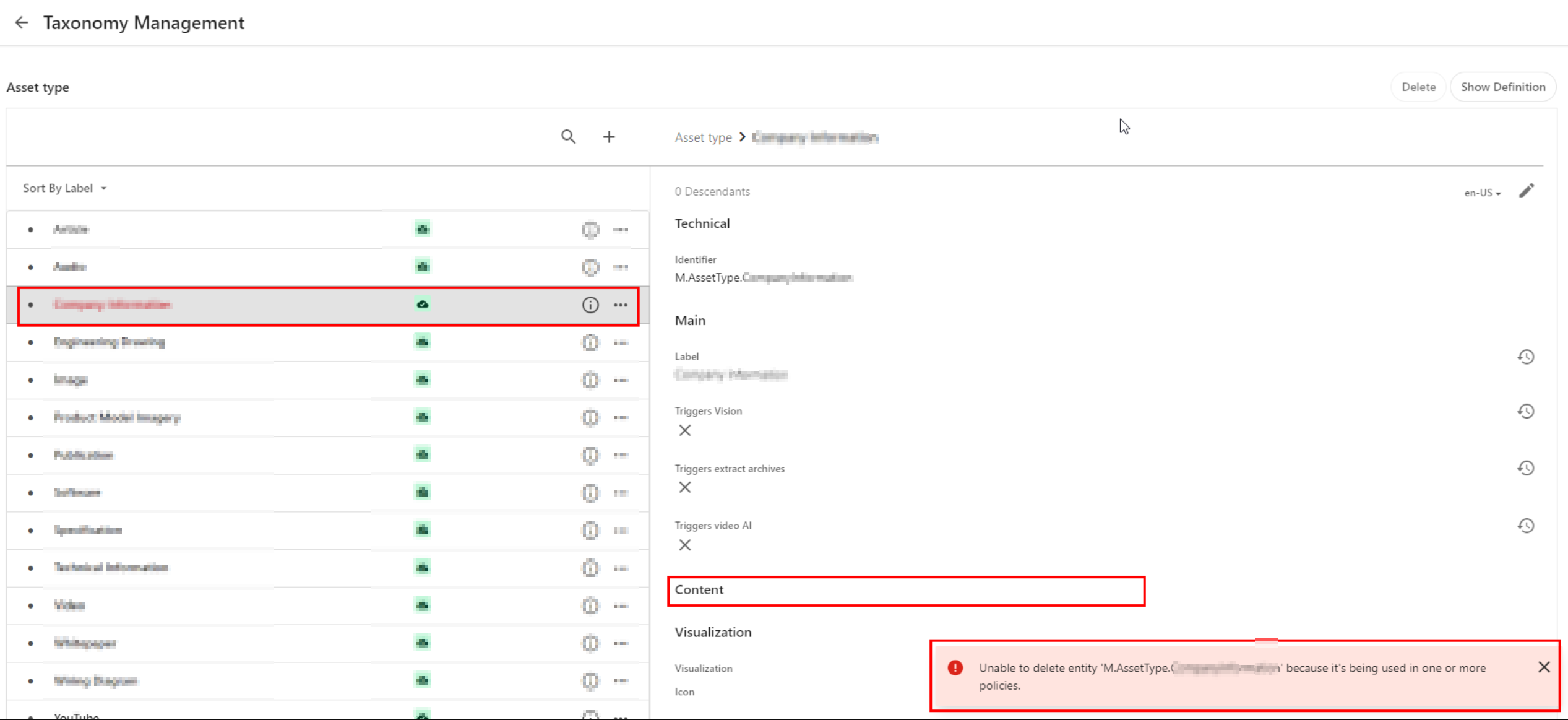
Below is a sample screenshot of this error message. In this example, the highlighted taxonomy value can not be deleted yet, until the dependency has been removed.

User group policy serialization as JSON

If you haven’t set up DevOps as part of your Content Hub development workflow, then we need to cover some basics around user group policies serialization. You can leverage Content Hub Import/Export feature to export all polices into a ZIP package, as detailed below:

  1. Using the Manage page, navigate to Import/Export.
  2. On the Import/Export page, in the Export section, select only the Policies check box and click Export. This will generate a ZIP package with all policies.
  3. Click View downloads at the right bottom of the screen.
  4. On the Downloads page, click the Download Order icon when the status of the package is ready for download. This will download the ZIP package with all policies.
  5. Unzip the downloaded package. This will have JSON files of all policies

A look at M.Builtin.Readers.json for example

Below is a snippet from the M.Builtin.Readers.json, which a serialized version of the M.Builtin.Readers user group (one of the out-of-the-box user groups)

Remember a group policy consists of one or more rules, with each rule having one or more conditions under which group members have permissions to do something.

I have highlighted one of the conditions within the first rule in this user group policy. This condition shows the dependency on one of the taxonomies, M.Final.LifeCycle.Status

On line 20, the reference (“href”) indicates which taxonomy child value is being used, which is M.Final.LifeCycle.Status.Approved

The full content of this file are available from my GitHub Gist for your reference.

How to safely delete or remove taxonomy references from user group policy JSON file

The serialized user group policy JSON file is a plain text file. So any a text editor of choice can be used to edit this file, and delete all references to the taxonomy with a dependency. And then save the changes in updated JSON file. That is it.

Due care has to be taken to ensure that the rest of the JSON file is not modified.

Once all references are deleted and verified, you can create a new ZIP package with the changed files, to be imported back into Content Hub.

It is recommended your certified Content Hub developers should make these changes (and validate them, say, using a text file comparison tool such as Beyond Compare). For example, you need to compare the original ZIP package with the newly created one to make sure that their structure is the same.

Finally, the newly created ZIP package can be imported using the Import/Export functionality as detailed in official docs.

DevOps: Automating removing taxonomy or entities references from user group policies

I have previously blogged about enabling DevOps as part of your Content Hub development workflow.

The current pain point becomes a bread-and-butter problem to solve assuming you already embraced Content Hub DevOps.

With some business logic implemented as part of your CI/CD pipelines, all references to taxonomy values or entities can be safely and reliably deleted from user group polices. This can be done with automation scripts and other tooling that comes with DevOps, truly bringing you ROI in your DevOps infrastructure.

Sample/suggested CI/CD pseudo code

  1. Define a CI/CD “user group policies clean-up” step to be invoked whenever we are deleting “entities” from your Content Hub instance.
  2. Using a Regex, scan and systematically delete such entities from your user group policies JSON files (depending on how you’ve setup your DevOps, all policies should be serialized to policies folder)
  3. Ensure your “user group policies clean-up” step runs ahead of any deletion of the entities (or taxonomy values). Remember you can’t delete an entity if it is being referenced in your user group policy.
  4. Work with your DevOps engineers to validate the steps and test any changes in non-production environment(s), before applying to production environment.

Remember to also look at my related blog post on DevOps automation for your Action Scripts.

Next steps

In this blog post, I have discussed a common pain point when you are Unable to delete entity because it’s being used in one or more policies. I explained why this is the case, and looked into technical details of user group policy architecture. I provided a solution, which can be automated with a robust DevOps culture adoption for Content Hub.

I hope my approach helps you address similar scenarios in your use-cases. Please let me know if you have any comments above and would like me to provide further or additional details.
Content Hub DevOps: Managing your action script code lifecycle in CI/CD pipelines

Context and background

When working with automated CI/CD pipelines with you Sitecore Content Hub, you need to be aware of the development lifecycle for your Action Scripts. This is to ensure your source code repo for your scripts doesn’t get ‘bloated with orphaned‘ script code files. In this blog post, I will cover how to manage the development lifecycle of your Action Scripts to mitigate against this problem.

What happens when you serialize action scripts into source control

I have previously blogged on Content Hub DevOps, especially on leveraging Content Hub CLI to extract a baseline of your Content Hub components. For example ch-cli system export --type Scripts --wait --order-id command allows you to export Actions, Scripts and Triggers package. When you unzip or extract the files within this package, you will notice there is a scripts folder. This will have two types of files: .json files and .csx files (assuming your actions scripts are written in C#.NET)

Script .json file type

For each action script packaged from your Sitecore Content Hub instance, it will have two files. One of them is the script .json file.
Below is a sample action script json file:

This file contains all the relevant meta-data about the action script. In particular, you will notice that it is referencing a second file using the ScriptToActiveScriptContent relations property. Using our sample above, this json file is referencing this code file “ZOGG4GbbQpyGlTYM7r1GfA

Script .csx code file

The code file based on C#.NET, is similar to the sample shown below.

What happens when you modify the code in your scripts

Each time you make changes to your Action Script source code and successfully build it, Content Hub will generate a new code file version behind the scenes. This will be automatically linked to its corresponding script .json file.

To visualise this, you will notice that when you serialise your Action Script again from your Content Hub instance, a new code file will be generated.

If you now compare the previous code file with the new one, it will become obvious which changes Content Hub has made to the .json file. Below is a sample comparison.

What should you do with the ‘old’ code file

We have now established what is going on whenever the source code in your action script is changed and successfully rebuilt. Each time, a new file will be generated. The old file will remain in your source code repository, unused and effectively ‘orphaned’.

My recommendation is to design your DevOps process that will always clean-up or delete all files from your scripts folder in your source code, before pulling the latest serialised files from your Content Hub instance.

You can do this in an automated way leveraging the Content Hub CLI commands. Alternatively, you can do it old school way leveraging PowerShell commands to delete all files from scripts folder before serializing new ones again. Whichever mechanism you leverage, ensure old and used code files do not bloat your source code repo.

Next steps

In this blog post, I have discussed what happens when you make code changes to your action scripts. I explained why you will have ‘old’ or ‘orphaned’ code files within your script folder that will bloat your source code repo. I also covered steps you can take to mitigate this problem.

I hope my approach helps you address similar scenarios in your use-cases. Please let me know if you have any comments above and would like me to provide further or additional details.

Streamlining Content Hub DevOps: Deploying Environment Variables and API Settings to QA and PROD

Context and background

I recently worked on an exciting Content Hub project which required automation of deployments from DEV environments to QA/TEST and PROD. One of the challenges I faced was how to handle environment specific variables and settings. One particular use case is the API call Action type, which has references to some API call endpoint and using an Api Key. Typically, such an API call will point to a non-production endpoint in your QA/TEST Content Hub and a production facing endpoint for the PROD Content Hub

Sounds familiar, should be easy right?

I thought so. I thought I put this question to my favourite search engine to see what is out there. The truth is Content Hub DevOps is nothing new really. There is plenty of documentation on how to go about it, including this blog post from the community From the Sitecore official docs, you can also find details about how to leverage Content Hub CLI to enable your DevOps workflows.

However, I couldn’t come across an end-to-end guide that solves my current problem. Nicky’s blog post “How to: Environment Variables in Content Hub Deployments” was pretty good actually and I have to say I found the approach quite compelling and detailed. However, I didn’t adopt Nicky’s approach as I would like to use automated end-to-end DevOps pipelines. Unfortunately, Nicky’s approach doesn’t.

My approach

Below is a high level process I have used.

  • Leveraging Content Hub CLI to extract a baseline of your Content Hub components. For example ch-cli system export --type Scripts --wait --order-id command allows you to export Actions, Scripts and Triggers package, which you can extract all yours Actions, Scripts and Triggers as JSON files. These can then be source controlled, allowing you to track future updates on a file-by-file basis. For a full list of components that you can export, you can pass --help param as shown below.
  • Without DevOps, you will typically package and deploy your Actions, Scripts and Triggers, say from DEV Content Hub into QA Content Hub instance. You will then have to manually update any of your API call Actions with the QA specific endpoint URL.
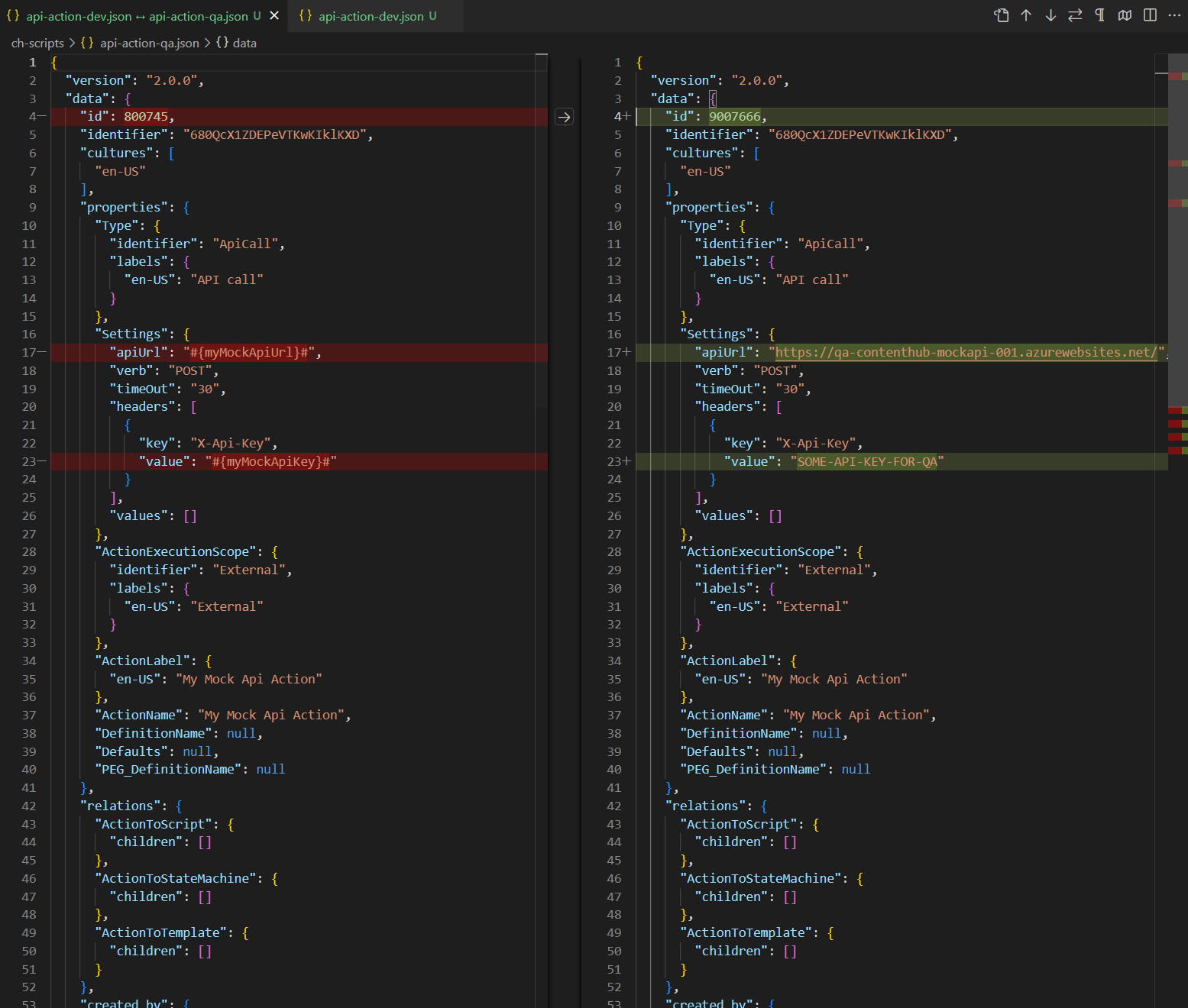
  • With Content Hub CLI, I am able to source control and compare my Content Hub DEV and QA files as shown below. Left-hand side is my DEV mock API action, right-hand side is my QA. Please keep note the identifier is the same (680QcX1ZDEPeVTKwKIklKXD) to ensure the same file can be deployed across to Content Hub QA and PROD
  • This is quite powerful, since I can take this to another level and define Environment specific variables for my mock API action, as shown below. I have identified I will need #{myMockApiUrl}# and {myMockApiKey} variables.
    • Notice I am leveraging the ReplaceTokens Azure pipelines task. Left-hand side is my DEV mock API action, this time I have parameterised the variables. Right-hand side is my QA to help illustrate the differences. During the QA deployment, my CI/CD pipelines will transform the source controlled file on the left-hand side into QA file on the right.
  • This is it, I have solved my problem. I have identified which component(s) have environment specific variables and parameters. I can now leverage DevOps CI/CD pipelines to package all my components, generate a deploy package specific for Content Hub QA environment.
  • Deploying a package using Content Hub CLI uses this command: ch-cli system import --source "path to your deploy package.zip" --job-id --wait
  • Wearing my DevOps hat, I am able to write a complete end-to-end CI/CD pipelines to automate the deployments.

Using Azure DevOps CI/CD pipelines

It is very straight forward to define and implement an end-to-end Azure DevOps CI/CD pipelines once we have defined our process and development workflows.

Azure variables template definition

One capability you can leverage is the Azure variables template definitions to allow you to define Content Hub QA and PROD variables, such as below. Please notice #{myMockApiUrl}# and {myMockApiKey} variables in this template file. They now have Content Hub QA specific values. We will need a similar file to hold Content Hub PROD variables.

Referencing Azure variables template file in main pipeline

The Azure variable template file for QA (qa-variable-template.yml, in my case) can then be linked to the main Azure CI/CD pipeline yaml file, such as shown below:

Replacing tokens in main pipelines

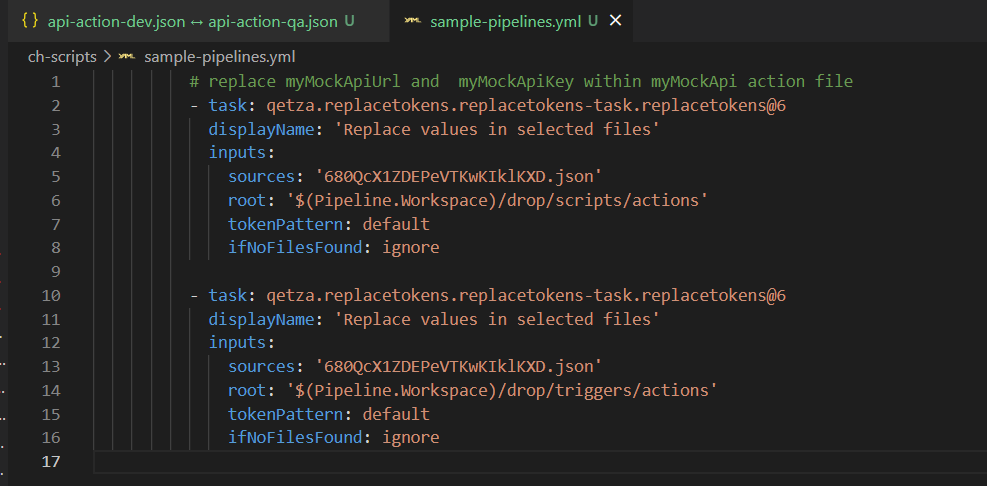
Replacing tokens sample is shown below. Please notice the API call Action Identifier 680QcX1ZDEPeVTKwKIklKXD that was referenced in my previous screenshots above

Next steps

In this blog post, I have introduced the problem and use-case when you need to manage and deploy Content Hub environment specific variables. I have used an API call Action type to illustrate this use case. I have also covered how to leverage Content Hub CLI to serialise Content Hub components and demonstrated an example of using Actions, Scripts and Triggers components. I finished with my own approach and how I did an implementation of an end-to-end automated DevOps process. I hope my approach helps you address similar scenarios in your use-cases. Please let me know if you have any comments above and would like me to provide further or additional details.
Sitecore AKS blue-green Search indexes deployments

This is a follow up to my Sitecore Zero Down time deployments series of blogs. I have also previously presented on this top during the Sitecore Symposium 2021.

If you haven’t read my previous blogs or watched my Sitecore Symposium 2021 session, I suggest you please pause now and go have a read or watch before proceeding with this blog post.

In this blog post, I will deep dive into the approach for Zero down-time deployments for Sitecore Indexes. I am going to use the Sitecore AKS workload for my scenario, although the same concepts can be applied for your Sitecore PaaS workloads too.

Blue-Green Web Index deployment strategy

To ensure complete isolation of your Sitecore Web Index during the Zero down-time deployments, you need to create two sets of the Web indexes:

  • Web Green Index to correspond to your CD green instance
  • And Web Blue Index to correspond to your Blue CD instance

This means during a deployment; you can do a full re-indexing of your staging CD without risk of breaking your LIVE CD

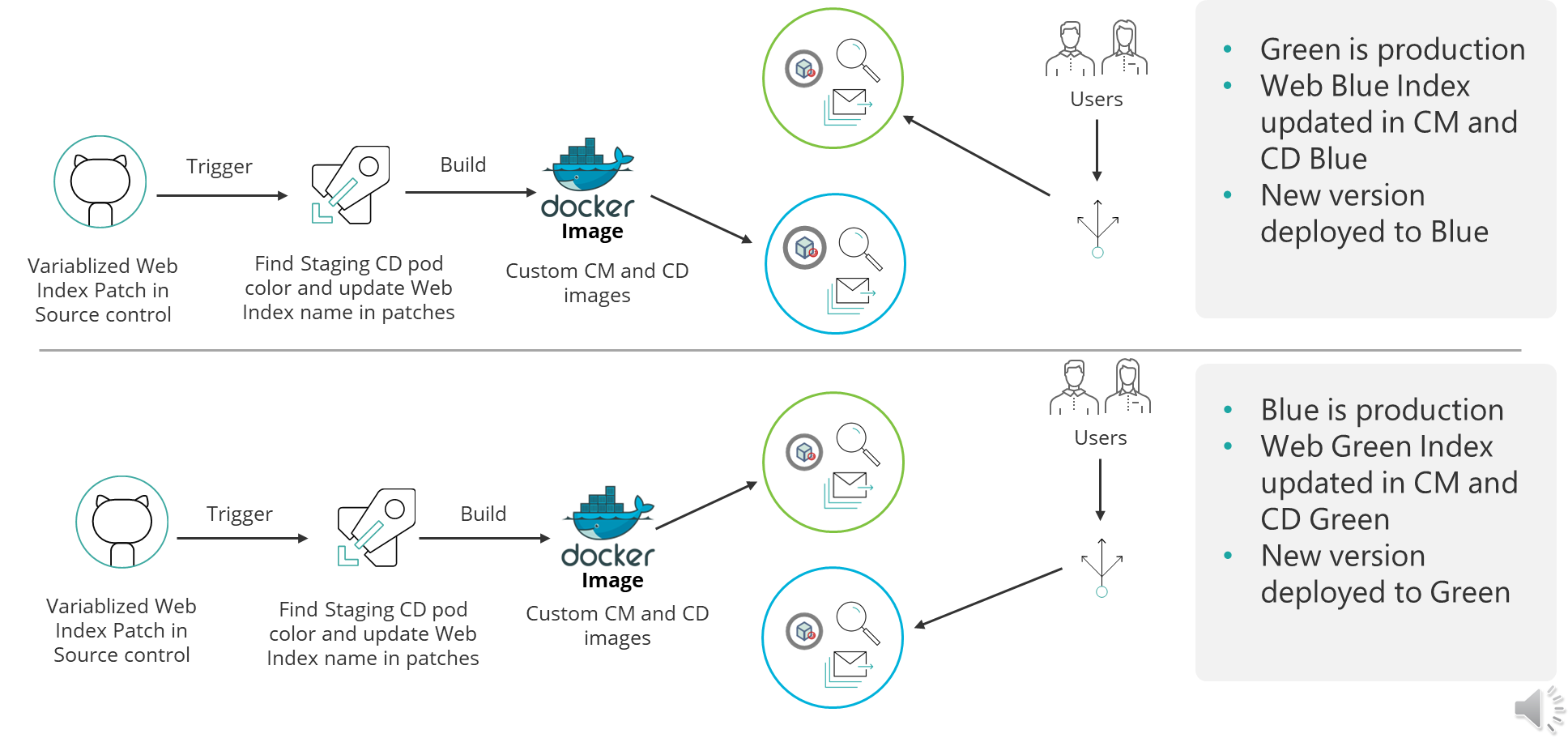
Blue Green Sitecore Web Index deployment strategy

This infographic captures the initial state when CD GREEN is LIVE and shows the transition when we do a new deployment.

You will notice that in the final state we have swapped CD BLUE to serve the live traffic, achieving Zero down-time deployments.

CI/CD Pipelines

How do you implement this?

Below, I am sharing a high-level CI/CD pipeline that I have used in my scenario for reference.

Sample CI/CD pipelines

In Blue-Green deployment strategy, you typically deploy to Blue CD instance, when Green CD is currently in production and serving LIVE traffic OR vice-versa. This is how we achieve zero downtime deployments. 

You can now extend your CI/CD pipelines to be aware of Web Blue Index and Web Green Index. You do this by ensuring that you update you Content Management (CM) instance configuration to point to the correct Web Blue or Web Green Index. This is achieved by parameterizing the Sitecore Index configuration patch files.

Your CI/CD process will then update your CM and CD images with correct Web Blue or Web Green index, before building them accordingly as show above. And that is it.

Prefer to watch the video instead?

If you prefer to watch my video instead, I have included the link below.

Video to walk you through the Sitecore AKS Blue-Green Search Index strategy

Next steps

If you have any feedback or questions, please leave me a comment, and I am happy to get back to you.

Also, you can subscribe to my YouTube channel, so you don’t miss out on latest updates.

Sitecore Zero-downtime deployments – Part 4

Sitecore PaaS/AKS blue-green deployments

With modern and mature DevOps, we all want smooth, sleek and painless automated deployments with zero-downtime. Sitecore deployments are no exception. Have you embraced zero-downtime deployments? This is not a new topic. If you look around Sitecore community, you see an odd question popping here and there regarding this topic.

The journey towards achieving zero-downtime deployments for any application in fact starts with your code base. So, in this series of blog posts, we will refresh ourselves on concepts like “Code Freeze” and the CI/CD process before deep diving into implementing Sitecore zero-downtime deployments.

Sitecore XP PaaS Blue-Green architecture

Sitecore XP PaaS reference architecture

The infographic above shows a typical Azure PaaS architecture for Sitecore XP scaled topology. In summary we have:

  • our Sitecore XP application roles such as CM, CD, ID among others
  • these role have access to Sitecore databases (master, web, core among others)
  • access to rest of the services such as Azure Key Vault, Azure Redis cache, App Insights, Azure Search among others

You will notice in this architecture, we have Blue-Web and Green-Web databases, which are corresponding to the BLUE-GREEN deployment slots for the CD App Service. We need separate web databases to enable us achieve content-safe deployments

The CM App Service also has BLUE-GREEN deployment slots specifically for code deployment, but with a shared master database. There is no compelling reason to have BLUE-GREEN master databases purely on basis of complexity introduced by such architecture (although it is not impossible to implement if you prefer this approach).

The rest of our XP scaled topology resources are shared

The Azure DevOps organisation typically will have access to run the CI/CD pipelines, is also included in the architecture.

How to manage settings

App Service Settings section can be leveraged to manage your Sitecore configuration settings including Sitecore connections Strings

Sitecore XP PaaS CI/CD process summary

Sitecore XP PaaS CI/CD process

Required steps:

  1. Tigger CD process
  2. Make copy of your web-db – this is for content safe deployment. Both CM and BLUE CD pointing to original web-db at this point. BLUE CD still in production with our live users accessing it
  3. Now deploy your new version to both CM instance and GREEN CD Staging slot instance – pointing them to use copy of web-db. Perform content deployment as usual, publish, rebuild the Sitecore indexes and perform any tests. This will not affect your BLUE CD at this stage.
  4. Once happy with deployment, then Swap CD production and staging slots. The GREEN CD with our new version is now production and our live users accessing it now. Zero down time achieved! Our previous version is still running in BLUE CD. If we have issues, we swap again to roll back.

Some notes:

 This example doesn’t have BLUE-GREEN for the CM instance, as I want to keep it simple – This though means your content editors will have to wait for deployment to finish to use the CM. If you really need CM zero down time, then you need to deploy CM BLUE-GREEN deployment slots as well. Alternatively, you can keep the deployment time to CM to a minimum and avoid BLUE-GREEN

You can be more also be creative with your Sitecore templates changes such that your changes are always backward compatible between successive releases  (e.g. don’t delete fields immediately, mark them as obsolete) This means you can safely rollback your changes without breaking the application

Sitecore XP AKS Blue-Green architecture

Sitecore using Containers makes use of Azure Kubernetes Service. This infographics shows a very simplified AKS blue-green strategy allows us to achieve zero downtime deployments.

Kubernetes Blue-Green strategy

How does it work?

  1. You will define a blue deployment for v1 and apply it to your desired state of your cluster.
  2. When version 2 comes along, you define a green deployment, apply it to your cluster, test and validate it without affecting blue deployment
  3. You then gradually replace V1 with V2
  4. Version 1 can be deleted if no longer needed.

Below we have a typical Sitcore XP Azure Kubernetes Service architecture for Sitecore XP scaled topology – the AKS cluster containing various pods running our containers.

Sitecore XP AKS Blue-Green reference architecture

You can see the scaled out Sitecore XP application roles running as individual Pods within this AKS cluster backed by a Windows Node Pool.

We also have access to Sitecore databases as well as other services such as Azure Key Vault, Azure Redis cache, App Insights among others.

I am showing our Azure DevOps organisations which will typically have access to run the CI/CD pipelines

Similar to the Azure PaaS architecture, AKS zero downtime deployments will make use of BLUE-GREEN deployment strategy for CD or CM instance

AKS Zero downtime deployments process

How do we do that? we don’t need to provision a separate cluster for GREEN environment. Instead, we define an additional GREEN deployment with its corresponding service and then label it accordingly, alongside our BLUE deployment.

For content-safe deployments, we will also be pointing to a copy of web database (Green) as shown.

Once we have tested and are happy with our new GREEN deployment, we switch traffic or routing to point to GREEN. We do this by updating our Ingress controller specification

Sitecore AKS Blue-Green (Green deployment)

In the above infographic, you can see now our end-users can access V2 in the GREEN deployment

BLUE deployment is on stand-by in case of roll back. And can be deleted if no longer required.

Note as previously discussed in PaaS deployments, you can implement BLUE-GREEN for the CM if required

Sitecore XP AKS CI/CD process

Sitecore XP AKS CI/CD process

Steps summary

  1. Trigger release pipeline process
  2. Make copy of your web-db – this is for content safe deployment. Both CM and BLUE CD pointing to web-db at this point. BLUE CD still in production with live users accessing it
  3. Apply your green deployment desired state onto the cluster. This creates the green pods with new version of docker images, and our Sitecore deployment including content deployment. This will use the copy of web-db we created earlier.  Publish and Rebuild indexes as usual and test and verify the deployment
  4. Once happy with deployment, Update traffic routing in Ingress Controller and live users can now access our new Sitecore version. In event of roll-back, update traffic routing in Ingress controller. If BLUE deployment no longer needed, clean it up to save on resources

Next steps

An this is a wrap. This post concludes this series of blog posts where we looked into implementing Sitecore Zero Downtime deployments. I hope you found this useful and can start your own journey towards achieving Zero Downtime deployments with your Sitecore workloads. If you have any comments or queries, please leave me a comment at the end of this post.

Sitecore Zero-downtime deployments – Part 3

Blue-Green Deployments

With modern and mature DevOps, we all want smooth, sleek and painless automated deployments with zero-downtime. Sitecore deployments are no exception. Have you embraced zero-downtime deployments? This is not a new topic. If you look around Sitecore community, you see an odd question popping here and there regarding this topic.

The journey towards achieving zero-downtime deployments for any application in fact starts with your code base. So, in this series of blog posts, we will refresh ourselves on concepts like “Code Freeze” and the CI/CD process before deep diving into implementing Sitecore zero-downtime deployments.

Blue-Green deployments architecture

Blue-green deployments strategy

In software engineering, blue-green deployment is a method of installing changes to a web, app, or database server by swapping alternating production and staging servers

Wikipedia

Key Concepts

In its purest form,  true BLUE/GREEN deployments means that we need two separate but identical environments, one is live (BLUE) and the other is on stand-by (GREEN). When you have  new version of your application, you deploy to the staging environment (GREEN) , test it without affecting BLUE. When you are happy with this new version, you can then swap it to be LIVE instance.

However, in practice, it doesn’t always make sense to run a copy of every resource. Furthermore, this may introduce some complexity to the process.

This is why we now have some shared resources as you can see in the infographic above, while others belong to BLUE or GREEN environment.

As part of this architecture, we need some way of switching or routing incoming traffic between the two environments.

Blue-Green deployment strategy effectively enables us to achieve zero down time deployments. This is because your users will not notice any downtime during deployments.

CI/CD process for Blue-Green deployments

CI/CD process for Blue-Green deployments

On the top part of the infographic above, – BLUE is currently production environment and our users accessing this environment. When we have, a new version of our application, it is deployed to GREEN environment, without affecting our users.

On the bottom part of the infographic above, – now GREEN is the production environment and our users are accessing this environment.  This leaves the BLUE environment available for us to deploy the next version of our application

We deploy to BLUE and GREEN in turns, this achieving zero downtime deployments. The process repeats in each deployment cycle.

Some benefits of Blue-Green strategy

If you haven’t already adopted the cloud for your Sitecore workloads – be it PaaS or Containers, then perhaps you need to start thinking about this seriously as there are benefits you will get.

“Blue-green deployments made easier with the cloud.”

fact

The cloud provides tooling you need to:

  • Automate your provisioning and tearing down of environments
  • Automate starting or stopping of services
  • Kubernetes simplifies container orchestration for us,  the Azure Kubernetes Service (AKS) provide a Control Plane for free
  • The flexibility and cost reductions the cloud offers makes blue-green deployments within everyone’s reach at this time and age, please embrace them.

Next steps

Hopefully, these blog post help you understand key concepts about BLUE-GREEN deployments.

In the next blog post in this series, we will look at implementing Sitecore Zero Downtime deployments.

Sitecore Zero-downtime deployments – Part 2

Sitecore Container based CI/CD Flow

With modern and mature DevOps, we all want smooth, sleek and painless automated deployments with zero-downtime. Sitecore deployments are no exception. Have you embraced zero-downtime deployments? This is not a new topic. If you look around Sitecore community, you see an odd question popping here and there regarding this topic.

The journey towards achieving zero-downtime deployments for any application in fact starts with your code base. So, in this series of blog posts, we will refresh ourselves on concepts like “Code Freeze” and the CI/CD process before deep diving into implementing Sitecore zero-downtime deployments.

Sitecore container based CI/CD flow

Sitecore Deployment options

Sitecore can be deployed to the cloud using IaaS, PaaS or Containers.  Microsoft Azure cloud  is preferred, although you can deploy to other providers like AWS

  • IaaS makes use of Virtual Machines
  • PaaS makes use of Azure App Service to run Sitecore web apps
  • Containers makes use of Azure Kubernetes Service (AKS)

How working with containers is different

When working outside of containers, you would typically build your application and then push it directly to the IaaS or PaaS instances hosting them. Using Containers changes this process slightly. The infographic below captures this process in detail

Sitecore containers CI/CD process summary

Explanation of the CI/CD process

  1. So developers make changes to the codebase.
  2. They then commit their changes into the repository, in this case stored in GitHub
  3. An Azure DevOps Pipeline monitors this repository and triggers a new image build each time there is a commit into the repo
  4. These images are built by Azure DevOps and the new image version is pushed into an Azure Container Registry (ACR) instance
  5. We have Other triggers for a base images that might have changed. For example, an update to the base Windows image or Sitecore image that can also trigger a new image build to occur. This is where the CI part of the process ends. We now have our new images built and available for deployment.
  6. So this is where the CD element starts. A release element is going to execute to start the deployment process.
  7. The first thing the CD element does is to push the new version of the k8s Specs into AKS, including pinning the deployments to the unique tag of the new images.
  8. AKS will now connect to the ACR instance to pull down these new images and build new deployments based on them.
  9. Of course any Sitecore deployment isn’t complete without a push of the content changes. Once the specs have been deployed the content is then also pushed to the CM instance running in AKS and a publish is executed.
  10. Once this has happened your end users can now browse the site and interact with the new containers running in AKS.

Hopefully, these blog post help you understand how to manage Sitecore Container based CI/CD process going forward. If you still struggling, engage your digital partners to look for long term solutions.

Next steps

In the next blog post in this series, we will look at BLUE-GREEN deployments and how to leverage this strategy to implement Sitecore Zero Downtime deployments.

Deprecated AD Module: Your upgrade options

Sitecore Identity Server Data flows

Faced with deprecated AD module, let us look at possible  upgrade options to Sitecore version 9.3 or 10 to for your Sitecore Identity Management

1. Do not use on-premises Active Directory?

If you choose to stop using on-premises AD with your Sitecore instance, THEN:

  • You will need to upgrade from 8.2 to 9.3 or version 10 using Sitecore provided Security Database Scripts
  • You will then need use the default Sitecore Identity provider for Sitecore local users
  • This option means you will keep all existing CMS users after the upgrade
  • There will be no more on-premises AD sync needed
  • Your upgraded Sitecore Security Database is now your single source of truth for Identity Management

2. Keep on-premises Active Directory?

If you choose to keep your on-premises AD with your Sitecore instance. THEN you will need to make it work with latest Sitecore 9.3 or 10. To achieve this:

  • You will need to do a vanilla 9.3 or 10 setup, no Sitecore Security DB upgrade is necessary in this case
  • Use a custom ADFS Sitecore Identity Host plugin. You can watch a demo for this later on my YouTube channel.
  • Now we have your on-premises AD working with Sitecore Identity, so your on-premises AD users can access Sitecore instance
  • No on-premises AD sync is needed as we are using Sitecore Identity
  • On-premises AD is now your single source of truth for Identity management

3. Switch into Azure Active Directory?

Depending on your cloud transformation strategy, this is probably what you should be considering at some point

We have a couple of options here such as using Azure AD Connect or Azure AD connect Health to help with the transformation. I will also recommend working with your digital transformation partner to explore further options.

  • IF you choose to switch into Azure AD instead, THEN
  • You will need to do a vanilla 9.3 or 10 setup as we did in previous option, no Sitecore Security DB upgrade is necessary
  • Use the Azure AD Sitecore Identity Plugin that ships out of the box with Sitecore
  • Now we your Azure AD users can access your Sitecore instance
  • No Azure AD sync is needed as we are using Sitecore Identity
  • Azure AD is now your single source of truth for Identity management

Sitecore Identity Server is your answer going forward!

Next steps

You can now watch the accompanying videos on my YouTube channel. You can also read on detailed step-by-step guide on creating an ADFS plugin. Stay tuned for more posts!