
Why Zero-downtime deployments?
With modern and mature DevOps, we all want smooth, sleek and painless automated deployments with zero-downtime. Sitecore deployments are no exception. Have you embraced zero-downtime deployments? This is not a new topic. If you look around Sitecore community, you see an odd question popping here and there regarding this topic.
The journey towards achieving zero-downtime deployments for any application in fact starts with your code base. So, in this series of blog posts, we will refresh ourselves on concepts like “Code Freeze” and the CI/CD process before deep diving into implementing Sitecore zero-downtime deployments.
- Sitecore Zero-downtime deployments – Part 1 (this post)
- Sitecore Zero-downtime deployments – Part 2 (Sitecore Container based CI/CD process)
- Sitecore Zero-downtime deployments – Part 3 (Blue-Green deployment strategy)
- Sitecore Zero-downtime deployments – Part 4 (Sitecore PaaS/AKS Zero-downtime deployments)
Code freeze? “Thing of the past”
A Code freeze is an adopted milestone from the Waterfall days.
“No changes whatsoever are permitted to a portion or the entirety of the program’s source code. Particularly in large software systems, any change to the source code may have unintended consequences, potentially introducing new bugs”
Wikipedia
Typical Code Freeze Challenges:
- Complex Sitecore solution with several dependencies
- Very large code bases possibly with legacy code
- Multiple teams from multiple geographies
- Complex and painful code merges
- Dedicated QA testing window
- Multiple languages and frameworks
All these challenges may mean you introduce some “code freeze” when preparing for your deployments. Naturally, this is not where you want to be. If not managed properly, this becomes a blocker, a barrier from a true CI/CD process and your journey to your Sitecore zero down time deployments. Let’s refresh ourselves on some tips to help address some of the issues.
Solving Code Freeze Challenges:
- Adopt a code branching strategy
- Adopt “clean code” principles
- Adopt microservices architecture
- Embrace modern CI/CD processes
- Embrace containers
Git Branching Strategy

- use of feature branches off the main branch – this will isolate work in progress from completed work, avoiding “code freezes” sessions when preparing for a release. Always use Pull Requests to merge feature branch into main branch. Make use of descriptive naming of your branches as best practice
- use of release branches off main branch when close to your release, at end of your sprint or cycle. Make use of bugfix branches for any bugs fixes in your release and merge them back to release branch
- There are other branching options available, such as the Release flow branching strategy
Embracing Microservices
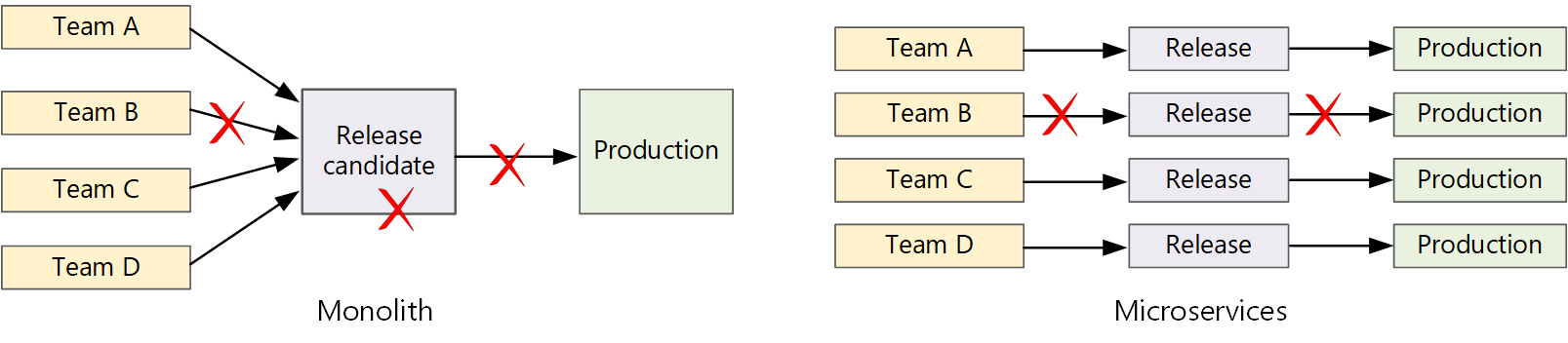
Let us now look how Microservices make life easier. A traditional monolithic app on the left, there is a single build pipeline whose output is the application executable. All development work feeds into this pipeline. If team B break, the whole thing breaks. In contrast with microservices philosophy on the right, there should never be a long release train where every team has to get in line. The team that builds service “A” can release an update at any time, without waiting for changes in service “B” to be merged, tested, and deployed.
Next steps
Hopefully, these tips help you address “Code Freeze” problem going forward. If you still struggling, engage your digital partners to look for long term solutions.
In the next blog post in this series, we will look at Sitecore CI/CD processes to support Sitecore Zero Downtime deployments.

3 thoughts on “Sitecore Zero-downtime deployments – Part 1”